







Question: C#: Write an application that computes the area of a circle, rectangle, and cylinder. Display a menu showing the three options. Allow users to input
C#: Write an application that computes the area of a circle, rectangle, and cylinder. Display a menu showing the three options. Allow users to input which figure they want to see calculated. Based on the value inputted, prompt for appropriate dimensions and perform the calculations using the following formulas: Area of circle = pi * radius ^ 2 Area of rectangle = length * width Area of cylinder 2 * pi * radius ^ 2 + 2 * pi * radius * height You will create a Windows Forms application that allows for the user to select the type of shape (rectangle, circle or cylinder) and then accept proper data and calculate the appropriate solution. Hint: a group of radio buttons will work very well along with changing the visible property of text boxes on your form. Comment your code for process communicating with clients.
I have written the majority of the code but I am still having trouble with the following lines:
private System.ComponentModel.IContainer components = null; protected override void Dispose(bool disposing) { if (disposing && (components != null)) { components.Dispose(); } base.Dispose(disposing); } With the red lines being under Dispose
this.SuspendLayout(); Red line under SuspendLayout();
this.AutoScaleDimensions = new System.Drawing.SizeF(9F, 20F); this.AutoScaleMode = System.Windows.Forms.AutoScaleMode.Font; this.ClientSize = new System.Drawing.Size(965, 633); this.Controls.Add(this.RbtRectangle); this.Controls.Add(this.Container); this.Controls.Add(this.LblResult); this.Controls.Add(this.BrtShape); this.Controls.Add(this.RbtCylinder); this.Controls.Add(this.RbtCircle); this.Name = "Area_Shape"; this.Text = "Area of Shape"; this.Container.ResumeLayout(false); this.Container.PerformLayout(); this.ResumeLayout(false); this.PerformLayout();
With each line having red lines under all the words after this.
Here is the rest of my code:
namespace Area_Shape { public partial class Area_Shape : Form { public Area_Shape() { InitializeComponent(); } private void Area_Shape_Load(object sender, EventArgs e) { LblHeight.Visible = false; LblLength.Visible = false; LblWidth.Visible = false; LblRadius.Visible = false; LblResult.Visible = false; TxtLength.Visible = false; TxtHeight.Visible = false; TxtRadius.Visible = false; TxtWidth.Visible = false; BtnCalculate.Visible = false; BtnExit.Visible = false; }
private void RbtRectangle_CheckedChanged(object sender, EventArgs e) { LblRadius.Visible = false; TxtRadius.Visible = false; LblHeight.Visible = false; TxtHeight.Visible = false; LblLength.Visible = true; LblWidth.Visible = true; TxtLength.Visible = true; TxtWidth.Visible = true; BtnCalculate.Visible = true; BtnExit.Visible = true; LblResult.Visible = true; }
private void RbtCircle_CheckedChanged(object sender, EventArgs e) { LblLength.Visible = false; LblWidth.Visible = false; TxtLength.Visible = false; TxtWidth.Visible = false; LblHeight.Visible = false; TxtHeight.Visible = false; LblRadius.Visible = true; TxtRadius.Visible = true; BtnCalculate.Visible = true; BtnExit.Visible = true; LblResult.Visible = true; }
private void RbtCylender_CheckedChanged(object sender, EventArgs e) { LblRadius.Visible = true; TxtRadius.Visible = true; LblHeight.Visible = true; TxtHeight.Visible = true; BtnCalculate.Visible = true; BtnExit.Visible = true; LblResult.Visible = true; LblLength.Visible = false; TxtLength.Visible = false; }
private void BtnExit_Click(object sender, EventArgs e) { Application.Exit(); //code for application exit }
private void BtnCalculate_Click(object sender, EventArgs e) { double area = 0; //To calculate area of Rectangle if (RbtRectangle.Checked == true) { if (TxtLength.Text != "" || TxtWidth.Text != "") { try { double length = double.Parse(TxtLength.Text); double width = double.Parse(TxtWidth.Text); area = width * length; LblResult.Text = $"Area of Rectangle with length :{length} and Width:{width} is {area} "; } catch (Exception ex) {
LblResult.Text = ex.Message; } } else { LblResult.Text = "Kindly provide Length and Width"; } } //to calculate area of circle else if (RbtCircle.Checked == true) { if (TxtRadius.Text != "") { try { double radius = double.Parse(TxtRadius.Text); area = 3.14 * radius * radius; LblResult.Text = $"Area of Circle with Radius :{radius} is {area} "; } catch (Exception ex) {
LblResult.Text = ex.Message; } } else { LblResult.Text = "Kindly provide value for Radius"; } } else //to calculate area of cylinder { if (TxtRadius.Text != "" || TxtHeight.Text != "") { try { double radius = double.Parse(TxtRadius.Text); double height = double.Parse(TxtHeight.Text); area = (2 * 3.14 * radius * radius) + (2 * 3.14 * radius * height); LblResult.Text = $"Area of Cylinder with Radius :{radius} and Height:{height} is {area} "; } catch (Exception ex) {
LblResult.Text = ex.Message; } } else { LblResult.Text = "Kindly provide value of Radius and Height"; } }
} } }
Area_Shape.Designer.cs
namespace Area_Shape { partial class Area_Of_Shape { ///
///
///
// Radio button Circle this.RbtCircle.AutoSize = true; this.RbtCircle.Font = new System.Drawing.Font("Times New Roman", 10F, System.Drawing.FontStyle.Bold, System.Drawing.GraphicsUnit.Point, ((byte)(0))); this.RbtCircle.Location = new System.Drawing.Point(378, 113); this.RbtCircle.Name = "RbtCircle"; this.RbtCircle.Size = new System.Drawing.Size(86, 27); this.RbtCircle.TabIndex = 3; this.RbtCircle.TabStop = true; this.RbtCircle.Text = "Circle"; this.RbtCircle.UseVisualStyleBackColor = true; // Radio button Cylinder this.RbtCylinder.AutoSize = true; this.RbtCylinder.Font = new System.Drawing.Font("Times New Roman", 10F, System.Drawing.FontStyle.Bold, System.Drawing.GraphicsUnit.Point, ((byte)(0))); this.RbtCylinder.Location = new System.Drawing.Point(547, 113); this.RbtCylinder.Name = "RbtCylinder"; this.RbtCylinder.Size = new System.Drawing.Size(107, 27); this.RbtCylinder.TabIndex = 4; this.RbtCylinder.TabStop = true; this.RbtCylinder.Text = "Cylinder"; this.RbtCylinder.UseVisualStyleBackColor = true; // Label Height this.LblHeight.AutoSize = true; this.LblHeight.Font = new System.Drawing.Font("Times New Roman", 10F, System.Drawing.FontStyle.Bold, System.Drawing.GraphicsUnit.Point, ((byte)(0))); this.LblHeight.Location = new System.Drawing.Point(202, 315); this.LblHeight.Name = "LblHeight"; this.LblHeight.Size = new System.Drawing.Size(67, 23); this.LblHeight.TabIndex = 5; this.LblHeight.Text = "Height"; // Label Width this.LblWidth.AutoSize = true; this.LblWidth.Font = new System.Drawing.Font("Times New Roman", 10F, System.Drawing.FontStyle.Bold, System.Drawing.GraphicsUnit.Point, ((byte)(0))); this.LblWidth.Location = new System.Drawing.Point(202, 187); this.LblWidth.Name = "LblWidth"; this.LblWidth.Size = new System.Drawing.Size(61, 23); this.LblWidth.TabIndex = 6; this.LblWidth.Text = "Width";
// Label Radius this.LblRadius.AutoSize = true; this.LblRadius.Font = new System.Drawing.Font("Times New Roman", 10F, System.Drawing.FontStyle.Bold, System.Drawing.GraphicsUnit.Point, ((byte)(0))); this.LblRadius.Location = new System.Drawing.Point(202, 248); this.LblRadius.Name = "LblRadius"; this.LblRadius.Size = new System.Drawing.Size(67, 23); this.LblRadius.TabIndex = 7; this.LblRadius.Text = "Radius"; // Text Length this.TxtLength.Location = new System.Drawing.Point(329, 133); this.TxtLength.Name = "TxtLength"; this.TxtLength.Size = new System.Drawing.Size(185, 26); this.TxtLength.TabIndex = 8; // Text Width this.TxtWidth.Location = new System.Drawing.Point(329, 184); this.TxtWidth.Name = "TxtWidth"; this.TxtWidth.Size = new System.Drawing.Size(185, 26); this.TxtWidth.TabIndex = 9; // Text Radius this.TxtRadius.Location = new System.Drawing.Point(329, 245); this.TxtRadius.Name = "TxtRadius"; this.TxtRadius.Size = new System.Drawing.Size(185, 26); this.TxtRadius.TabIndex = 10; // Text Height this.TxtHeight.Location = new System.Drawing.Point(329, 312); this.TxtHeight.Name = "TxtHeight"; this.TxtHeight.Size = new System.Drawing.Size(185, 26); this.TxtHeight.TabIndex = 11; // Label Result this.LblResult.AutoSize = true; this.LblResult.Location = new System.Drawing.Point(372, 496); this.LblResult.Name = "LblResult"; this.LblResult.Size = new System.Drawing.Size(0, 20); this.LblResult.TabIndex = 12;
// Button Calculate this.BtnCalculate.Font = new System.Drawing.Font("Times New Roman", 10F, System.Drawing.FontStyle.Bold, System.Drawing.GraphicsUnit.Point, ((byte)(0))); this.BtnCalculate.Location = new System.Drawing.Point(194, 383); this.BtnCalculate.Name = "BtnCalculate"; this.BtnCalculate.Size = new System.Drawing.Size(115, 46); this.BtnCalculate.TabIndex = 13; this.BtnCalculate.Text = "Calculate"; this.BtnCalculate.UseVisualStyleBackColor = true; // Button Exit this.BtnExit.Font = new System.Drawing.Font("Times New Roman", 10F, System.Drawing.FontStyle.Bold, System.Drawing.GraphicsUnit.Point, ((byte)(0))); this.BtnExit.Location = new System.Drawing.Point(448, 383); this.BtnExit.Name = "BtnExit"; this.BtnExit.Size = new System.Drawing.Size(110, 46); this.BtnExit.TabIndex = 14; this.BtnExit.Text = "Exit"; this.BtnExit.UseVisualStyleBackColor = true; // Container this.Container.Controls.Add(this.BtnExit); this.Container.Controls.Add(this.LblLength); this.Container.Controls.Add(this.BtnCalculate); this.Container.Controls.Add(this.TxtHeight); this.Container.Controls.Add(this.LblHeight); this.Container.Controls.Add(this.TxtRadius); this.Container.Controls.Add(this.LblWidth); this.Container.Controls.Add(this.TxtWidth); this.Container.Controls.Add(this.LblRadius); this.Container.Controls.Add(this.TxtLength); this.Container.Location = new System.Drawing.Point(49, 146); this.Container.Name = "Container"; this.Container.Size = new System.Drawing.Size(823, 435); this.Container.TabIndex = 15; this.Container.TabStop = false;
// Area_Shape this.AutoScaleDimensions = new System.Drawing.SizeF(9F, 20F); this.AutoScaleMode = System.Windows.Forms.AutoScaleMode.Font; this.ClientSize = new System.Drawing.Size(965, 633); this.Controls.Add(this.RbtRectangle); this.Controls.Add(this.Container); this.Controls.Add(this.LblResult); this.Controls.Add(this.BrtShape); this.Controls.Add(this.RbtCylinder); this.Controls.Add(this.RbtCircle); this.Name = "Area_Shape"; this.Text = "Area of Shape"; this.Container.ResumeLayout(false); this.Container.PerformLayout(); this.ResumeLayout(false); this.PerformLayout();
}
private System.Windows.Forms.Label BrtShape; private System.Windows.Forms.Label LblLength; private System.Windows.Forms.RadioButton RbtRectangle; private System.Windows.Forms.RadioButton RbtCircle; private System.Windows.Forms.RadioButton RbtCylinder; private System.Windows.Forms.Label LblHeight; private System.Windows.Forms.Label LblWidth; private System.Windows.Forms.Label LblRadius; private System.Windows.Forms.TextBox TxtLength; private System.Windows.Forms.TextBox TxtWidth; private System.Windows.Forms.TextBox TxtRadius; private System.Windows.Forms.TextBox TxtHeight; private System.Windows.Forms.Label LblResult; private System.Windows.Forms.Button BtnCalculate; private System.Windows.Forms.Button BtnExit; private System.Windows.Forms.GroupBox Container; } }
Here is what my forum looks like:
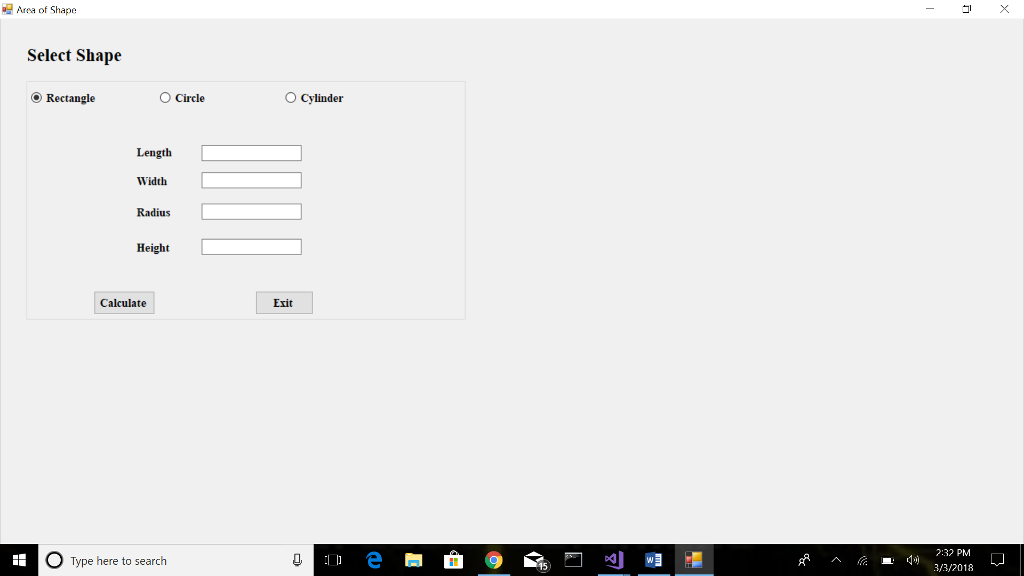
Any help would be appreciated, I would also like to get rid of the try can catch functions but I am not too sure how to make this work without them. Thank you
Area of Shape Select Shape Rectangle O Circle O Cylinder Length Width Radius Height Calculate Exit 2:32 PM Type here to search 3/3/2018 Area of Shape Select Shape Rectangle O Circle O Cylinder Length Width Radius Height Calculate Exit 2:32 PM Type here to search 3/3/2018
Step by Step Solution
There are 3 Steps involved in it

Get step-by-step solutions from verified subject matter experts
 Study Help