







Question: can you help me solve this error? and can you make sure it actually runs and doesnt create another error too please! - 7- -
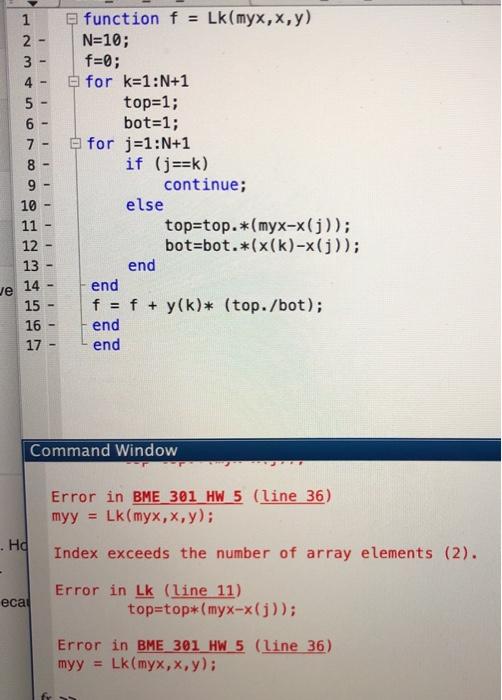
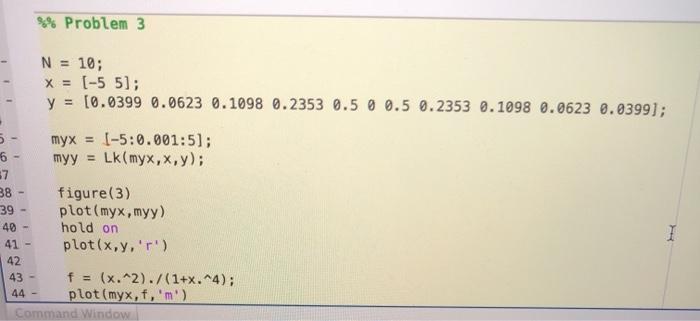
- 7- - 1 function f = Lk(myx,x,y) 2 N=10; 3 f=; 4 - for k=1:N+1 5 - top=1; 6 bot=1; for j=1:N+1 8 if (j==k) 9 continue; 10 else 11 top=top.*(myx-x(j)); 12 bot-bot.*(x(k)-x(j)); 13 end Je 14 end 15 f = f + y(k)* (top./bot); 16 end 17 end - - - - - - - Command Window Error in BME 301 HW 5 (line 36) myy = Lk(myx,x,y); Index exceeds the number of array elements (2). . Hd ecal Error in Lk (line 11) top=top*(myx-x(j)); Error in BME 301 HW 5 (line 36) Lk myx,x,y); myy = %% Problem 3 N = 10; X = (-5 5]; y = [0.0399 0.0623 0.1098 0.2353 0.5 0 0.5 0.2353 0.1098 0.0623 0.0399); myx = 1-5:0.001:51; 6 myy = Lk(myx,x,y); 87 38 figure(3) 39 plot(myx,myy) 40 - hold on 41 plot(x,y,'') 42 43 - f = (x.^2)./(1+x. 4); 44 plot(myx,f,m') Command Window 1 - 7- - 1 function f = Lk(myx,x,y) 2 N=10; 3 f=; 4 - for k=1:N+1 5 - top=1; 6 bot=1; for j=1:N+1 8 if (j==k) 9 continue; 10 else 11 top=top.*(myx-x(j)); 12 bot-bot.*(x(k)-x(j)); 13 end Je 14 end 15 f = f + y(k)* (top./bot); 16 end 17 end - - - - - - - Command Window Error in BME 301 HW 5 (line 36) myy = Lk(myx,x,y); Index exceeds the number of array elements (2). . Hd ecal Error in Lk (line 11) top=top*(myx-x(j)); Error in BME 301 HW 5 (line 36) Lk myx,x,y); myy = %% Problem 3 N = 10; X = (-5 5]; y = [0.0399 0.0623 0.1098 0.2353 0.5 0 0.5 0.2353 0.1098 0.0623 0.0399); myx = 1-5:0.001:51; 6 myy = Lk(myx,x,y); 87 38 figure(3) 39 plot(myx,myy) 40 - hold on 41 plot(x,y,'') 42 43 - f = (x.^2)./(1+x. 4); 44 plot(myx,f,m') Command Window 1
Step by Step Solution
There are 3 Steps involved in it

Get step-by-step solutions from verified subject matter experts
 Study Help