







Question: Complete the implementation of the VectorRotate function. The function rotates the input column vector, a, by 45 degrees to get b. It then rotates
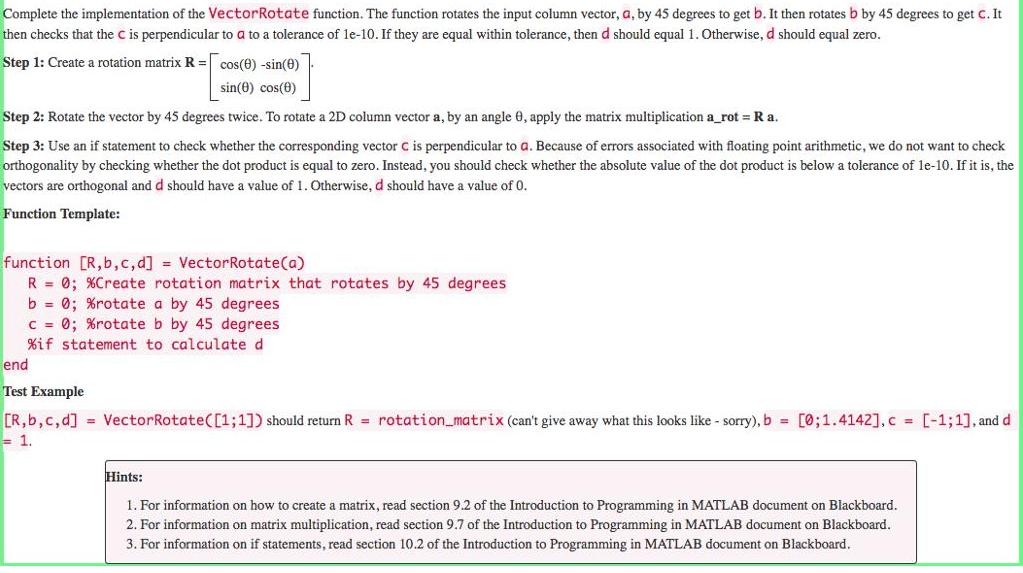
Complete the implementation of the VectorRotate function. The function rotates the input column vector, a, by 45 degrees to get b. It then rotates b by 45 degrees to get c. It then checks that the C is perpendicular to a to a tolerance of le-10. If they are equal within tolerance, then d should equal 1. Otherwise, d should equal zero. Step 1: Create a rotation matrix R = cos(0) -sin(e) sin(0) cos(0) Step 2: Rotate the vector by 45 degrees twice. To rotate a 2D column vector a, by an angle 0, apply the matrix multiplication a_rot = Ra. Step 3: Use an if statement to check whether the corresponding vector C is perpendicular to a. Because of errors associated with floating point arithmetic, we do not want to check orthogonality by checking whether the dot product is equal to zero. Instead, you should check whether the absolute value of the dot product is below a tolerance of le-10. If it is, the vectors are orthogonal and d should have a value of 1. Otherwise, d should have a value of 0. Function Template: function [R,b,c,d] = VectorRotate(a) R = 0; %Create rotation matrix that rotates by 45 degrees b = 0; %rotate a by 45 degrees C = 0; %rotate b by 45 degrees %if statement to calculate d end Test Example [R,b,c,d] = VectorRotate([1;1]) should return R = rotation_matrix (can't give away what this looks like - sorry), b = [0;1.4142],c = [-1;1], and d -1. Hints: 1. For information on how to create a matrix, read section 9.2 of the Introduction to Programming in MATLAB document on Blackboard. 2. For information on matrix multiplication, read section 9.7 of the Introduction to Programming in MATLAB document on Blackboard. 3. For information on if statements, read section 10.2 of the Introduction to Programming in MATLAB document on Blackboard.
Step by Step Solution
3.43 Rating (153 Votes )
There are 3 Steps involved in it
1 We have two scripts function and driver program be... View full answer

Get step-by-step solutions from verified subject matter experts
 Study Help