







Question: Computer Networks: Using the wireshark trace and answer the following questions: Number of packets sent: 10 Number of packets received: 6 Packet loss rate is:40
Computer Networks:
Using the wireshark trace and answer the following questions:
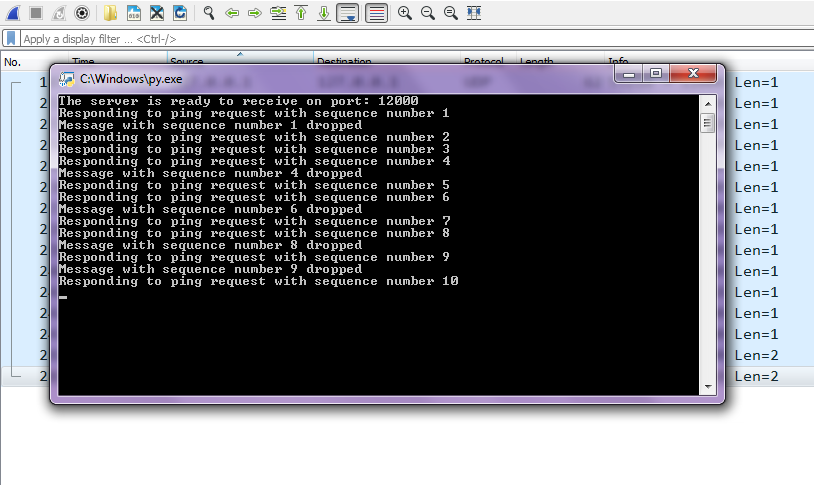 Number of packets sent: 10 Number of packets received: 6 Packet loss rate is:40 % Maximum RTT is:4.1 seconds Minimum RTT is:3.1 seconds Average RTT is:3.9 seconds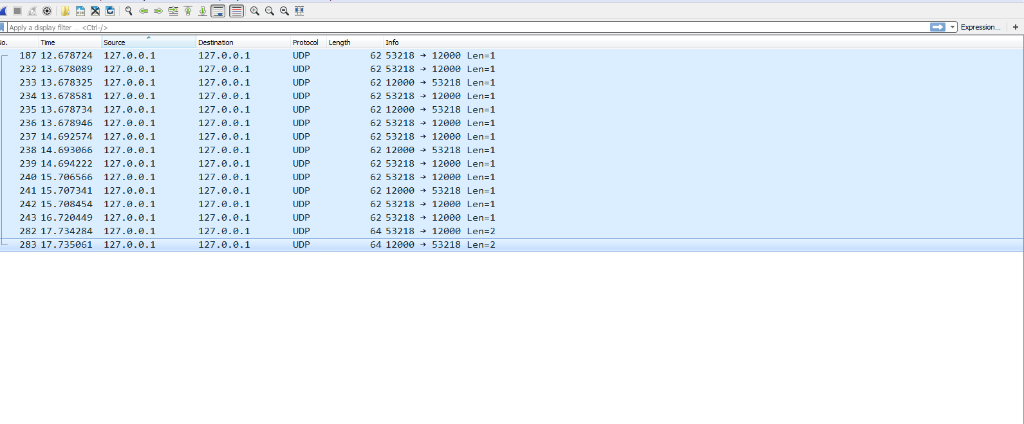
- What packet numbers correspond to ping requests? _______________________________
- What packet numbers correspond to ping responses? ______________________________
- How many ping requests were lost (no response from server)?______________________
- What is the loss rate of ping requests (%)?________________________________________
- What is the IP address of the client? Which header includes this address in a packet? (2) __________________________________________________________________________
- What is the IP address of the server? Which header includes this address in a packet? (2) __________________________________________________________________________
- What port is the client listening on? Which header includes this port in a packet? (2) __________________________________________________________________________
- What port is the server listening on? Which header includes this port in a packet? (2) __________________________________________________________________________
- In your program, where is the port number that the client listens on specified? _____________________________________________________________________
- In your program, where is the port number that the server listens on specified? _____________________________________________________________________
- What protocol in the protocol stack is responsible for forwarding a packet from a source host to a destination host?__________________________________________________
- What protocol in the protocol stack is responsible for multiplexing and de-multiplexing ping packets to and from the application processes?___________________________________
- What application data does the ping client send to the server and what is its length in bytes? (2) _____________________________________________________________________
- What application data does the ping server send to the client and what is its length in bytes? (2) _____________________________________________________________________
- How much overhead (in bytes) does the network stack (link layer, network layer and transport layer) in the operating system add to each ping packet? (3) ____________________________________________________________________
- Network protocols format messages using network byte order. Explain network byte order and why is it used? (2) ______________________________________________________________________________________________________________________________________________________ ___________________________________________________________________________
Apply a display filter
Step by Step Solution
There are 3 Steps involved in it

Get step-by-step solutions from verified subject matter experts
 Study Help