







Question: Create a GUI that we can use for our Zodiac project. It should look like this: (SHOULD TAKE THE INPUT BIRTHDAY AND CONVERT IT TO
Create a GUI that we can use for our Zodiac project. It should look like this: (SHOULD TAKE THE INPUT BIRTHDAY AND CONVERT IT TO THE ZODIAC SIGN)
//ZODIACTABLE
import java.text.DateFormat; import java.text.FieldPosition; import java.text.SimpleDateFormat; import java.util.Date; import java.util.ArrayList; import java.text.ParseException;
public class ZodiacTable {
/* * Holds the zodiac signs */ ArrayList
/* * Date format for all inputs and params */ DateFormat df = new SimpleDateFormat("MM/dd/yyyy");
/* * Initializes and adds each zodiac sign to the signs table */ public ZodiacTable() throws ParseException { // add Aries signs.add(new Sign("Aries", df.parse("03/21/2016"), df.parse("04/19/2016"))); // add Taurus signs.add(new Sign("Taurus", df.parse("04/20/2016"), df.parse("05/20/2016"))); // add Gemini signs.add(new Sign("Gemini", df.parse("05/21/2016"), df.parse("06/20/2016"))); // add Cancer signs.add(new Sign("Cancer", df.parse("06/21/2016"), df.parse("07/22/2016"))); // add Leo signs.add(new Sign("Leo", df.parse("07/23/2016"), df.parse("08/22/2016"))); // add Virgo signs.add(new Sign("Virgo", df.parse("08/23/2016"), df.parse("09/22/2016"))); // add Libra signs.add(new Sign("Libra", df.parse("09/23/2016"), df.parse("10/22/2016"))); // add Scorpio signs.add(new Sign("Scorpio", df.parse("10/23/2016"), df.parse("11/21/2016"))); // add Sagittarius signs.add(new Sign("Sagittarius", df.parse("11/22/2016"), df.parse("12/21/2016"))); // add Capricorn signs.add(new Sign("Capricorn", df.parse("12/22/2016"), df.parse("01/19/2017"))); // add Aquarius signs.add(new Sign("Gemini", df.parse("01/20/2017"), df.parse("02/18/2017"))); // add Pisces signs.add(new Sign("Gemini", df.parse("02/19/2017"), df.parse("03/20/2017"))); }
/* * Displays the zodiac table */ public void display() { for (Sign sign : signs) { System.out.println(sign); } }
/* * Determines the sign based on birthdate * * @return sign String of the sign name that the birthdate falls on */ public String determineSign(Date birthdate){
FieldPosition pos1 = new FieldPosition(DateFormat.MONTH_FIELD); FieldPosition pos2 = new FieldPosition(DateFormat.DATE_FIELD); StringBuffer sb1 = new StringBuffer();
df.format(birthdate, sb1, pos1); int birthMonth = Integer.parseInt(sb1.substring(pos1.getBeginIndex(), pos1.getEndIndex())); df.format(birthdate, sb1, pos2); int birthDay = Integer.parseInt(sb1.substring(pos2.getBeginIndex(), pos2.getEndIndex()));
for (Sign sign: signs){
StringBuffer sb2 = new StringBuffer(); df.format(sign.getStartDate(), sb2, pos1); int startDateMonth = Integer.parseInt(sb2.substring(pos1.getBeginIndex(), pos1.getEndIndex())); df.format(sign.getStartDate(), sb2, pos2); int startDateDay = Integer.parseInt(sb2.substring(pos2.getBeginIndex(), pos2.getEndIndex()));
df.format(sign.getEndDate(), sb2, pos1); int endDateMonth = Integer.parseInt(sb2.substring(pos1.getBeginIndex(), pos1.getEndIndex())); df.format(sign.getEndDate(), sb2, pos2); int endDateDay = Integer.parseInt(sb2.substring(pos2.getBeginIndex(), pos2.getEndIndex()));
if ((birthMonth == startDateMonth && birthDay >= startDateDay)){ return sign.getSign(); }
else if(birthMonth == endDateMonth && birthDay
//if birthdate does not match any date in year return "Please enter a valid birthdate."; } }
//DRIVER
import java.util.*; import java.text.DateFormat; import java.text.SimpleDateFormat; import java.text.ParseException; import java.io.IOException; import java.lang.Object;
public class Driver {
private static Scanner sc;
public static void main(String[] args) throws IOException, ParseException { boolean cont = true; do { // no instance variable/class name in front of getBirthdate() --> // it's // inside the driver Date birthdate = getBirthdate(); ZodiacTable zodiac = createZodiacTable(); System.out.println(zodiac.determineSign(birthdate));
sc = new Scanner(System.in); System.out.println("Continue: true/false"); if (sc.nextLine().toLowerCase().startsWith("f")) { cont = false; } } while (cont); }
public static Date getBirthdate() throws IOException, ParseException {
try { sc = new Scanner(System.in); System.out.println("Enter your birthdate (format like '11/25/1995'): "); String birthdateString = sc.nextLine(); Date birthdate = new Date(); DateFormat df = new SimpleDateFormat("MM/dd/yyyy"); birthdate = (Date) df.parse(birthdateString); return birthdate; } // end try block for inputting birthdate catch (ParseException error) { System.err.println("Caught Exception: " + error.getMessage()); throw error; } // end catch block }
public static ZodiacTable createZodiacTable() throws ParseException { return new ZodiacTable(); } }
//SIGN
import java.util.Date;
public class Sign {
/* * Name of the zodiac sign */ String sign;
/* * Start date and end date of the span of time that a given sign falls on */ Date startDate, endDate;
public Sign(String sign, Date startDate, Date endDate){ this.sign = sign; this.startDate = startDate; this.endDate = endDate; }
/* * Getters and setters for all params */
public String getSign() { return sign; }
public void setSign(String sign) { this.sign = sign; }
public Date getStartDate() { return startDate; }
public void setStartDate(Date startDate) { this.startDate = startDate; }
public Date getEndDate() { return endDate; }
public void setEndDate(Date endDate) { this.endDate = endDate; }
@Override public String toString(){ return sign + ", start date: "+startDate+", end date: "+endDate; }
}
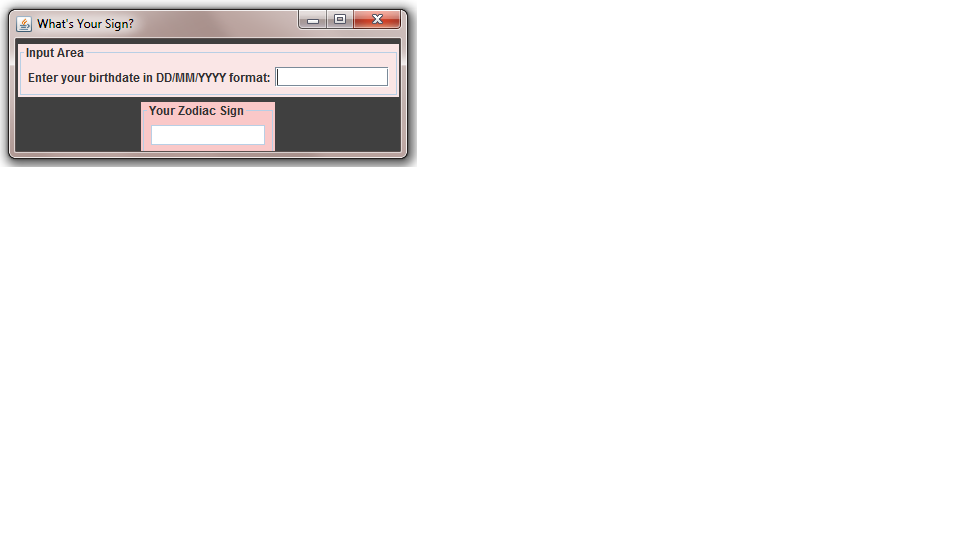
Make a subclass of JFrame called ZodiacUI The constructor should set certain properties, such as location, size, what happens on close Make a private method to build and add the components The window should be 400 x 150 pixels The text field for the zodiac sign should not be enabled (this does not actually need to run the zodiac project) The background is DarkGray and the two panels are RGB 250, 230, 230 and RGB 250, 200, 200 Make a Driver class to create your ZodiacUI (this does not need to actually run the Zodiac program, simply spin up the gui) > Connect the GUI you made in Activity 2 to the Zodiac Assignment code you have already written. Have the Result from the Zodiac Program (the users determined sign) displayed in a JMessageDialog.
> Add an Clear Text button to Zodiac GUI. When the User clicks this button they should be able clear the current date, and input another. Have the Program loop and allow the user to check signs for multiple dates (one at a time).
What's Your Sign? Input Area Enter your birthdate in DD/MMIYYYY format: g)| Your Zodiac Sign What's Your Sign? Input Area Enter your birthdate in DD/MMIYYYY format: g)| Your Zodiac Sign
Step by Step Solution
There are 3 Steps involved in it

Get step-by-step solutions from verified subject matter experts
 Study Help