







Question: Display alert box, confirmation box, prompt box and call a function. Create a button, when user presses on it, it display an alert box
Display alert box, confirmation box, prompt box and call a function.
• Create a button, when user presses on it, it display an alert box with a message.
• Create a button, when user presses on it, it display a prompt box for input. User enter some text and it display text either on the web page or an alert box.
• Create another button when user clicks on it. it displays a confirmation box.
• Finally create a function and call it by clicking on a button and it displays some text through an alert box.
You are going to match the output below: 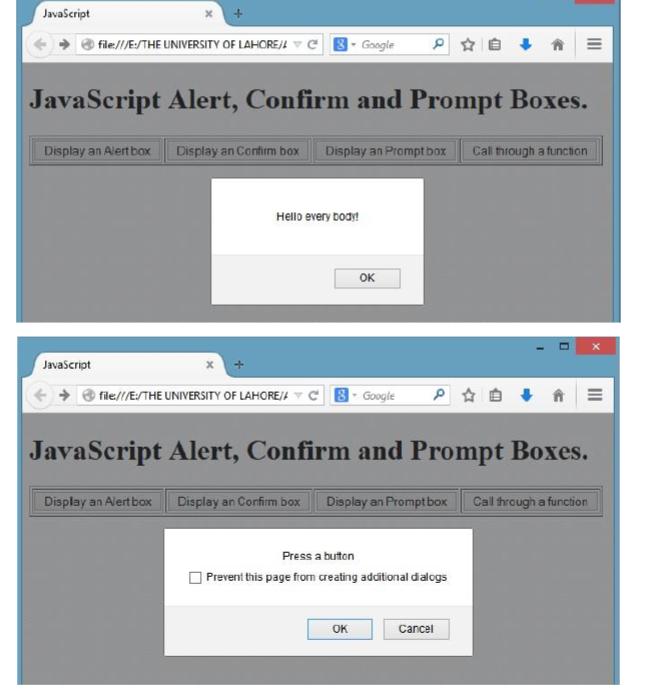
JavaScript Ofile//E:/THE UNIVERSITY OF LAHOREJA C Google JavaScript Alert, Confirm and Prompt Boxes. Display an Alert box Display an Contim box Display an Prompt box Call through a function Hello every boa! OK Javascript file///ESTHE UNIVERSITY OF LAHORE/ Y C 8- Google JavaScript Alert, Confirm and Prompt Boxes. Display an Alert box Display an Corfirm box Display an Promptbox Call fhrough a function Press a buton Prevent this page frorm creating adcitional dalogs OK Cancel
Step by Step Solution
3.48 Rating (151 Votes )
There are 3 Steps involved in it
To replicate the functionality demonstrated in the screenshots youll need to write some JavaScript a... View full answer

Get step-by-step solutions from verified subject matter experts
 Study Help