







Question: For this assignment, you will use your knowledge of arrays, lists, sets, and strings to determine which two sentences out of a collection of sentences
For this assignment, you will use your knowledge of arrays, lists, sets, and strings to determine which two sentences out of a collection of sentences are the most similar. You will do this by determining the Jaccard similarity index for each possible pair of sentences from the collection. Your program will obtain the collection of sentences from an input file, the name of which will be specified as a command argument to the program. The required output is described below. All output will be to the console (screen).
Your implementation must use the test driver program (JaccardTest.java) given below without any changes, except that you must add the course header with your name at the top of the file. You must also add the necessary code to complete the functionality of the Jaccard.java file that is also given below. And finally, to support the work that the methods in Jaccard.java will perform, you will reuse and extend the SentenceUtils.java class that you developed for Program Assignment below.
The sections below contain the specific requirements that you must follow for completing this program assignment.
Shingle Sets:
The Program 2 assignment covered what shingle sets are and how to construct them. The SentenceUtils class that you developed for Program 2 already calculates shingles from sentences, among other things.
Jaccard Index:
The Jaccard index measures the degree of overlap of two finite sets. For two shingle sets (representing two sentences), the Jaccard index is simply the number of unique shingles they have in common divided by the total number of unique shingles across both shingle sets. Mathematically, this is expressed in the equation:

The values of J( A, B ) will range from a low of 0.0 (the sets are entirely different) to 1.0 (they are the same sets).
For example, consider the sets A = { "ab", "bc", "cd", "de" } and B = { "ab", "bc", "cd", "fe", "ef", "fg" }. Then, the number of shingles in their intersection is 3, since they have only 3 shingles in common: { "ab", "bc", "cd" }. Also, the number of unique shingles in their union is 7, since these are the unique elements across both sets: { "ab", "bc", "cd", "de", "fe", "ef", "fg" }. As a result, the Jaccard index for these two sets is:
J( A, B ) = 3 / 7 = .4288 (rounded to 4 decimal places).
You can find out more about the Jaccard Index by reading the associated Wikipedia page and other online sources on the topic.
Input File:
Your program must accept the input file name as a command line parameter. You will not know the name of the file in advance, so you cannot hard code the file name. You must get it from the args[0] input parameter to the main() method. The JaccardTest template file that is provided to you below already handles getting the command argument and reading the file.
Just as for Program 2, the input file will be a text file that has one sentence on each line. In general, the sentences will have letters, numbers, whitespace, punctuation, and special characters. The number of sentences will vary and you will not know in advance how many there will be, so you cannot hard code how many sentences to process in your program.
Required Output:
The program must present output in the form shown in the following sample. The output will be different for different files containing different sentences. We will test your programs using several different input files that have different file names and which will contain different numbers of sentences.
This is the output for the "cosmic" input file from Program 2:
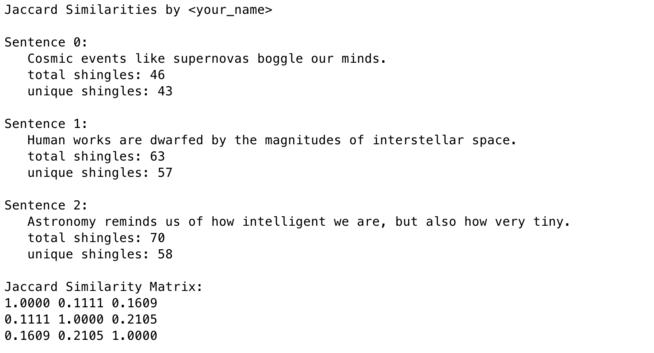
The sections of the output are discussed separately below.
(1) Output heading with your name:
The program should output the heading "Jaccard Similarities by " followed by your name.
(2) Sentence data:
The program should output the heading "Sentence " as shown, followed by a zero-based sentence number, as shown. For each sentence, the program must show the following information, indented by 3 spaces as shown: (a) the sentence itself all on one line, no matter how long the sentence is; (b) the total number of shingles for the sentence; and (c) the total number of unique shingles for the sentence. The sentence data blocks should be separated by blank lines, as shown.
(3) Jaccard similarity matrix:
The program should output the heading "Jaccard Similarity Matrix:" as shown, followed by the similarity values in matrix form, as shown, for each possible combination of two input sentences. Although not shown, the rows and columns each run from 0 to the largest sentence number, so that the matrix element in the row i and column j represents the similarity of sentences i and j.
The numerical values must be shown as decimal real numbers (doubles) shown to 4 decimal places. The entries on each row should be separated from each other by a single space. PLEASE NOTE: the value of the matrix element in row j column i should be the same as in row i column j. Also, the matrix elements along the main diagonal should be 1.0000, as shown, since such elements represent the similarity of a sentence compared with itself.
NetBeans Project Setup
1. Create a Java application project called Jaccard" in NetBeans. Edit the project's packaging properties so that the source (.java) files will be included in the JAR file.
2. Create a Java package called jaccard" in this project if the package was not already created for you by NetBeans.
3. If NetBeans automatically created a Jaccard.java file for you, delete it.
4. Create a regular Java class file called JaccardTest.java" in the jaccard package. This is the test driver file that will contain the main() method for the program. Then, enter all of the following code, including the file header with your name. Do not modify this code. Your program must use it exactly as it is written.
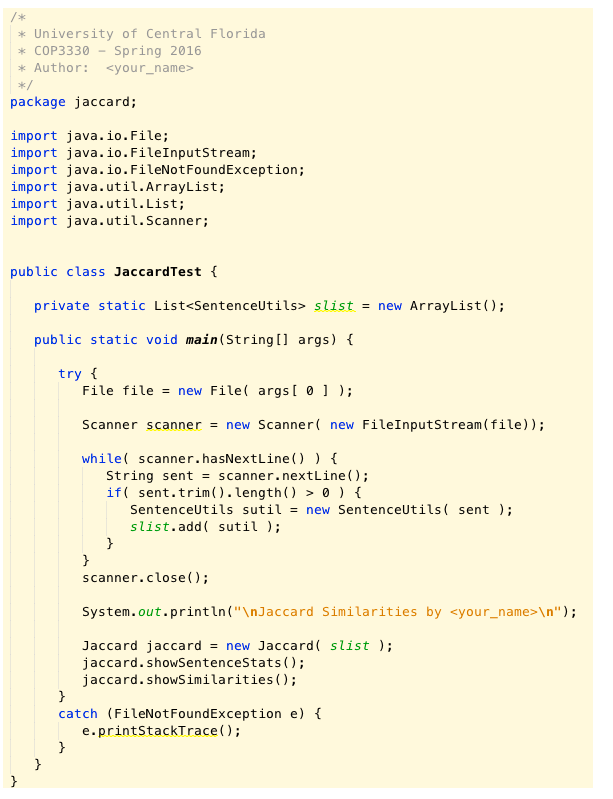
5. Copy the "cosmic" file that you used for Program 2 and place it into the Jaccard project. It should at the top level of the project. Do not put it into the "src" or any other subfolder of the project.
6. Edit the project properties for the Jaccard project, as follows:
(a) The "Packaging" properties should be edited to include the Java source files in the JAR. This is accomplished by deleting all entries in the "files to exclude" category. The packaging properties should look like:
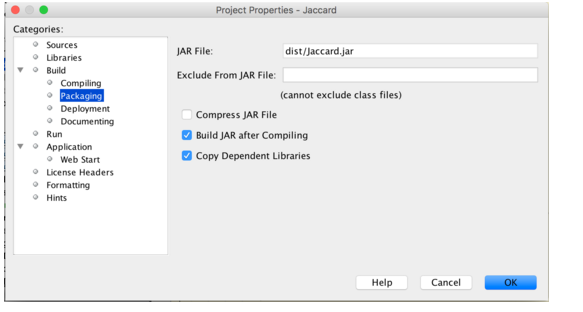
(b) The "Run" properties should be edited to name jaccard.JaccardTest as the main class, and to use the "cosmic" test file. The run properties should look like:
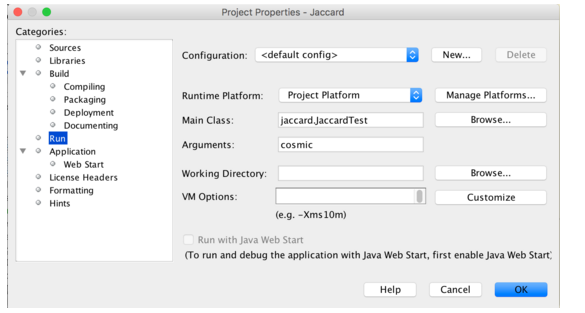
7. Copy the SentenceUtils.java source file from the SentenceUtils project that you created for Program 2, and place it into the Jaccard project. The file should be placed inside the jaccard package, so that it is alongside the JaccardTest.java file. To perform the copy, just right-click on the file in the SentenceUtils project and select "copy", and then right-click in the jaccard package and select "paste". If you wish, you may use any or all of the contents from the SentenceUtils class in the sample solution that has been posted for Program 2.
8. Edit the SentenceUtils.java file in the jaccard package to change the package declaration at the top of the file so that it states "package jaccard;".
9. Add the following two "getter" methods to the SentenceUtils class. A suggested location is to put them at the bottom of the file, just before the brace that closes the class declaration. These are the getter methods to add:
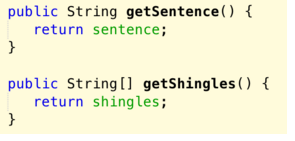
10. Create a regular Java class file called Jaccard.java" in the jaccard package. This is the class that will perform the Jaccard index calculations for the program. It will need to get the sentences and shingles to process by using the getter methods that you inserted into the SentenceUtils class in the previous instruction. Once you have created the Jaccard.java file, enter all of the following code, including the file header with your name:
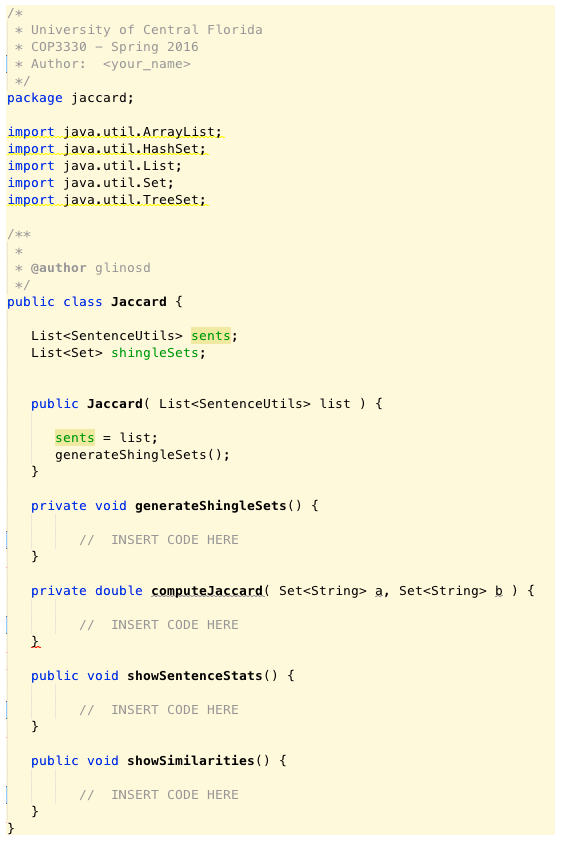
This is the file that you must edit to add the necessary Java code to perform the function described below. Please note that the file will not currently compile because the computeJaccard() method must return a double but there is currently no return statement in that method. You will need to add the return statement to return the result when you have computed it.
Please note the import statements that are already in this file. These are all the imports that the sample solution that will be posted after the assignment is due. You may consider this set of imports as a reasonable set of the Java classes that are necessary to satisfy the requirements of this assignment. You may freely use other Java classes is you wish, but they must be in the standard Java API, so your program will be able to run on the graders' machines.
The following describes the required functionality of each of the methods that your program must implement:
(a) generateShingleSets( ):
The shingle arrays that SentenceUtils computes may contain duplicates, but the Jaccard calculation requires that we need a collection with no duplicates. We also know that sets are guaranteed not to contain duplicates. Therefore, the job of this method is, for each sentence, to get its shingle array from its SentenceUtils object, to create a set for its shingles, and then add the set to the "shingleSets" list that is defined for the Jaccard class. Please note that the program should know how many sentences there are and their associated SentenceUtils objects, since the constructor for the Jaccard class receives a list of SentenceUtils objects as input. Moreover, this list is available to all the methods of the class because the list is saved as the "sents" instance variable. Please note also that the sets that are created by this method should be sets of strings, so that they can be used as input for the computeJaccard() method.
(b) computeJaccard( Set
This method should take two sets of strings (representing two shingle sets) and compute their Jaccard index. Please note that this method should not loop through all combinations of shingle sets. It should merely compute the Jaccard value for the two sets that are input. It will be the job of the showSimilarities() method to loop through all the combinations of sets. Because the Jaccard value is a real (fractional) value between 0 and 1, the value should be computed as a double. And once the value is computed, the method should return it as a double.
(c) showSentenceStats( ):
This method should output to the console the sentence data for all of the sentences that are being compared. The required format is described in the output section above. The value "total shingles" refers to the number of shingles in the sentence, including any duplicates, so it should be the size of the shingles array that is obtained from SentenceUtils. The "unique shingles" refers to the number of shingle without duplicates, so it should be the size of the corresponding shingle set that is generated in the Jaccard class.
(d) showSimilarities( ):
This method will output to the console the Jaccard similarity matrix. The required format for the matrix is described in the output section above. To compute the matrix, this method must loop through all possible pairs of sentences, compute the Jaccard index value for each pair, and report the value in the required format in the appropriate place in the matrix.
Program Testing
If you have followed all steps in the NetBeans project setup procedure above, you should be able to compile and run your program within NetBeans, using the "cosmic" file that you created as input. It should produce the same output as shown above.
Once you are satisfied with your program in NetBeans, use the NetBeans "Clean and Build" command to generate a fresh JAR file. Then, from the NetBeans "Files" tab, examine your JAR file to be sure it contains all .java source files. You will find the JAR file in the "dist" subfolder within your NetBeans project.
Your project file hierarchy should look like the following when viewed from the NetBeans "Files" tab, with both the "dist" and "src" subfolders expanded:
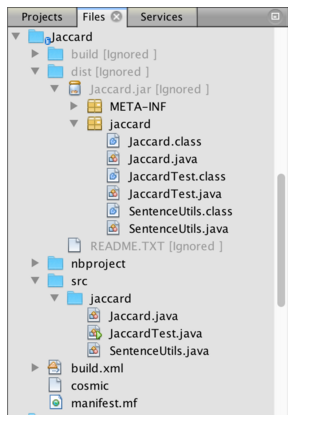
Please note that in both the src and dist folders all three source files are contained within the "jaccard" package, and that the JAR file also contains the compiled bytecode (.class) files.
Once you have confirmed that your source files are in the JAR file, exit NetBeans and the copy both the JAR file and the "cosmic" file to your desktop. Then, open a command window and navigate to your desktop and run your program using this command:
java -jar Jaccard.jar cosmic
This is the format of the command that the graders will use to test your program. Of course, we may use a different test file instead of "cosmic", so be sure that your program gets the file name as a command argument and does not hard code the name.
Once you have confirmed that your program works properly from the command line, you are ready to submit it for grading. Please be sure to submit the very same version that you tested above and not some other version that you just "think" should be the same.
Step by Step Solution
There are 3 Steps involved in it

Get step-by-step solutions from verified subject matter experts
 Study Help