







Question: For this project, you will demonstrate the ability to print text, define coordinates, and plot lines in Matlab. In Matlab, write a script to print
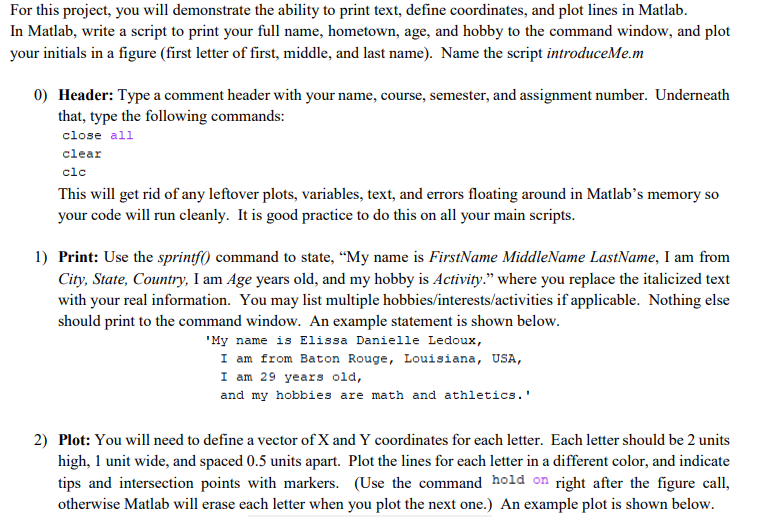
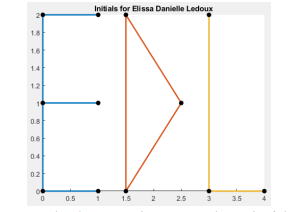
For this project, you will demonstrate the ability to print text, define coordinates, and plot lines in Matlab. In Matlab, write a script to print your full name, hometown, age, and hobby to the command window, and plot your initials in a figure (first letter of first, middle, and last name). Name the script introduceMe.m 0) Header: Type a comment header with your name, course, semester, and assignment number. Underneath that, type the following commands: close all clear clc This will get rid of any leftover plots, variables, text, and errors floating around in Matlab's memory so your code will run cleanly. It is good practice to do this on all your main scripts. 1) Print: Use the sprintf() command to state, My name is FirstName MiddleName LastName, I am from City, State, Country, I am Age years old, and my hobby is Activity. where you replace the italicized text with your real information. You may list multiple hobbies/interests/activities if applicable. Nothing else should print to the command window. An example statement is shown below. "My name is Elissa Danielle Ledoux, I am from Baton Rouge, Louisiana, USA, I am 29 years old, and my hobbies are math and athletics.' 2) Plot: You will need to define a vector of X and Y coordinates for each letter. Each letter should be 2 units high, 1 unit wide, and spaced 0.5 units apart. Plot the lines for each letter in a different color, and indicate tips and intersection points with markers. (Use the command hold on right after the figure call, otherwise Matlab will erase each letter when you plot the next one.) An example plot is shown below. Initials for Elissa Danielle Ledoux 12 0.8 06 02 2 0.5 1.5 2 25 3.5 For this project, you will demonstrate the ability to print text, define coordinates, and plot lines in Matlab. In Matlab, write a script to print your full name, hometown, age, and hobby to the command window, and plot your initials in a figure (first letter of first, middle, and last name). Name the script introduceMe.m 0) Header: Type a comment header with your name, course, semester, and assignment number. Underneath that, type the following commands: close all clear clc This will get rid of any leftover plots, variables, text, and errors floating around in Matlab's memory so your code will run cleanly. It is good practice to do this on all your main scripts. 1) Print: Use the sprintf() command to state, My name is FirstName MiddleName LastName, I am from City, State, Country, I am Age years old, and my hobby is Activity. where you replace the italicized text with your real information. You may list multiple hobbies/interests/activities if applicable. Nothing else should print to the command window. An example statement is shown below. "My name is Elissa Danielle Ledoux, I am from Baton Rouge, Louisiana, USA, I am 29 years old, and my hobbies are math and athletics.' 2) Plot: You will need to define a vector of X and Y coordinates for each letter. Each letter should be 2 units high, 1 unit wide, and spaced 0.5 units apart. Plot the lines for each letter in a different color, and indicate tips and intersection points with markers. (Use the command hold on right after the figure call, otherwise Matlab will erase each letter when you plot the next one.) An example plot is shown below. Initials for Elissa Danielle Ledoux 12 0.8 06 02 2 0.5 1.5 2 25 3.5
Step by Step Solution
There are 3 Steps involved in it

Get step-by-step solutions from verified subject matter experts
 Study Help