







Question: Hello my dear Colud you please help me in this 2 questions please Q1/ *Please when you solve use do while loop* _______________ *Fraction* package
Hello my dear Colud you please help me in this 2 questions please
Q1/ *Please when you solve use do while loop*
_______________
*Fraction*
package sa.edu.yuc; public interface Fraction { public int numerator(); public int denominator(); public Fraction add(Fraction f); public Fraction sub(Fraction f); public Fraction mul(Fraction f); public Fraction div(Fraction f); }
______________________
*FractionImpl*
package sa.edu.yuc; public class FractionImpl implements Fraction{ private int num; private int den; public FractionImpl(int num, int den) { this.num = num; this.den = den; } @Override public int numerator() { // TODO Auto-generated method stub return 0; } @Override public int denominator() { // TODO Auto-generated method stub return 0; } @Override public Fraction add(Fraction f) { // TODO Auto-generated method stub return null; } @Override public Fraction sub(Fraction f) { // TODO Auto-generated method stub return null; } @Override public Fraction mul(Fraction f) { // TODO Auto-generated method stub return null; } @Override public Fraction div(Fraction f) { // TODO Auto-generated method stub return null; } }
______________________
*FractionTest*
package sa.edu.yuc; import java.util.Scanner; public class FractionTest { public static void main(String[] args) { Scanner read = new Scanner(System.in); System.out.print("Enter first numerator = "); int num1 = read.nextInt(); System.out.print("Enter first denominator = "); int den1 = read.nextInt(); System.out.print("Enter second numerator = "); int num2 = read.nextInt(); System.out.print("Enter second denominator = "); int den2 = read.nextInt(); // TODO Auto-generated method stub /* Create two objects of FractionImpl and Just the follow the code * of Complex Number, Write the menu operations */
} }
____________
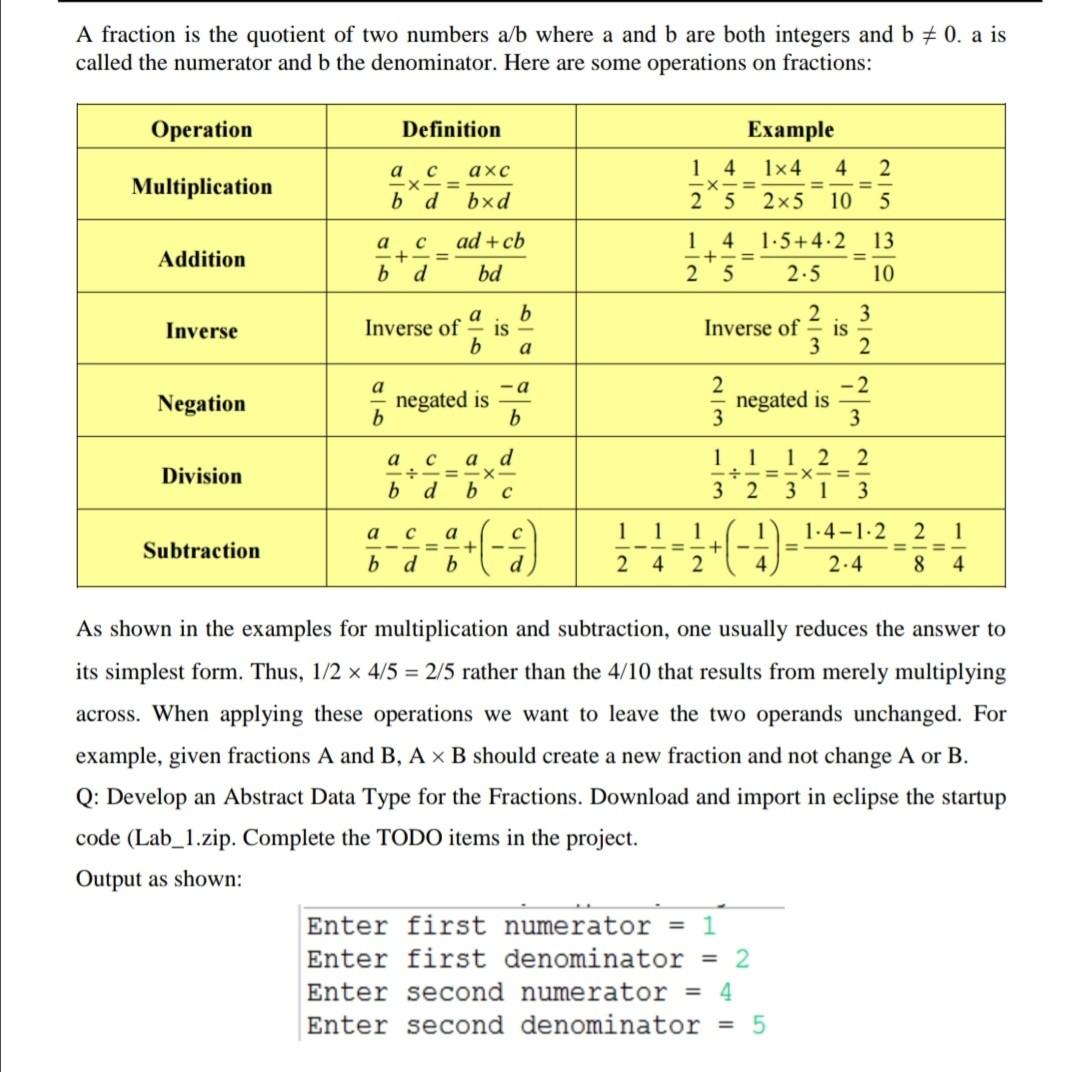
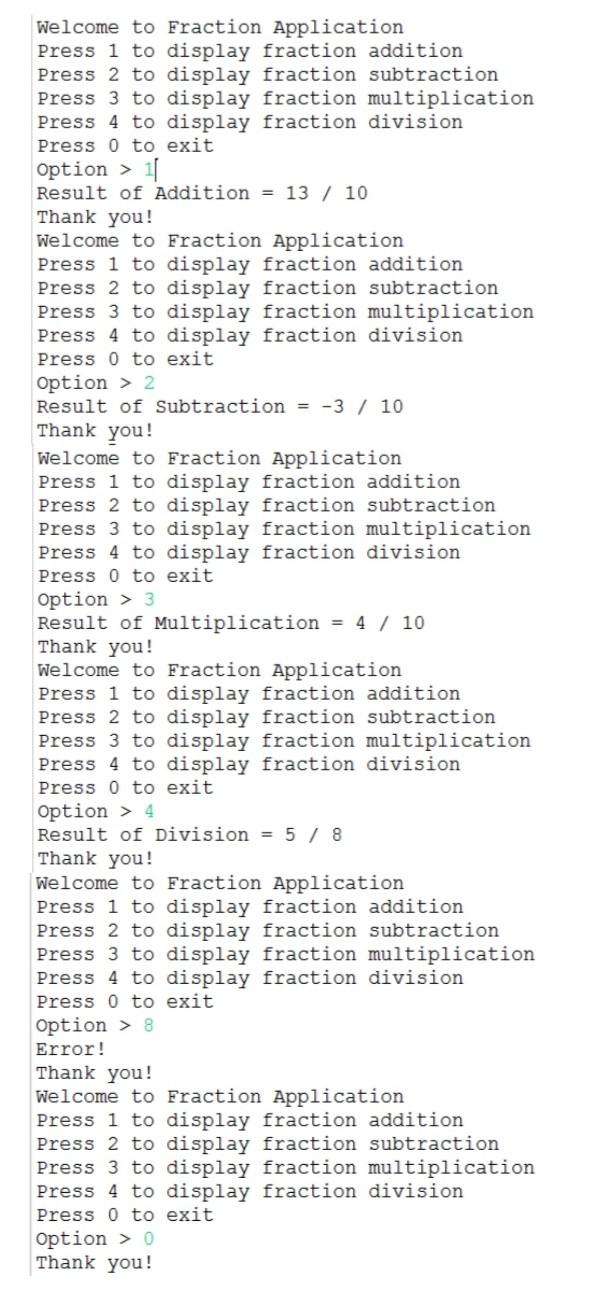
Q2/ *Please when you solve use do while loop*
__________________
*Account*
package sa.edu.yuc; import java.util.Scanner; public class Account implements Comparable
________________________
*ArrayDuplicateException*
package sa.edu.yuc;
public class ArrayDuplicateException extends Exception { public ArrayDuplicateException(String message) { super(message); } }
_______________________
*ArrayEmptyException*
package sa.edu.yuc; public class ArrayEmptyException extends Exception { public ArrayEmptyException(String message){ super(message); } }
________________________
*ArrayFullException*
package sa.edu.yuc; public class ArrayFullException extends Exception{ public ArrayFullException(String message) { super(message); } } ________
*Bank*
package sa.edu.yuc; public class Bank { public boolean addAccount(Account account) throws ArrayFullException, ArrayDuplicateException { // TODO Auto-generated method stub return false; } public Account findAccount(int id) throws ArrayEmptyException { // TODO Auto-generated method stub return null; } public boolean deleteAccount(int id)throws ArrayEmptyException { // TODO Auto-generated method stub return false; } public void showAll() { // TODO Auto-generated method stub } }
__________________
*BankTest*
package sa.edu.yuc; import java.util.Scanner; public class BankTest { public static void main(String[] args) { Bank bank = new Bank(); Scanner input = new Scanner(System.in); int option; do{ menu(); System.out.print("Enter Option(1..5) > "); option = input.nextInt(); switch (option) { case 1: // TODO Auto-generated method stub break; case 2: // TODO Auto-generated method stub break; case 3: // TODO Auto-generated method stub break; case 4: // TODO Auto-generated method stub break; case 5: System.out.println("Thank you for using bank application !!!"); break; default: System.out.println("Invalid option Plz enter(1..5)!!!"); } }while(option != 5); } private static void menu() { System.out.println("Welcome to MyBank"); System.out.println("Press 1 to add an account"); System.out.println("Press 2 to find an account"); System.out.println("Press 3 to delete an account"); System.out.println("Press 4 to list all accounts"); System.out.println("Press 5 to exit"); } }
_____________
*MyArray*
package sa.edu.yuc; public interface MyArray { public boolean isEmpty(); public boolean isFull(); public boolean add(int value) throws ArrayFullException, ArrayDuplicateException; public boolean remove(int value) throws ArrayEmptyException; public int find(int value) throws ArrayEmptyException; public int get(int index); }
_______________________
*MyArrayImpl*
package sa.edu.yuc; public interface MyArray { public boolean isEmpty(); public boolean isFull(); public boolean add(int value) throws ArrayFullException, ArrayDuplicateException; public boolean remove(int value) throws ArrayEmptyException; public int find(int value) throws ArrayEmptyException; public int get(int index); }
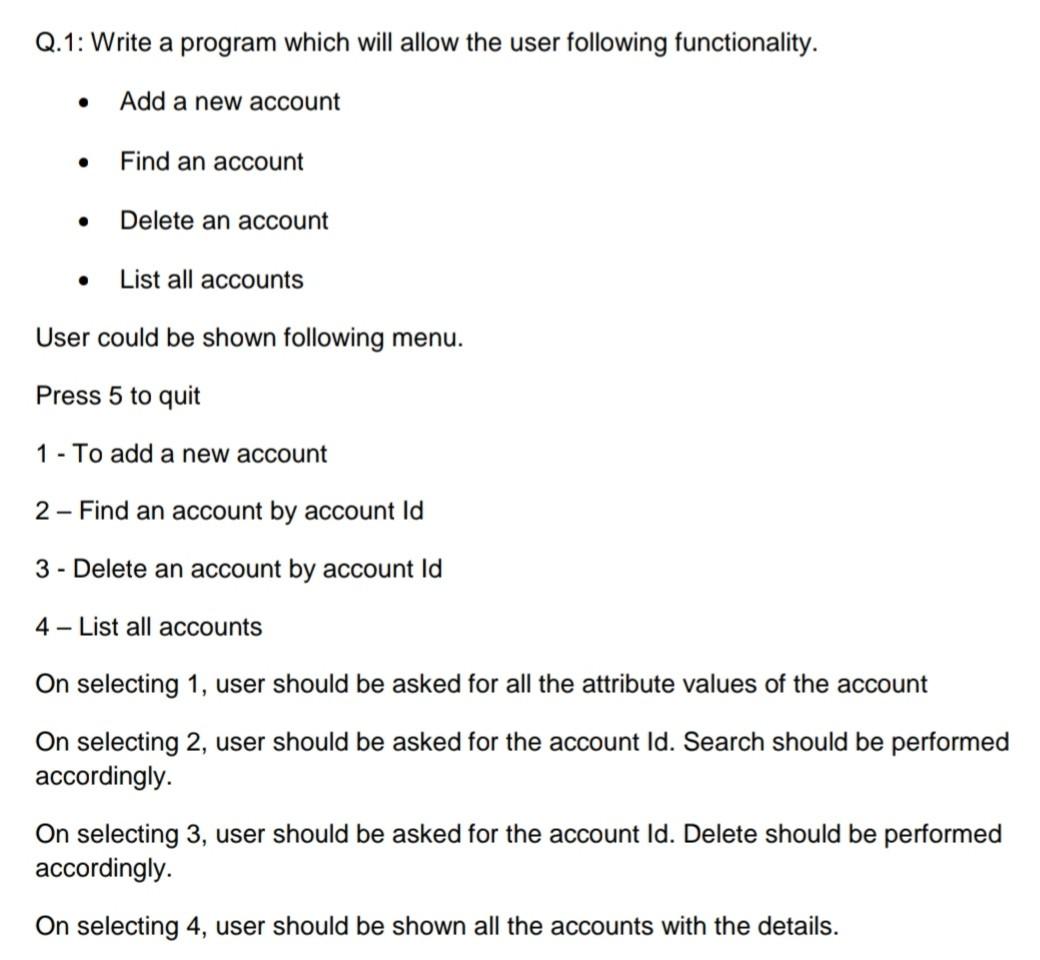
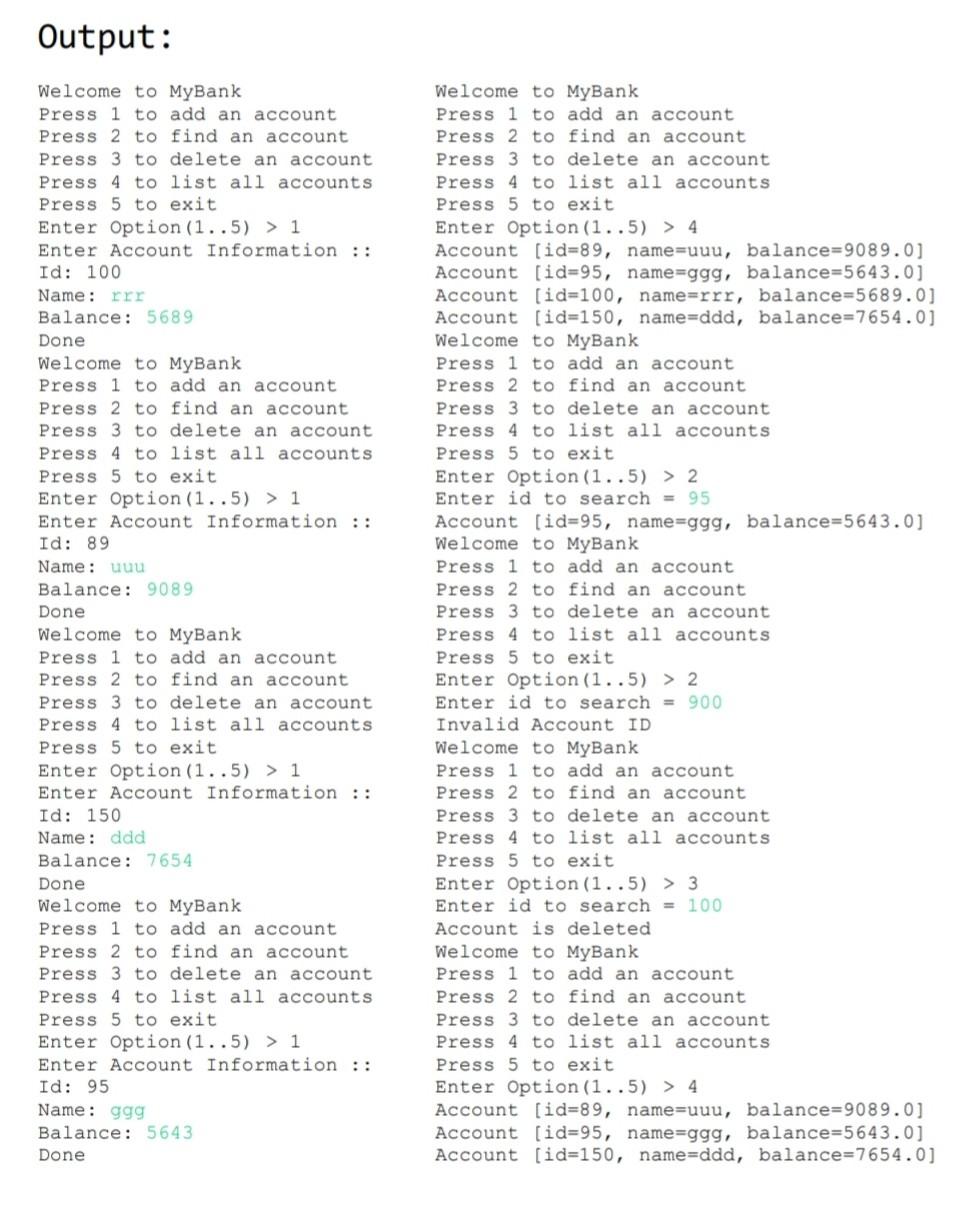
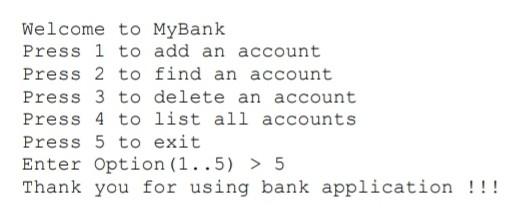
A fraction is the quotient of two numbers a/b where a and b are both integers and b = 0. a is called the numerator and b the denominator. Here are some operations on fractions: Operation Definition Multiplication a axc X = bd bxd own Example 14 1x4 4 2 25 2x5 10 5 1 4 1.5+4.2 13 + 2 5 2.5 10 2 3 Inverse of is 3 2 a + bd Addition ad + cb bd -= = b Inverse a Inverse of b is a a -a 2 -2 Negation negated is win negated is b b a Division a d =-X- db 1 1 1 2. 2 - 3 2 3 1 3 X b a a 1 1 1.4-1.2 2 1 Subtraction + 1 +1 - 2 b d b 2 4 2.4 8 4 As shown in the examples for multiplication and subtraction, one usually reduces the answer to its simplest form. Thus, 1/2 x 4/5 = 2/5 rather than the 4/10 that results from merely multiplying across. When applying these operations we want to leave the two operands unchanged. For example, given fractions A and B, A B should create a new fraction and not change A or B. Q: Develop an Abstract Data Type for the Fractions. Download and import in eclipse the startup code (Lab_1.zip. Complete the TODO items in the project. Output as shown: Enter first numerator = 1 Enter first denominator = 2 Enter second numerator = 4 Enter second denominator = 5 Welcome to Fraction Application Press 1 to display fraction addition Press 2 to display fraction subtraction Press 3 to display fraction multiplication Press 4 to display fraction division Press O to exit option > 11 Result of Addition = 13 / 10 Thank you! Welcome to Fraction Application Press 1 to display fraction addition Press 2 to display fraction subtraction Press 3 to display fraction multiplication Press 4 to display fraction division Press O to exit Option > 2 Result of Subtraction = -3 / 10 Thank you! Welcome to Fraction Application Press 1 to display fraction addition Press 2 to display fraction subtraction Press 3 to display fraction multiplication Press 4 to display fraction division Press O to exit Option> 3 Result of Multiplication = 4 / 10 Thank you! Welcome to Fraction Application Press 1 to display fraction addition Press 2 to display fraction subtraction Press 3 to display fraction multiplication Press 4 to display fraction division Press O to exit Option > 4 Result of Division = 5 / 8 Thank you! Welcome to Fraction Application Press 1 to display fraction addition Press 2 to display fraction subtraction Press 3 to display fraction multiplication Press 4 to display fraction division Press O to exit Option > 8 Error! Thank you! Welcome to Fraction Application Press 1 to display fraction addition Press 2 to display fraction subtraction Press 3 to display fraction multiplication Press 4 to display fraction division Press O to exit Option > 0 Thank you! Q.1: Write a program which will allow the user following functionality. . Add a new account Find an account Delete an account List all accounts User could be shown following menu. Press 5 to quit 1 - To add a new account 2 - Find an account by account Id 3 - Delete an account by account Id 4 - List all accounts On selecting 1, user should be asked for all the attribute values of the account On selecting 2, user should be asked for the account Id. Search should be performed accordingly. On selecting 3, user should be asked for the account Id. Delete should be performed accordingly. On selecting 4, user should be shown all the accounts with the details. Output: Welcome to MyBank Press 1 to add an account Press 2 to find an account Press 3 to delete an account Press 4 to list all accounts Press 5 to exit Enter Option (1..5) > 1 Enter Account Information :: Id: 100 Name: rrr Balance: 5689 Done Welcome to MyBank Press 1 to add an account Press 2 to find an account Press 3 to delete an account Press 4 to list all accounts Press 5 to exit Enter Option (1..5) > 1 Enter Account Information :: Id: 89 Name : uuu Balance: 9089 Done Welcome to MyBank Press 1 to add an account Press 2 to find an account Press 3 to delete an account Press 4 to list all accounts Press 5 to exit Enter Option (1..5) > 1 Enter Account Information :: Id: 150 Name: ddd Balance: 7654 Welcome to MyBank Press 1 to add an account Press 2 to find an account Press 3 to delete an account Press 4 to list all accounts Press 5 to exit Enter Option(1..5) > 4 Account (id=89, name=uuu, balance=9089.0] Account (id=95, name=ggg, balance=5643.0] Account (id=100, name=rrr, balance=5689.0] Account (id=150, name=ddd, balance=7654.0) Welcome to MyBank Press 1 to add an account Press 2 to find an account Press 3 to delete an account Press 4 to list all accounts Press 5 to exit Enter Option (1..5) > 2 Enter id to search = 95 Account (id=95, name=ggg, balance=5643.0] Welcome to MyBank Press 1 to add an account Press 2 to find an account Press 3 to delete an account Press 4 to list all accounts Press 5 to exit Enter Option (1..5) > 2 Enter id to search = 900 Invalid Account ID Welcome to MyBank Press 1 to add an account Press 2 to find an account Press 3 to delete an account Press 4 to list all accounts Press 5 to exit Enter Option(1..5) > 3 Enter id to search = 100 Account is deleted Welcome to MyBank Press 1 to add an account Press 2 to find an account Press 3 to delete an account Press 4 to list all accounts Press 5 to exit Enter Option (1..5) > 4 Account (id=89, name=uuu, balance=9089.0] Account [id=95, name=ggg, balance=5643.0] Account (id=150, name=ddd, balance=7654.0) Done Welcome to MyBank Press 1 to add an account Press 2 to find an account Press 3 to delete an account Press 4 to list all accounts Press 5 to exit Enter Option (1..5) > 1 Enter Account Information :: Id: 95 Name: ggg Balance: 5643 Done Welcome to MyBank Press 1 to add an account Press 2 to find an account Press 3 to delete an account Press 4 to list all accounts Press 5 to exit Enter Option (1..5) > 5 Thank you for using bank application
Step by Step Solution
There are 3 Steps involved in it

Get step-by-step solutions from verified subject matter experts
 Study Help