







Question: Homework 2 - 1 Build the Price Quotation app For this assignment, you will build a single - page app like the one that s
Homework Build the Price Quotation app
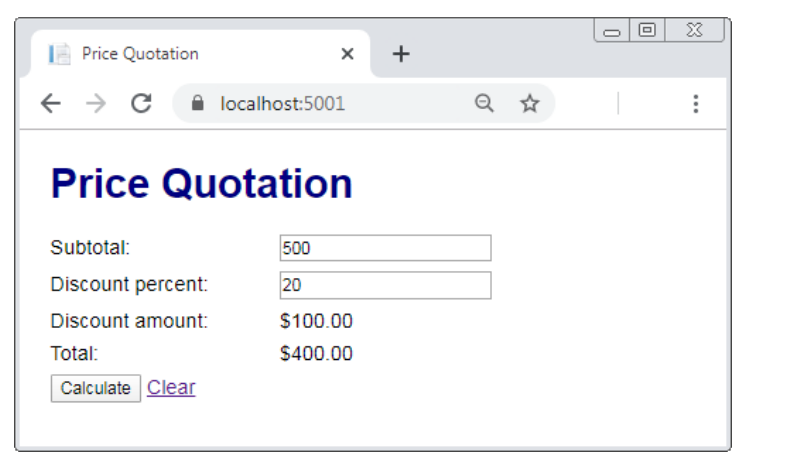
For this assignment, you will build a singlepage app like the one thats shown below.
Specifications
You may either start a new ASP.NET Core MVC web application like how we started ChFutureValue and
name the application ChQuotation. Or you may use the starter application files provided for you in DL
If you use the starter application, you will need to create the following files in the SolutionExplorer of
Visual Studio:
HomeController.cs
o The HomeController.cs file will need to be created in the Controllers folder
Index.cshtml
o The Index.cshtml file will need to be created in the ViewsHome folder.
o Hint from within the HomeController.cs file, right click on the Index action method and
select Add View to create an Index.cshtml file that will automatically be stored in the Home
folder.
Quotation.cs
o The Quotation.cs file is the suggested name of the model for this application.
o The Quotation.cs file will need to be created in the Models folder.
When the app starts, it should display the Price Quotation page with no Subtotal or Discount percent. The
Discount amount and Total should show $
In the model class, store the Subtotal and Discount percent as properties and include methods to calculate
the Discount amount and Total.
The Discount amount is calculated by multiplying the Subtotal by the Discount percent converted to a
decimal value. Subtotal Discount percent
The Total amount is calculated by subtracting the Discount amount calculated in the previous step
from the Subtotal. Subtotal Discount amount.
If the user enters a valid Subtotal and valid Discount percent and clicks the Calculate button, the app should
calculate and display the Discount amount and Total.
If the user enters invalid data and clicks the Calculate button, the app should display a summary of validation
errors above the form.
Here are the requirements for valid data:
The Subtotal is required and must be a valid number from to
The Discount percent is required and must be a valid number from to
If the user clicks the Clear link, the app should reset the form to how it was when the app first started.
Create a custom.css CSS style sheet to style the HTML elements, so they appear like what is shown above.
You may use the same CSS styles we used in the FutureValue application, or you may use your creativity with
the CSS styles to create a web design of your choice.
Step by Step Solution
There are 3 Steps involved in it
1 Expert Approved Answer
Step: 1 Unlock

Question Has Been Solved by an Expert!
Get step-by-step solutions from verified subject matter experts
Step: 2 Unlock
Step: 3 Unlock
 Study Help