







Question: How do I modify this code so it uses vec3 instead of vec4? Javascript : use strict; var canvas; var gl; var numPositions = 36;
How do I modify this code so it uses vec3 instead of vec4?
Javascript:
"use strict";
var canvas;
var gl;
var numPositions = 36;
var positions = [];
var colors = [];
var xAxis = 0;
var zAxis = 2;
var yAxis = 1;
var axis = 0;
var theta = [0, 0, 0];
var thetaLoc;
window.onload = function init() {
canvas = document.getElementById("gl-canvas");
gl = canvas.getContext('webgl2');
if (!gl) alert("WebGL 2.0 isn't available");
colorPyramid();
gl.viewport(0, 0, canvas.width, canvas.height);
gl.clearColor(1.0, 1.0, 1.0, 1.0);
gl.enable(gl.DEPTH_TEST);
//
// Load shaders and initialize attribute buffers
//
var program = initShaders(gl, "vertex-shader", "fragment-shader");
gl.useProgram(program);
var cBuffer = gl.createBuffer();
gl.bindBuffer(gl.ARRAY_BUFFER, cBuffer);
gl.bufferData(gl.ARRAY_BUFFER, flatten(colors), gl.STATIC_DRAW);
var colorLoc = gl.getAttribLocation(program, "aColor");
gl.vertexAttribPointer(colorLoc, 4, gl.FLOAT, false, 0, 0);
gl.enableVertexAttribArray(colorLoc);
var vBuffer = gl.createBuffer();
gl.bindBuffer(gl.ARRAY_BUFFER, vBuffer);
gl.bufferData(gl.ARRAY_BUFFER, flatten(positions), gl.STATIC_DRAW);
var positionLoc = gl.getAttribLocation(program, "aPosition");
gl.vertexAttribPointer(positionLoc, 4, gl.FLOAT, false, 0, 0);
gl.enableVertexAttribArray(positionLoc);
thetaLoc = gl.getUniformLocation(program, "uTheta");
//event listeners for buttons
document.getElementById("xButton").onclick = function () {
axis = xAxis;
};
document.getElementById("yButton").onclick = function () {
axis = yAxis;
};
document.getElementById("zButton").onclick = function () {
axis = zAxis;
};
render();
}
function colorPyramid() {
// Base color
var baseColor = vec4(1.0, 0.0, 0.0, 1.0);
// Side colors
var vertexColors = [
vec4(1.0, 0.0, 1.0, 1.0),
vec4(0.0, 1.0, 0.0, 1.0),
vec4(0.0, 0.0, 1.0, 1.0),
vec4(1.0, 1.0, 0.0, 1.0)
];
// Vertex positions
var vertices = [
vec4(0.0, -0.5, 0.0, 1.0),
vec4(0.5, 0.0, 0.5, 1.0),
vec4(-0.5, 0.0, 0.5, 1.0),
vec4(-0.5, 0.0, -0.5, 1.0),
vec4(0.5, 0.0, -0.5, 1.0)
];
// Base
triple(1, 2, 3, 4, baseColor, vertices);
// Sides
for (var i = 0; i
triple(0, (i % 4) + 1, ((i + 1) % 4) + 1, 0, vertexColors[i], vertices);
}
}
function triple(a, b, c, d, color, vertices) {
var indices = [a, b, c, a, c, d];
for (var i = 0; i
positions.push(vertices[indices[i]]);
colors.push(color);
}
}
function render() {
gl.clear(gl.COLOR_BUFFER_BIT | gl.DEPTH_BUFFER_BIT);
theta[axis] += 2.0;
gl.uniform3fv(thetaLoc, theta);
gl.drawArrays(gl.TRIANGLES, 0, numPositions);
requestAnimationFrame(render);
}
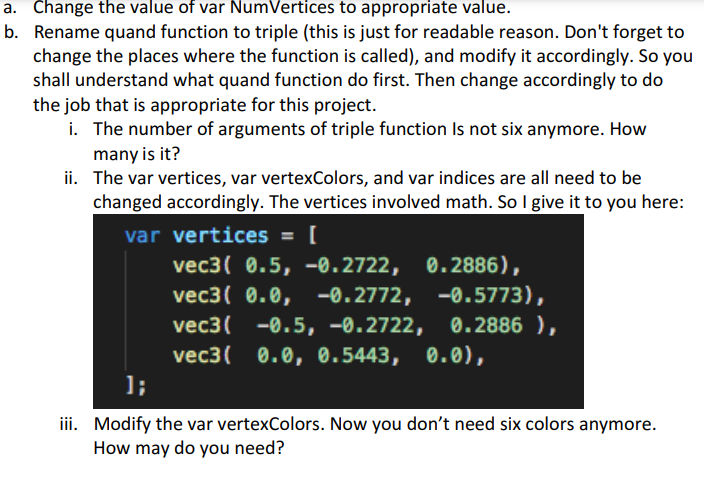
Change the value of var NumVertices to appropriate value. o. Rename quand function to triple (this is just for readable reason. Don't forget to change the places where the function is called), and modify it accordingly. So you shall understand what quand function do first. Then change accordingly to do the job that is appropriate for this project. i. The number of arguments of triple function Is not six anymore. How many is it? ii. The var vertices, var vertexColors, and var indices are all need to be changed accordingly. The vertices involved math. So I give it to you here: varvertices=[vec3(0.5,0.2722,0.2886),vec3(0.0,0.2772,0.5773),vec3(0.5,0.2722,0.2886),vec3(0.0,0.5443,0.0),] iii. Modify the var vertexColors. Now you don't need six colors anymore. How may do you need
Step by Step Solution
There are 3 Steps involved in it

Get step-by-step solutions from verified subject matter experts
 Study Help