







Question: How would I flush the DimLocations table and populate it again to add the StreetID So the table would now have LocationKey, CityKey and StreetID
How would I flush the DimLocations table and populate it again to add the StreetID So the table would now have LocationKey, CityKey and StreetID (which contains street name) The data source for StreetID value is the Street Table from the OLTP Database. The datatype for StreetID is the same data type as Street_Code
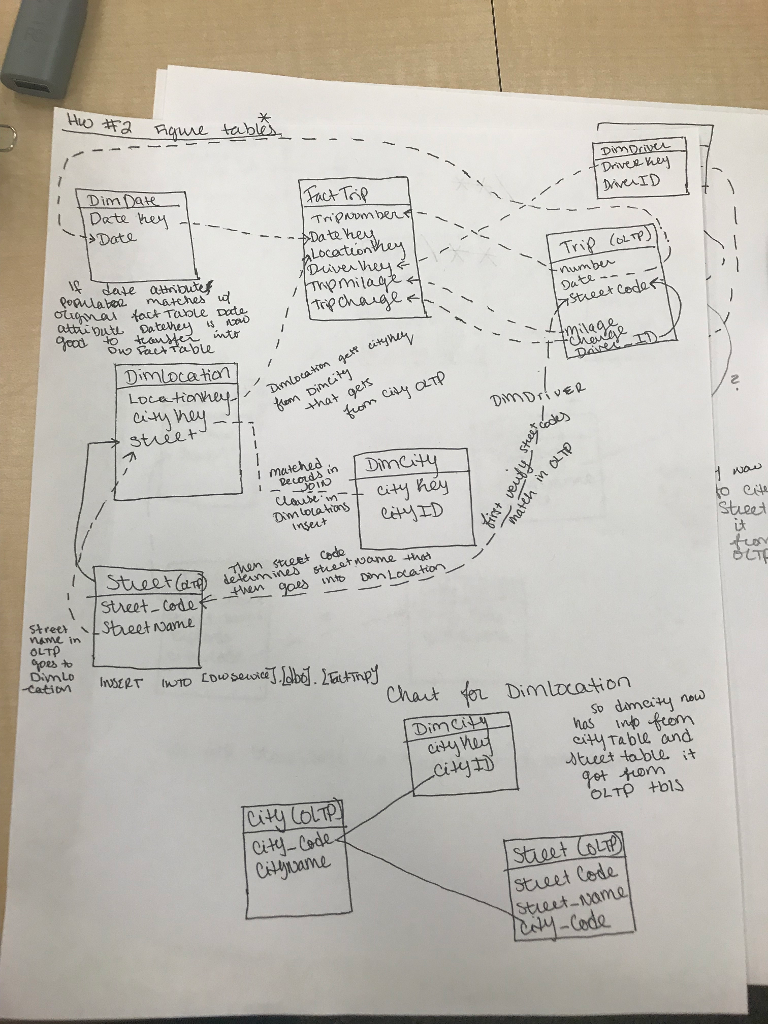
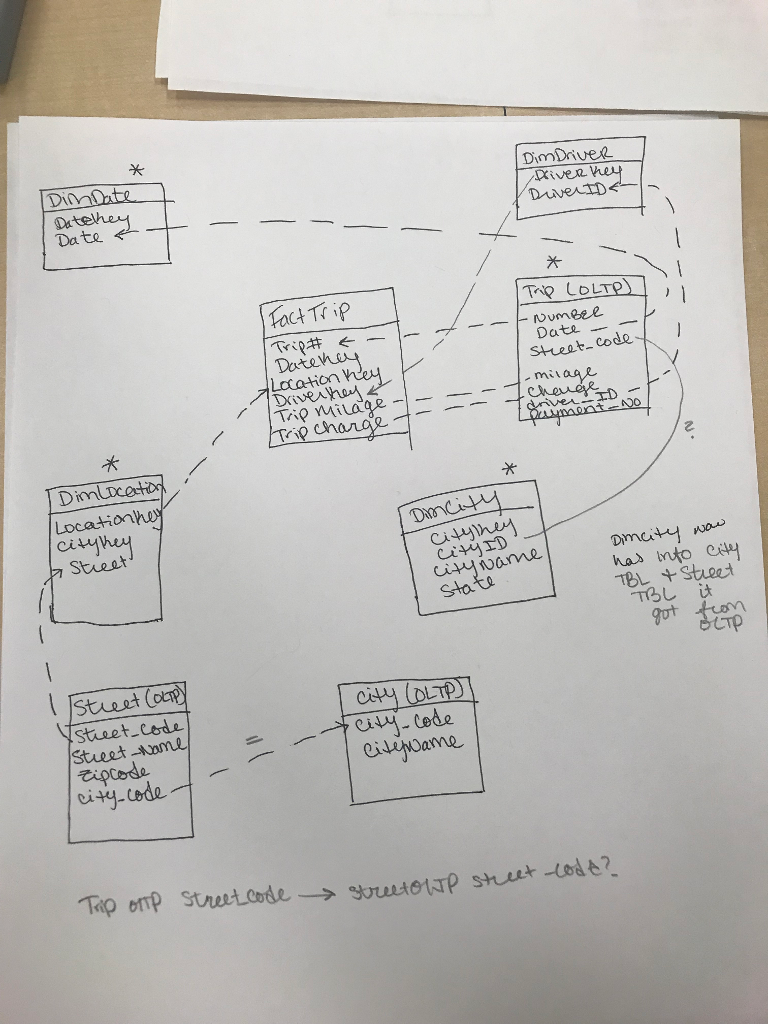 I need to: 1. Drop the FK constraint For dimLocation: ALTER TABLE dbo.DimLocation DROP CONSTRAINT [FK_DimLocation_DimCity] ALTER TABLE dbo.DimLocation DROP CONSTRAINT [FK_?_?] ??? 2. Truncate the DimLocation TRUNCATE TABLE [dbo].[DimLocation]
3. Add the FK back in ALTER TABLE [dbo].[DimLocation] WITH CHECK ADD CONSTRAINT [FK_DimLocation_DimCity] FOREIGN KEY ([CityKey]) References [dbo].[DimCity] ([CityKey]) GO I'd need another FK too at this point
4. Then populate the table: This is my ETL that I have right now- but it needs to add the StreetID attribute INSERT INTO dbo.DimLocation ( CityKey, Street ) ( SELECT [CityKey] = DimCity.CityKey, [Street] = CAST ( isNull([StreetName], 'Unknown') AS NVARCHAR(50)) FROM ([ServiceDB].[Dbo].[Street] INNER JOIN [DWService].[dbo].[DimCity] ON [serviceDB].[dbo].[Street].[City_Code] = [DWService].[dbo].[DimCity].[CityID] ) )
This is the ETL for all the tables I have currently:
--hw 4 USE [DWService] go
-- First drop all foreign key constraints ALTER TABLE dbo.DimLocation DROP CONSTRAINT [FK_DimLocation_DimCity]
ALTER TABLE dbo.FactTrips DROP CONSTRAINT [FK_FactTrips_DimDates]
ALTER TABLE dbo.FactTrips DROP CONSTRAINT [FK_FactTrips_DimLocation]
ALTER TABLE dbo.FactTrips DROP CONSTRAINT [FK_FactTrips_DimDriver]
Go
--Truncate the tables to 'Select all' the data to flush. This clears the tables TRUNCATE TABLE [dbo].[DimCity] TRUNCATE TABLE [dbo].[DimDates] TRUNCATE TABLE [dbo].[DimLocation] TRUNCATE TABLE [dbo].[DimDriver] TRUNCATE TABLE [dbo].[FactTrips]
--Add the foreign keys back in use DWService
ALTER TABLE [dbo].[DimLocation] WITH CHECK ADD CONSTRAINT [FK_DimLocation_DimCity] FOREIGN KEY ([CityKey]) References [dbo].[DimCity] ([CityKey]) GO
ALTER TABLE [dbo].[FactTrips] WITH CHECK ADD CONSTRAINT [FK_FactTrips_DimLocation] FOREIGN KEY ([LocationKey]) REFERENCES [dbo].[DimLocation] ([LocationKey]) GO
ALTER TABLE [dbo].[FactTrips] WITH CHECK ADD CONSTRAINT [FK_FactTrips_DimDates] FOREIGN KEY ([DateKey]) References [dbo].[DimDates] ([DateKey]) GO
ALTER TABLE [dbo].[FactTrips] WITH CHECK ADD CONSTRAINT [FK_FactTrips_DimDriver] FOREIGN KEY ([DriverKey]) References [dbo].[DimDriver] ([DriverKey]) GO
--DimDriver table --GOOD -- INSERT INTO dbo.DimDriver ( DriverID, DriverName ) ( SELECT [DriverID] = CAST ([Driver_Id] AS nchar(5) ), [DriverName] = CAST ( isNull ([FirstName] + N'' + [LastName], 'unkown' ) AS nVarchar(100) ) FROM [serviceDB].[Dbo].[Driver] )
--DimCity Table --GOOD INSERT INTO dbo.DimCity ( [CityID], [CityName], [State]) ( SELECT
[CityID] = CAST ([City_Code] AS NChar(4) ), [CityName] = CAST ( isNULL( [CountryName], 'Unknown') AS nvarCHAR(50) ), [State] = CASE CAST ([City_Code] AS nChar(50)) WHEN 'AUS' THEN 'Texas' WHEN 'HOU' THEN 'Texas' WHEN 'PHEX' THEN 'Arizona' END FROM [serviceDB].[Dbo].[City] ) GO
--DimDates DECLARE @StartDate datetime = '01/01/2010' DECLARE @EndDate datetime = '01/01/2013'
--Use a while loop to add dates to the table DECLARE @DateInProcess datetime SET @DateInProcess = @StartDate
WHILE @DateInProcess
-- isNull( [pub_name], 'Unknown' --DimLocation Table INSERT INTO dbo.DimLocation ( CityKey, Street ) ( SELECT [CityKey] = DimCity.CityKey, [Street] = CAST ( isNull([StreetName], 'Unknown') AS NVARCHAR(50)) FROM ([ServiceDB].[Dbo].[Street] INNER JOIN [DWService].[dbo].[DimCity] ON [serviceDB].[dbo].[Street].[City_Code] = [DWService].[dbo].[DimCity].[CityID] ) )
--FactTrips INSERT INTO [DWService].[dbo].[FactTrips] ([TripNumber], [DateKey], [LocationKey], [DriverKey], [TripMilage], [TripChange])
SELECT [TripNumber] = CAST([number] AS nVarchar(50)), [DateKey] = [DWService].[dbo].[DimDates].[DateKey], [LocationKey] = [DWService].[dbo].[DimLocation].[LocationKey], [DriverKey] = [DWService].[dbo].[DimDriver].[DriverKey], [TripMilage] = Cast ( IsNull([milage], 0) AS Decimal(18,4)), [TripCharge] = Cast ( IsNull([charge], 0) AS Decimal(18,4))
FROM [serviceDB].[dbo].[Trip] INNER JOIN [DWService].[dbo].[DimDates] ON [serviceDB].[dbo].[Trip].[Date] = [DWService].[Dbo].[DimDates].[Date] Inner Join serviceDB.dbo.Street ON serviceDB.dbo.Trip.Street_Code = serviceDB.dbo.Street.Street_Code
INNER JOIN [DWService].[dbo].[DimLocation] ON serviceDB.dbo.Street.StreetName = DWService.dbo.DimLocation.Street INNER JOIN [DWService].[dbo].[DimDriver] ON [serviceDB].[dbo].[Trip].[Driver_ID] = [Dwservice].[dbo].[dimdriver].[DriverID]
GO
Dim DaHK Date hey -?Drive Lhej Date /}.Tr t$?010 inttr Streek Coda ocatic 0i that ge fom cy aTtp ? stieet matehed, r Hias inse steet it Then steet Code neSeet oame OLTP goes Dimlo Chant Dimlrcation so damey no oty City? eity Tablh and "Stud table.? Citl staeet Cod. steet-name. Code Dim DaHK Date hey -?Drive Lhej Date /}.Tr t$?010 inttr Streek Coda ocatic 0i that ge fom cy aTtp ? stieet matehed, r Hias inse steet it Then steet Code neSeet oame OLTP goes Dimlo Chant Dimlrcation so damey no oty City? eity Tablh and "Stud table.? Citl staeet Cod. steet-name. Code
Step by Step Solution
There are 3 Steps involved in it

Get step-by-step solutions from verified subject matter experts
 Study Help