







Question: I can't seem to use the examples in interactions from page 2. Also I keep getting checkstyle errors on my code. I am using Jgrasp
I can't seem to use the examples in interactions from page 2. Also I keep getting checkstyle errors on my code. I am using Jgrasp a free IDE for Java that has strict format guidlines.
Here is my code:
import java.text.DecimalFormat; /** * Program that formualtes an ellipsoid. This program takes input from the user. * * Project 4. * @author david estrada - comp 1210 - section 008. * @version 02/05/2020. */ public class Ellipsoid { //Fields private String label = ""; private double a = 0; private double b = 0; private double c = 0; //constructor /** *@param labelIn establish the label *@param aIn establishes a axes. *@param bIn establishes b axes. *@param cIn establishes c axes. */ public Ellipsoid(String labelIn, double aIn, double bIn, double cIn) { setLabel(labelIn); setA(aIn); setB(bIn); setC(cIn); } //Methods /** *@return getLabel */ public String getLabel() { return label; } /** * * @param setLabel * @return if String is not null * return true */ public boolean setLabel(String labelIn) { if (label != null) { this.label = label.trim(); return true; } else { return false; } } /** * * @return field a */ public double getA() { return a; } /** * * @param a * @return if a>0 return true */ public boolean setA(double aIn) { if (a > 0) { this.a = a; return true; } else { return false; } } /** * * @return field b */ public double getB() { return b; } /** * * @param b * @return true if b>0 */ public boolean setB(double bIn) { if (b > 0) { this.b = b; return true; } else { return false; } } /** * * @return field c */ public double getC() { return c; } /** * * @param c * @return true if c>0 */ public boolean setC(double cIn) { if (c > 0) { this.c = c; return true; } else { return false; } } /** * * @return volume calculated */ public double volume() { return (4 * Math.PI * a * b * c) / 3; } /** * *@return calculated surfaceArea */ public double surfaceArea() { double sa = (Math.pow((a * b), 1.6) + Math.pow((a * c), 1.6) + Math.pow((b * c), 1.6)) / 3; sa = 4 * Math.PI * Math.pow(sa, (1.0 / 1.6)); return sa; } /** * * @return String representation of Ellipsoid object */ @Override public String toString() { DecimalFormat decimalFormat = new DecimalFormat("#,##0.0###"); return "Ellipsoid \"" + label + "\" with axes a = " + getA() + ", b = " + getB() + ", c = " + getC() + " units has: volume = " + decimalFormat.format(volume()) + " square units" + " surface area = " + decimalFormat.format(surfaceArea()) + " cubic units"; } }
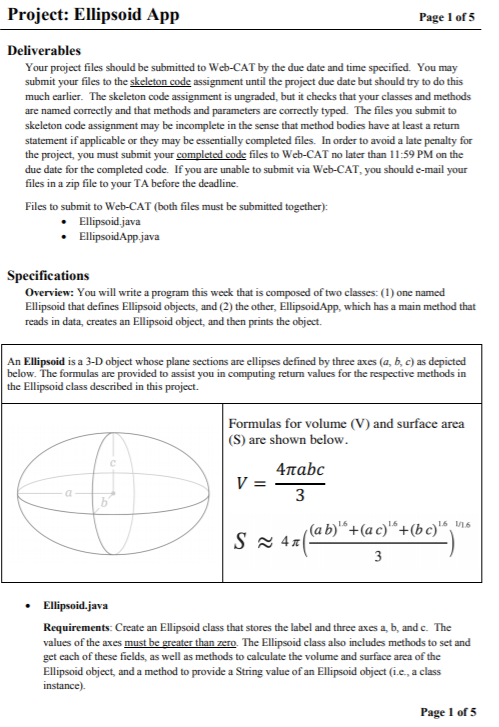
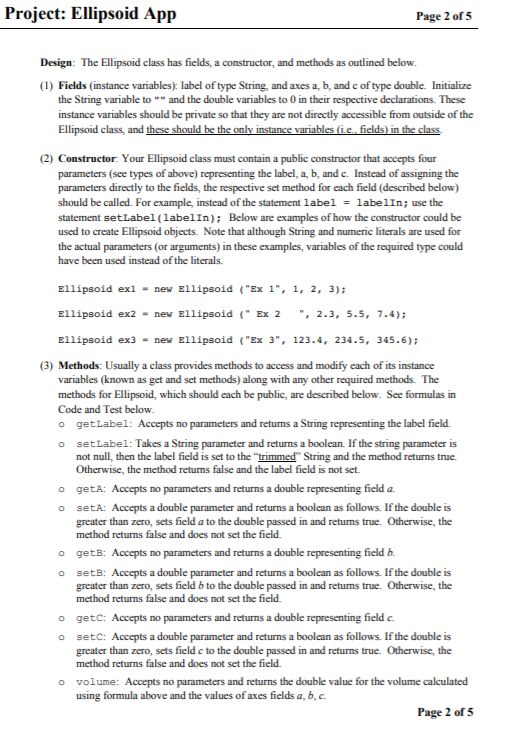
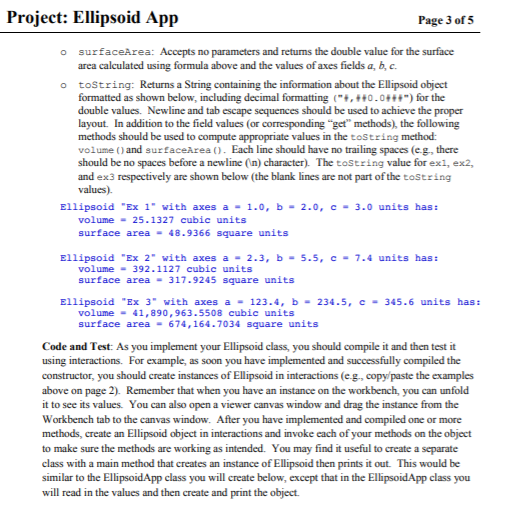
Project: Ellipsoid App Page 1 of 5 Deliverables Your project files should be submitted to Web-CAT by the due date and time specified You may submit your files to the skeleton code assignment until the project due date but should try to do this much earlier. The skeleton code assignment is ungraded, but it checks that your classes and methods are named correctly and that methods and parameters are correctly typed. The files you submit to skeleton code assignment may be incomplete in the sense that method bodies have at least a return statement if applicable or they may be essentially completed files. In order to avoid a late penalty for the project, you must submit your completed code files to Web-CAT no later than 11:59 PM on the due date for the completed code. If you are unable to submit via Web-CAT, you should e-mail your files in a zip file to your TA before the deadline. Files to submit to Web-CAT (both files must be submitted together): Ellipsoid.java Ellipsoid App.java Specifications Overview: You will write a program this week that is composed of two classes: (1) one named Ellipsoid that defines Ellipsoid objects, and (2) the other, EllipsoidApp, which has a main method that reads in data, creates an Ellipsoid object, and then prints the object. An Ellipsoid is a 3-D object whose plane sections are ellipses defined by three axes (a, b, c) as depicted below. The formulas are provided to assist you in computing return values for the respective methods in the Ellipsoid class described in this project. Formulas for volume (V) and surface area (S) are shown below. v = 4habc Sz42/(ab)" +(Qc)"+(bc)" S ~ 47( 3 Ellipsoid.java Requirements: Create an Ellipsoid class that stores the label and three axes a, b, and c. The values of the axes must be greater than zero The Ellipsoid class also includes methods to set and get each of these fields, as well as methods to calculate the volume and surface area of the Ellipsoid object, and a method to provide a String value of an Ellipsoid object (.e., a class instance) Page 1 of 5 Project: Ellipsoid App Page 2 of 5 Design: The Ellipsoid class has fields, a constructor, and methods as outlined below. (1) Fields (instance variables): label of type String, and axes a, b, and c of type double. Initialize the String variable to and the double variables to 0 in their respective declarations. These instance variables should be private so that they are not directly accessible from outside of the Ellipsoid class and these should be the only instance variables (ie fields) in the class (2) Constructor: Your Ellipsoid class must contain a public constructor that accepts four parameters (see types of above) representing the label, a, b, and c. Instead of assigning the parameters directly to the fields, the respective set method for each field (described below) should be called. For example, instead of the statement label = labelin; use the statement setLabel(labelIn); Below are examples of how the constructor could be used to create Ellipsoid objects. Note that although String and numeric literals are used for the actual parameters (or arguments) in these examples, variables of the required type could have been used instead of the literals. Ellipsoid exl - new Ellipsoid ("Ex 1", 1, 2, 3); Ellipsoid ex2 - new Ellipsoid("Ex 2 " 2.3, 5.5, 7.4); Ellipsoid ex3 - new Ellipsoid ("Ex 3", 123.4, 234.5, 345.6); (3) Methods: Usually a class provides methods to access and modify each of its instance variables (known as get and set methods) along with any other required methods. The methods for Ellipsoid, which should each be public, are described below. See formulas in Code and Test below. o getLabel: Accepts no parameters and returns a String representing the label field O setLabel: Takes a String parameter and returns a boolean. If the string parameter is not null, then the label field is set to the "trimmed String and the method returns true Otherwise, the method retums false and the label field is not set. o getA: Accepts no parameters and returns a double representing field a. O seta: Accepts a double parameter and returns a boolean as follows. If the double is greater than zero, sets field a to the double passed in and returns true. Otherwise, the method returns false and does not set the field o getB: Accepts no parameters and returns a double representing field b. o sets: Accepts a double parameter and returns a boolean as follows. If the double is greater than zero, sets field b to the double passed in and returns true. Otherwise, the method returns false and does not set the field o getc: Accepts no parameters and returns a double representing field c. o setc: Accepts a double parameter and returns a boolean as follows. If the double is greater than zero, sets field c to the double passed in and returns true. Otherwise, the method returns false and does not set the field volume: Accepts no parameters and returns the double value for the volume calculated using formula above and the values of axes fields a, b, c. Page 2 of 5 Project: Ellipsoid App Page 3 of 5 surfaceArea: Accepts no parameters and returns the double value for the surface area calculated using formula above and the values of axes fields a, b, c. o toString: Returns a String containing the information about the Ellipsoid object formatted as shown below, including decimal formatting ("+, ++0.0+++") for the double values. Newline and tab escape sequences should be used to achieve the proper layout. In addition to the field values (or corresponding "get" methods), the following methods should be used to compute appropriate values in the toString method: volume and surfaceArea (). Each line should have no trailing spaces (eg, there should be no spaces before a newline (n) character). The tostring value for exi, ex2, and ex3 respectively are shown below the blank lines are not part of the toString values) Ellipsoid "Ex 1" with axes a -1.0, b - 2.0, c-3.0 units has: volume - 25.1327 cubic units surface area - 48.9366 square units Ellipsoid "Ex 2" with axes a - 2.3, b-5.5, C- 7.4 units has: volume - 392.1127 cubic units surface area - 317.9245 square units Ellipsoid "Ex 3" with axes a - 123.4, b - 234.5, C-345.6 units has: volume - 41,890,963.5508 cubic units surface area - 674, 164.7034 square units Code and Test: As you implement your Ellipsoid class, you should compile it and then test it using interactions. For example, as soon you have implemented and successfully compiled the constructor, you should create instances of Ellipsoid in interactions (eg., copy paste the examples above on page 2). Remember that when you have an instance on the workbench, you can unfold it to see its values. You can also open a viewer canvas window and drag the instance from the Workbench tab to the canvas window. After you have implemented and compiled one or more methods, create an Ellipsoid object in interactions and invoke each of your methods on the object to make sure the methods are working as intended. You may find it useful to create a separate class with a main method that creates an instance of Ellipsoid then prints it out. This would be similar to the EllipsoidApp class you will create below, except that in the Ellipsoid App class you will read in the values and then create and print the object
Step by Step Solution
There are 3 Steps involved in it

Get step-by-step solutions from verified subject matter experts
 Study Help