







Question: I need help creating a query for all employees: Employee ID First and Last Name Department Name Current Salary Last Raise Date We kindly ask
I need help creating a query for all employees:
Employee ID
First and Last Name
Department Name
Current Salary
Last Raise Date
We kindly ask that you provide us with this report by May th so that we can review and analyze the data.
dbo.ErrorLog
HumanResources. Department
Columns
DepartmentID PK smallint,
SQLQuerysql SHI...SHIELAlshiel SQLQuerysql not connected
SQLQuerysql not connected
playerdbsql not connected
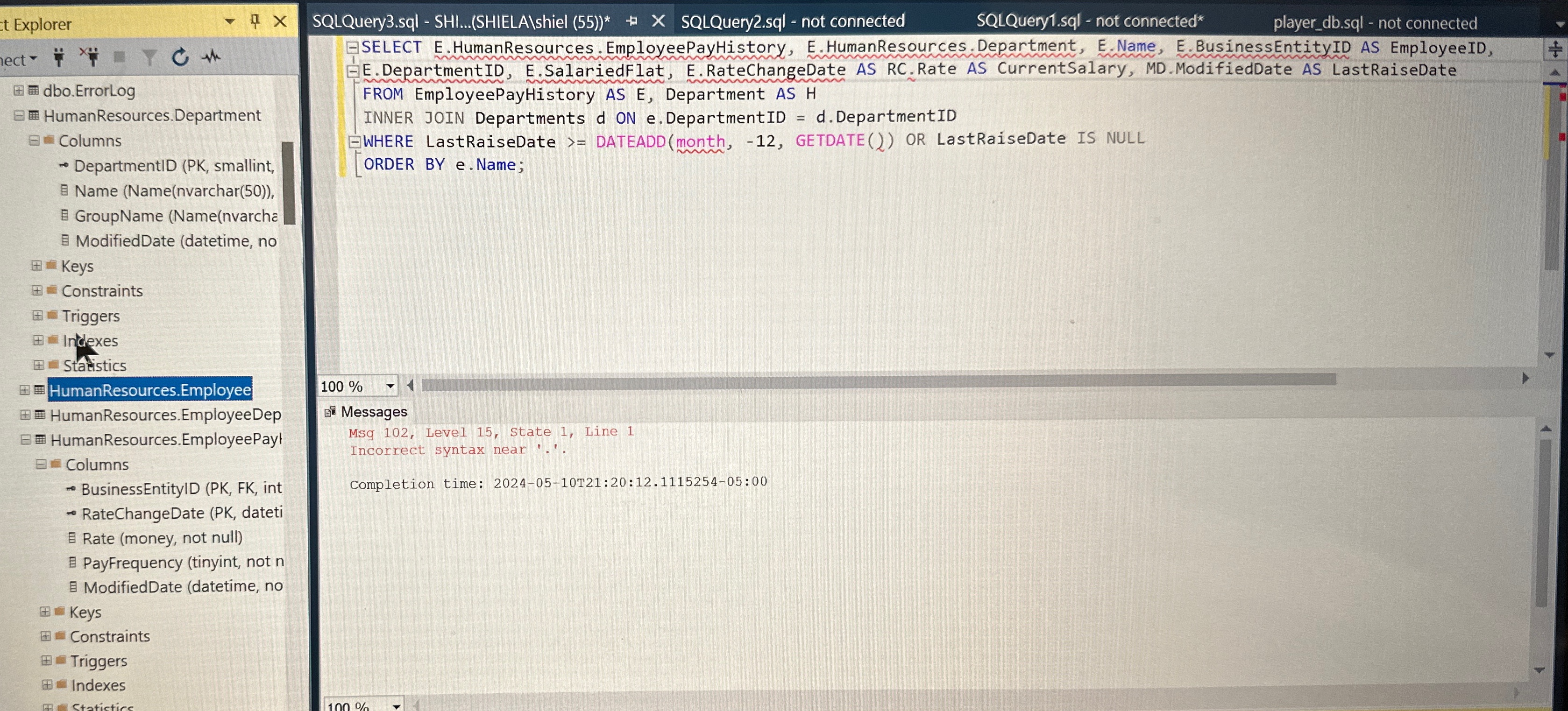
SELECT EHumanResources.EmployeePayHistory, EHumanResources.Department,
EName, EBusinessEntityID AS EmployeeID, EDepartmentID, ESalariedFlat, ERateChangeDate AS RCRate AS CurrentSalary, MDModifiedDate AS LastRaiseDate FROM EmployeePayHistory AS E Department AS H INNER JOIN Departments d ON eDepartmentID dDepartmentID
WHERE LastRaiseDate DATEADDmonth GETDATE OR LastRaiseDate IS NULL ORDER BY
eName;
Name Namenvarchar
G GroupName Namenvarcha
ModifiedDate datetime no
HumanResources.Employee
HumanResources.EmployeeDep
HumanResources.EmployeePay
E Columns
BusinessEntityID PK FK int
Messages
Msg Level State Line
Incorrect syntax near
RateChangeDate PK dateti
Rate money not null
PayFrequency tinyint not
B ModifiedDate datetime no
Completion time: :::
Please include the following features in your report.
Include our company logo
Include a title of the report named Employee Salary History.
Flag any employee who has not had a raise in over months. You can either color code the output or create a widget indicator.
Include all the information mentioned above.
Make the report sortable by the employee's last name.
We would also like an export of the report in Excel format to share with our coworkers. I have to filter out employees who have not had a raise in months or more.
This is what i have for a query but cannot get it to work
Step by Step Solution
There are 3 Steps involved in it
1 Expert Approved Answer
Step: 1 Unlock

Question Has Been Solved by an Expert!
Get step-by-step solutions from verified subject matter experts
Step: 2 Unlock
Step: 3 Unlock
 Study Help