







Question: ID Page view l A Read aloud Draw High CSC237 C# Programming Programming Project 2 Due date: March 10, 2021 This programming project is due
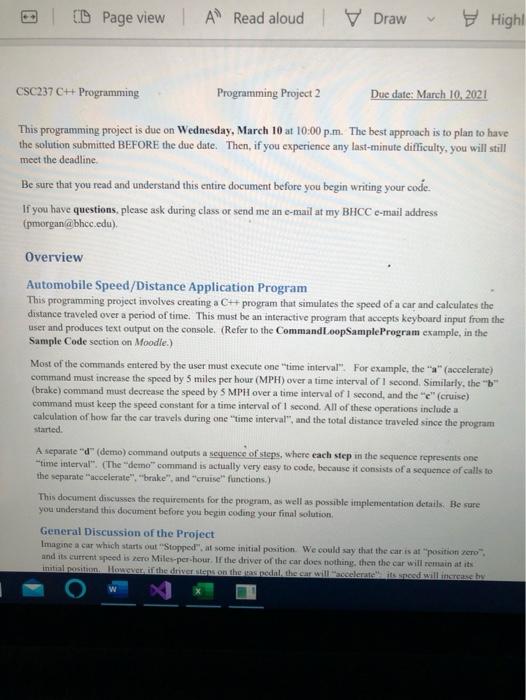
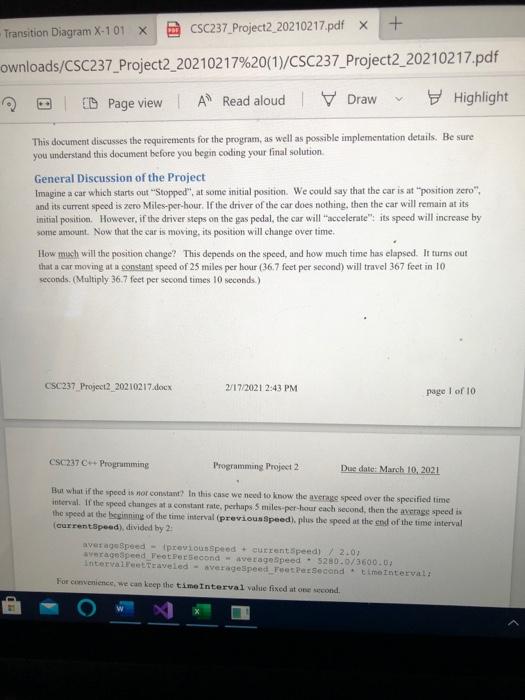
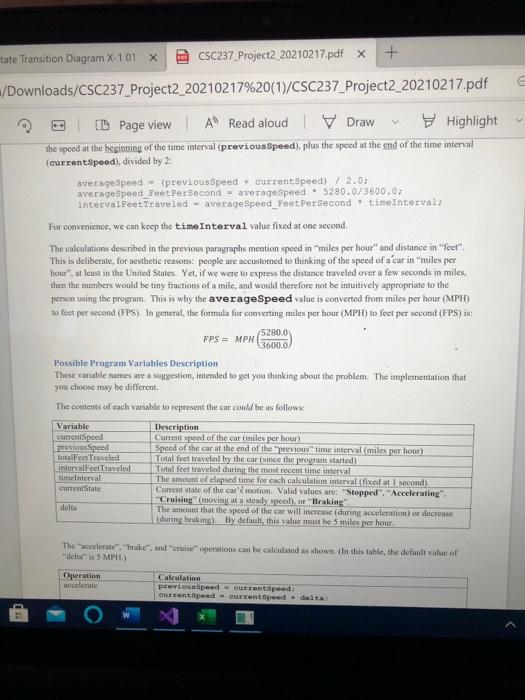
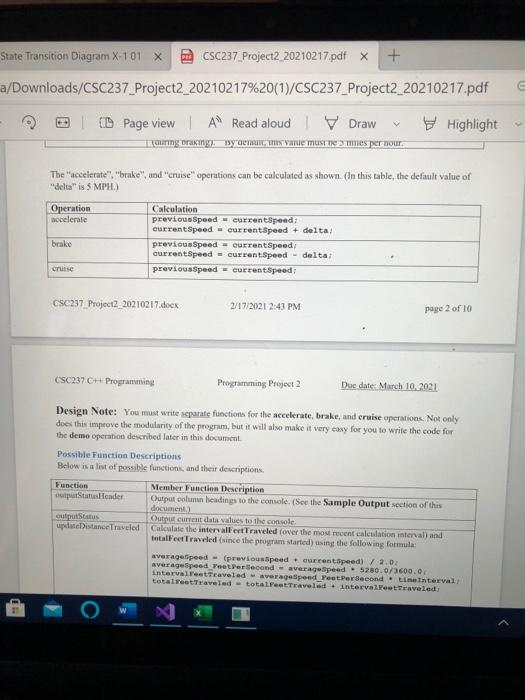
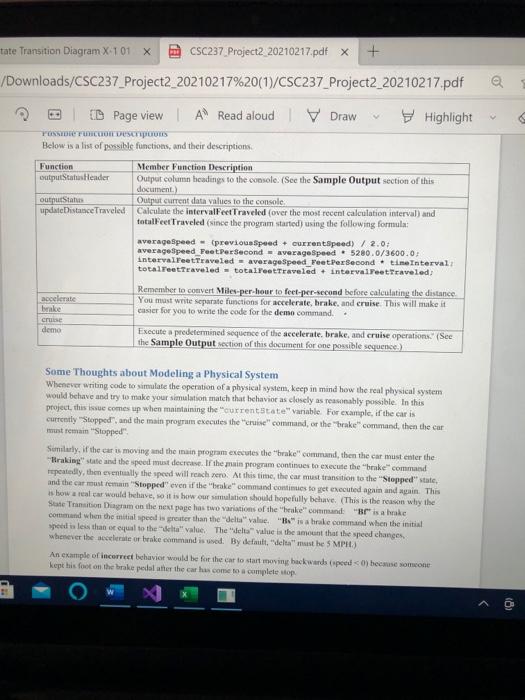
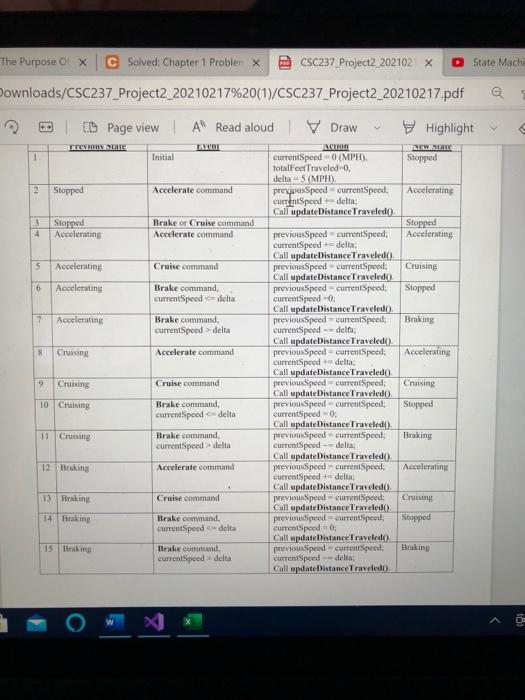
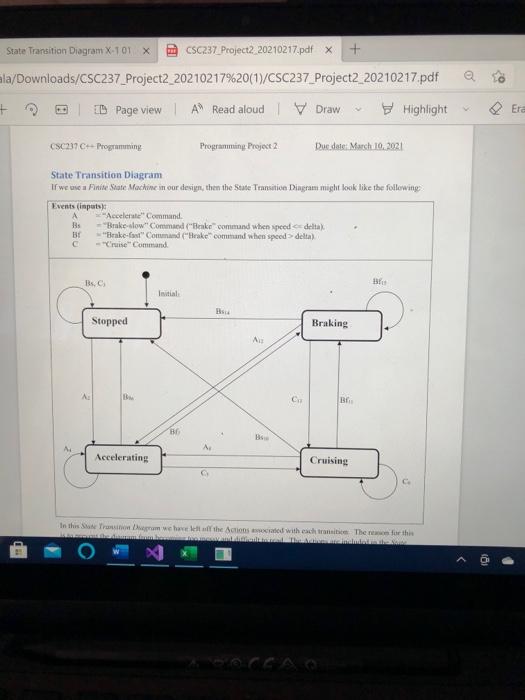
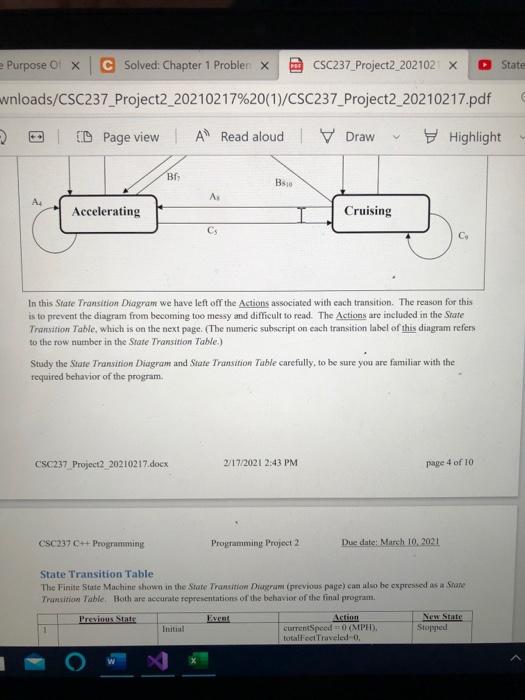
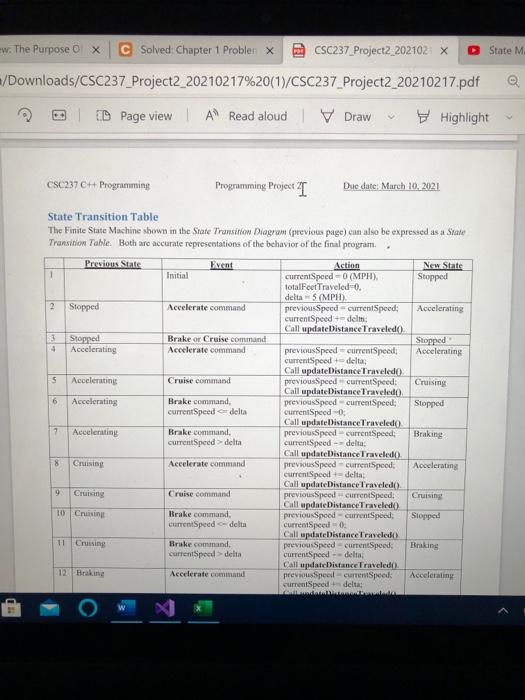
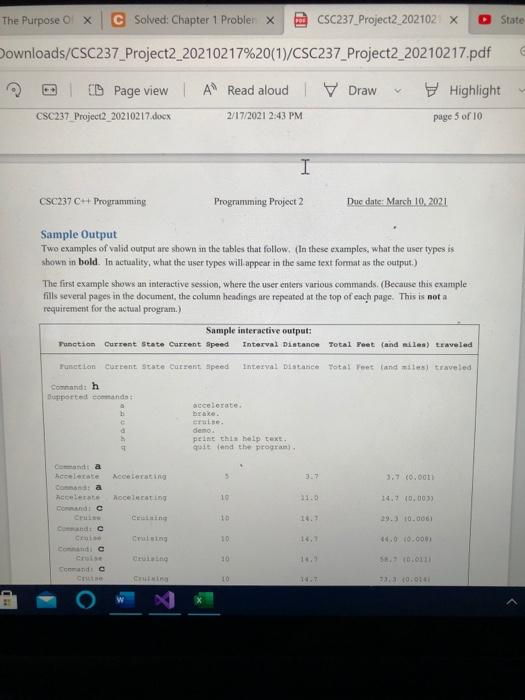
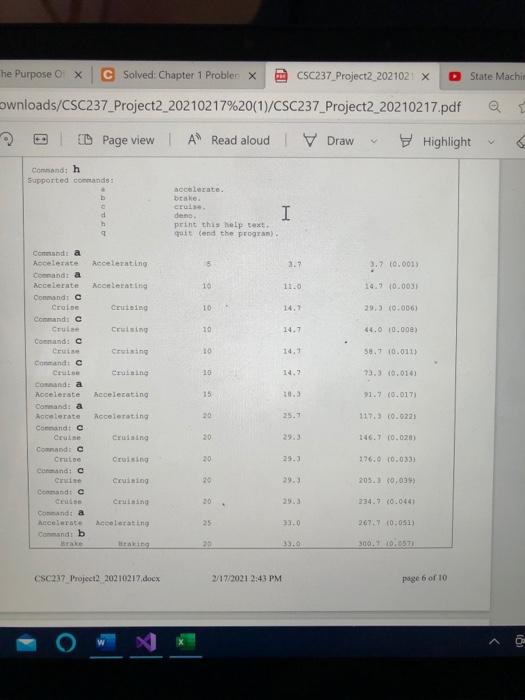
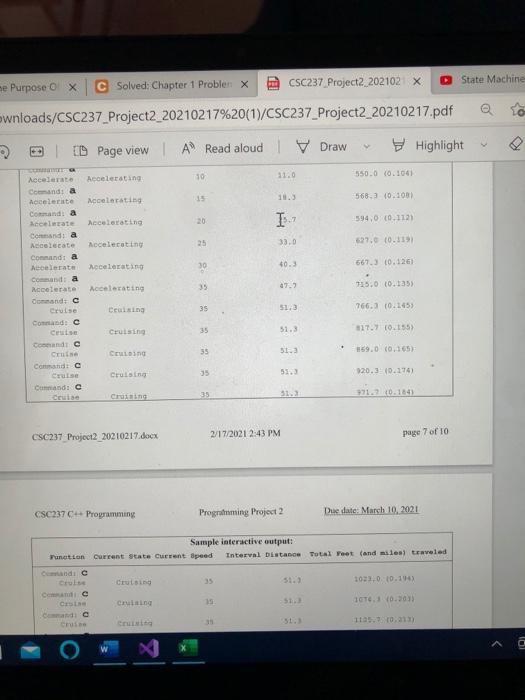
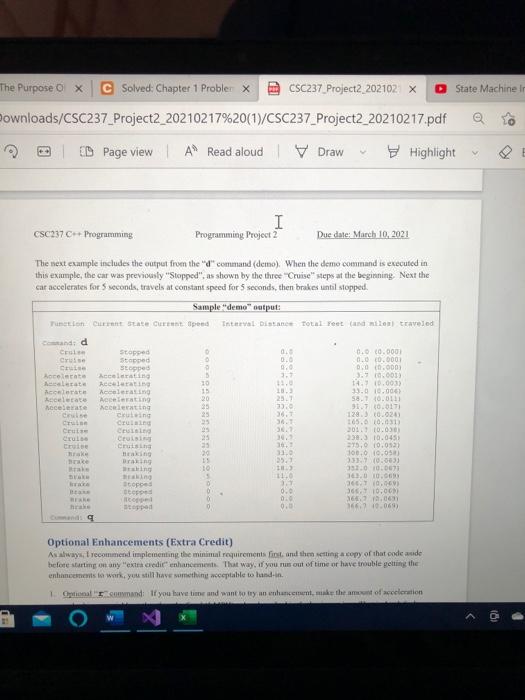
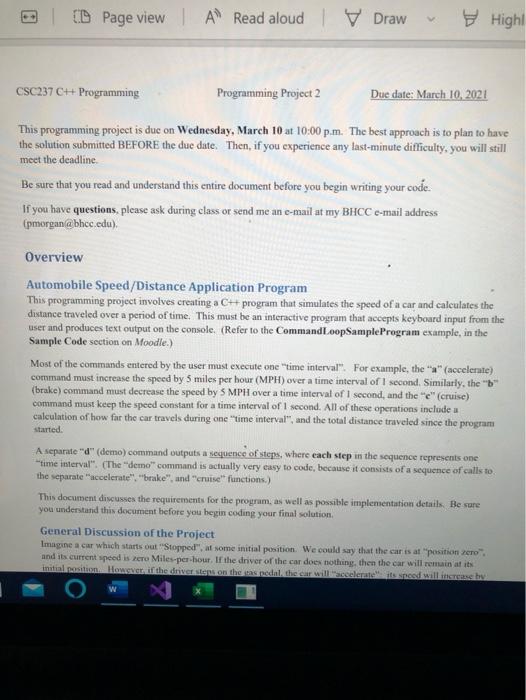
ID Page view l A Read aloud Draw High CSC237 C# Programming Programming Project 2 Due date: March 10, 2021 This programming project is due on Wednesday, March 10 at 10:00p.m. The best approach is to plan to have the solution submitted BEFORE the due date. Then, if you experience any last-minute difficulty, you will still meet the deadline Be sure that you read and understand this entire document before you begin writing your code. If you have questions, please ask during class or send me an e-mail at my BHCC e-mail address (pmorgan (@bhcc.edu) Overview Automobile Speed/Distance Application Program This programming project involves creating a C++ program that simulates the speed of a car and calculates the distance traveled over a period of time. This must be an interactive program that accepts keyboard input from the user and produces text output on the console. (Refer to the CommandLoopSample Program example, in the Sample Code section on Moodle.) Most of the commands entered by the user must execute one time interval". For example, the "" (accelerate) command must increase the speed by 5 miles per hour (MPH) over a time interval of 1 second. Similarly, the "b" (brake) command must decrease the speed by 5 MPH over a time interval of 1 second, and the "e" (cruise) command must keep the speed constant for a time interval of 1 second. All of these operations include a calculation of how far the car travels during one "time interval", and the total distance traveled since the program started A separate "d" (demo) command outputs a sequence of steps, where each step in the sequence represents one time interval" (The "demo" command is actually very easy to code, because it consists of a sequence of calls to the separate accelerate". "brake" and "cruise functions.) This document discusses the requirements for the program, as well as possible implementation details. Be sure you understand this document before you begin coding your final solution, General Discussion of the Project Imagine a car which starts out "Stopped" at some initial position. We could say that the car is at "position zero and its current speed is zero Milen-per-bout. If the driver of the car does nothing, then the car will remain at its Initiation over the drivers on the seal the car will assisted walls + Transition Diagram X-101 X CSC237_Project2_20210217.pdf X ownloads/CSC237_Project2_20210217%20(1)/CSC237_Project2_20210217.pdf | D Page view A Read aloud V Draw Highlight This document discusses the requirements for the program, as well as possible implementation details. Be sure you understand this document before you begin coding your final solution General Discussion of the Project Imagine a car which starts out "Stopped" at some initial position. We could say that the car is at "position zero", and its current spoed is zero Miles-per-bour. If the driver of the car does nothing, then the car will remain at its initial position. However, if the driver steps on the gas pedal, the car will "accelerate" its speed will increase by some amount. Now that the car is moving, its position will change over time. How much will the position change? This depends on the speed, and how much time has elapsed. It turns out that a car moving at a constant speed of 25 miles per hour (36.7 feet per second) will travel 367 feet in 10 seconds. (Multiply 36.7 feet per second times 10 seconds) CSC237 Project2_20210217.docx 2/17/2021 2:43 PM page 1 of 10 CSC237 - Programming Programming Project 2 Due date: March 10, 2021 But what if the speed is nor constant? In this case we need to know the average speed over the specified time interval. If the speed changes at a constant rate, perhaps 5 miles per hour each second, then the average speed is the speed at the leginning of the time interval (previous Speed), plus the speed at the end of the time interval (currentSpeed), divided by 2: averageSpeed - previous speed + current speed)/ 2.0) average speed_Peet Per Second - average Speed - 5280.0/3600.0 Intervalltraveled averageSpeed Feet Per Second time Interval For convenience, we can keep the time Interval value fixed at one second HD tate Transition Diagram X-101 X CSC237 Project2_20210217.pdf x + /Downloads/CSC237_Project2_20210217%20(1)/CSC237_Project2_20210217.pdf E ID Page view A Read aloud Draw Highlight the speed at the beginning of the time interval (previous Speed), plus the speed at the end of the time interval (currentSpeed), divided by 23 averageSpeed (previous Speed + current Speed)/ 2.01 averageSpeed Feet Per Second - average Speed 5280.0/3600.07 intervalFeet Traveled - averageSpeed_Peet Per Second time Interval: For convenience, we can keep the time Interval value fixed at one second The calculations described in the previous paragraphs mention speed in "miles per hour" and distance in "feet" This is deliberate, for aesthetic reason people are accustomed to thinking of the speed of a car in "miles per hour"at least in the United States. Yet, if we were to express the distance traveled over a few seconds in miles, then the numbers would be tiny fractions of a mile, and would therefore not be intuitively appropriate to the person using the program. This is why the averageSpeed value is converted from miles per hour (MPH) to feet per second (FPS). In general, the formula for converting miles per hour (MPH) to feet per second (FPS) 5280.0 FPS = MPH 3600.0 Possible Program Variables Description These variable names are a suggestion, intended to get you thinking about the problem. The implementation that you chose may be different The contents of each variable to represent the car could be as follows: Variable Description cunet Spes speed of the car (miles per hour) previous Speed Speed of the car at the end of the previous time interval (miles per hour) totalFeet Traveled Total feel traveled by the car (since the program started) intervalFeet Traveled Total feet traveled during the most recent time interval timeInterval The amount of clapsed time for each calculation intervall fixed at 1 second) currentState Current state of the car motion. Valid values are: "Stopped", "Accelerating" "Cruising moving at a seady speed), or "Braking The amount that the speed of the car will increase during acceleration) or decrease (duting brakint). By default this value must be 5 miles per hour The accelerate". "hake", and "cruise" operations can be calculated as shown in this table, the default value of delta" 5 MPH) Operation uccelente Calculation previouslipeed - currentSpeed: Current Speed - curent speed. delta! State Transition Diagram X-101 X CSC237_Project2 20210217.pdf X + a/Downloads/CSC237_Project2_20210217%20(1)/CSC237_Project2_20210217.pdf ID Page view | A Read aloud Draw Highlight uuring Braking y Genu, au mus ne mes per nour The accelerate", "brake", and "cruise" operations can be calculated as shown. (In this table, the default value of "dela" is 5 MPH Operation Bocelerate brake Calculation previous Speed - currentSpeed: current Speed - Current Speed + delta previous Speed - Current Speed current Speed - current Speed - delta previous Speed current speed CSC237 Project2_20210217.docx 2/17/2021 2:43 PM page 2 of 10 CSC237 C# Programming Programming Project 2 Due date: March 10, 2021 Design Note: You must write separate functions for the accelerate, brake, and cruise operations. Not only does this improve the modularity of the program, but it will also make it very easy for you to write the code for the demo operation described later in this document Possible Function Descriptions Below is a list of possible functions, and their descriptions Function Member Function Description utputStateslender Output column leading to the console. (See the Sample Output section of this document, outputStatus Output current data values to the console update Distance Traveled Calculate the intervallert Traveled (over the most recent calculation interval) and Intallet Traveled (since the program started using the following formula: averageSpeed - (previous Speed - Guerant.Ipeed) / 2.0 average Speed_Peet. Per second average speed 520.0/3600.0 intervalletTeaveled average speed_Peetersecond time interval total traveled - totaletraveled intervalltraveled tate Transition Diagram X-101 X CSC237 Project2_20210217.pdf X + /Downloads/CSC237_Project2_20210217%20(1)/CSC237_Project2_20210217.pdf ID Page view | A Read aloud V Draw Highlight TOSTOETUI SCIOUS Below is a list of possible functions, and their descriptions Function Member Function Description outputStatus Header Output column heading to the console. (See the Sample Output section of this document) outnut Status Output current data values to the console updateDistance Traveled Calculate the intervallet Traveled (over the most recent calculation interval) and totalFeet Traveled (since the program started using the following formula averagespeed - previous Speed + currentSpeed) / 2.0 average speed FeetPersecond average speed. 5280.0/3600.0 intervallet Traveled = averageSpeed FeetPer Second . tine Interval totalreet Traveled = totallet Traveled + intervalet Traveled Remember to convert Miles-per-hour to feet-per-second before calculating the distance accelerate You must write separate functions for accelerate, brake, and cruise. This will make it I brake easier for you to write the code for the demo command. Cruise demo Execute a predetermined sequence of the accelerate brake, and cruise operations. (See the Sample Output section of this document for one possible sequence) Some Thoughts about Modeling a Physical System Whenever writing code to simulate the operation of a physical system, keep in mind how the real physical system would behave and try to make your simulation match that behavior as closely as reasonably possible. In this project, this issue comes up when maintaining the current state" variable. For example, if the car is currently "Stopped", and the main proyrum executes the cruise command, or the brake" command, then the car must remai "Stopped". Similarly, if the car is moving and the main program executes the brake command, then the car must enter the Braking state and the speed must decrease. If the main program continues to execute the brake command repeatedly, the eventually the speed will reachero. At this time, the car must transition to the "Stopped state, and the cat must remain Stopped even if the brake command continues to get executed again and again. This is how a real car would behave, so it is how our simulation should hopefully behave. This is the reason why the State Transition Diagram on the next page has two variations of the "hake command "Brisanke command when the mitial speed is greater than the delta" value. "B" is a brake command when the initial speed is less than or equal to the value. The value is the amount that the speed changes whenever the color brake command is used. By default.deltamasthe 5 MPH) An example of incorrect behavior would be for the car to start moving backwards opeebese someone kept his foot on the brake pololatter the car has come to a complete stop State Mach The Purpose olx C Solved: Chapter 1 Probler x CSC237 Project2_202102 X Downloads/CSC237_Project2_20210217%20(1)/CSC237_Project2_20210217.pdf @ ID Page view | A Read aloud Draw Highlight ITERUSS ATHUN NEWS 1 Instal currentSpeed (MP) Stopped totalFeet Traveled, delta - 5 (MPH) 2 Stopped Accelerate command prepusSpeed-currentSpeed: Accelerating currentSpeed delta: Call update Distance Traveled a Stopped Brake or Cruise command Stopped 4 Accelerating Accelerate command previousSpeed current Speed: Accelerating currentSpeed-delta Call update Distance Traveled() 5 Accelerating Cruise command previous Speed currentSpeed; Cruising Call update Distance Traveled) 6 Accelerating Brake command, previousSpeed-currentSpeed: Stopped currentSpeed delta currentSpeed - Call update Distance Traveled(). 17 Accelerating Brake command, previous Speed currentSpeed Braking currentSpeed delta currentSpeed - dela Call update Distance Traveled 8 Cruising Accelerate command previous Speed - currentSpeed: Accelerating currentSpeed + delta: Call update Distance Traveled Cruising Cruise command previousSpeed currentSpeed: Cruising Call update Distance Traveled(). 10 Cruising Brake command previous Speed = currentSpeed: Stopped currentSpeed-delta currentSpeed=0 Call update Distance Traveled). 11 Cruising Brake command, previonsSpeed currentSpeed: Braking currentSpeed delta Current Speed - delta Call update Distance Traveled 12 Braking Accelerate command previousSpeedcurrenSpeed Accelerating currentSpeed - delta Call updateDistance Traveled). 13 Braking Cruise command previous Speed currentSpeed: Cruising Call update Distance Traveled() 14 Braking Brake comund previous Speed current Speed: Stopped currentSpeed-delta currentSpeed=0 Call update Distance Traveled 15 Baking Brake command previousSpeed currentSpeed: currentSpeed > delta currentSpeed --delta Call update Distance Traveled Braking State Transition Diagram X-TOX CSC237_Project2_20210217.pdf x + la/Downloads/CSC237_Project2_20210217%20(1)/CSC237_Project2_20210217.pdf + PD Page view A Read aloud V Draw Highlight Era CSC237 C Programming Programming Project 2 Due dele March 10, 2021 State Transition Diagram If we ca Finite State Machine in our design then the State Transition Diagram might look like the following Events (input) A "Accelerate" Command Bs -Brake-slow" Command lake command when speed delta) B: Brakes Command ("Brake command when speed delta) - Cruise Command Bs. Initial Stopped Braking A AL BE BE A A: Accelerating Cruising C In this room we have the actions with each tritic Then the Nam State Purpose Of X C Solved: Chapter 1 Probler X CSC237 Project2_202102 x wnloads/CSC237_Project2_20210217%20(1)/CSC237_Project2_20210217.pdf C El CD Page view A Read aloud | Draw Highlight BE B: A. A4 Accelerating Cruising CS CH In this State Transition Diagram we have left off the Actions associated with cach transition. The reason for this is to prevent the diagram from becoming too messy and difficult to read. The Actions are included in the State Transation Table, which is on the next page. (The numeric subscript on each transition label of this diagram refers to the row number in the State Transition Table) Study the State Transition Diagram and State Transition Table carefully, to be sure you are familiar with the required behavior of the program CSC 237 Project2 20210217.docx 2/17/2021 2:43 PM page 4 of 10 CSC237C++ Programming Programming Project 2 Due date: March 10, 2021 State Transition Table The Finite State Machine shown in the State Tranuition Dirumi (previous page) can also he expressed as a Stare Transition Table Both are accurate representations of the behavior of the final program Previous State Eyret Action New State currentSpeed=0XMPH). Stopped totalFoc Traveleda w. The Purpose 0 X C Solved: Chapter 1 Probler x CSC237_Project2_202102 x State M /Downloads/CSC237_Project2_20210217%20(1)/CSC237 Project2_20210217.pdf E D Page view A Read aloud | V Draw Highlight CSC237 H+ Programming Programming Project T Due date: March 10, 2021 State Transition Table The Finite State Machine shown in the State Transition Diagram (previous page) can also be expressed as a State Transition Table. Both are accurate representations of the behavior of the final program. Previous Stats Action New Stats 1 Initial Current Speed - 0 (MPH). Stopped totalFeet Traveled-0. delta 5 (MPH). 2 Stopped Accelerate command previousSpeed-currentSpeed; Accelerating currentSpeed - delm Call update Distance Traveled 3 Stopped Brake or Cruise command Stopped 4 Accelerating Accelerate command previous Speed currentSpeed Accelerating currentSpeed +delta: Call update Distance Traveled 5 Accelerating Cruise command previous Speed current Speed: Cruising Call update Distance Traveled() 6 Accelerating Brake command previousSpeed currentSpeed: Stopped currentSpeed delta Current Speed 0 Call update Distance Traveledo 2 Accelerating Brake command previousSpeed currentSpeed Braking currentSpeed > delta currentSpeed-delta: Call update Distance Traveled). 18 Cri Accelerate command previousSpeed currentSpeed, Accelerating currenSpeed-delta Call update Distance Traveledo). 9 Cruising Cruise command previousSpeed currentSpeed: Cruising Call update Distance Traveled 10 Cruising Brake command, previous Spoed currentSpeed: Stopped currentSpeed - delta currentSpeed - 0 Call update Distance Traveled 11 Crossing Brake command previous Speed currentSpeed: Braking current Speed delta currentSpeed - delta Call updateDistance Traveled 12 Braking Accelerate command previous Speel-currentSpeed: Accelerating currentSpeed + delta: O State The Purpose X C Solved: Chapter 1 Probler x CSC237_Project2_202102 x Downloads/CSC237_Project2_20210217%20(1)/CSC237_Project2_20210217.pdf Highlight 9 Page view | A Read aloud | Draw CSC237 Project2_20210217.docx 2/17/2021 2:43 PM page 5 of 10 I CSC237 C Programming Programming Project 2 Duc date: March 10, 2021 Sample Output Two examples of valid output are shown in the tables that follow, (In these examples, what the user types.is shown in bold. In actuality, what the user types will appear in the same text format as the output.) The first example shows an interactive session, where the user enters various commands (Because this example fills several pages in the document, the column headings are repeated at the top of each page. This is not a requirement for the actual program.) Sample interactive output: Interval Distance Total Peet and siles) traveled Function Current state Current Speed Function current state Current Speed interval Distance Total Feet and mile traveled Command h Bupported comandat c accelerate braxe. tutte demo print this help text. que and the program Nocenti 3:7 3.7 (0.001 Cana hccelerate Costa Accelerate Condic Cruise Rocedating 10 31.0 14. 10.00 Cristine 29.310.000 Cung 10 4.0 10.000 droite 10 crise Comanda Crite 40 091 State Machin he Purpose Ox C Solved: Chapter 1 Probler X CSC237_Project2_2021021 x ownloads/CSC237_Project2_20210217%20(1)/CSC237_Project2_20210217.pdf D Page view | A Read aloud V Draw Highlight Comisand: h Supported commands: accelerate. brake Cruise den print this help text quit end the progra) I 5 2.7 ..7 0.001 10 1120 14.9 0.0031 10 14.7 10 14.7 4.0 10.000) 10 14. 58.7 10.011) -10 14, 73.) 10.014) Condia Accelerate Accelerating Conandi a Accelerate conlerating Commande Croise Cetind Command Cruise Cruising Command: Cesis Cuising Contato Cou comanda Accelerate hecelerating Command a Accelerate Accelerating Conandt Cruise Comandi c Chi Cruising cand a ce Ceining Comande Cruising Command: a Accelerate declarating Condib 15 91.7 (0.017) 20 25. 117.3 0.9221 146.7 10.020 20 360 10.033) 20 2033 0,039) 30 234.7 (0.0441 26767 (0:051) 300. 10.3571 CSC237 Project 20210217.docx 2/17/2021 2:43 PM page 6 of 10 O w me Purpose o X State Machine C Solved: Chapter 1 Probler x CSC237 Project2 202102 x ownloads/CSC237_Project2_20210217%20(1)/CSC237_Project2_20210217.pdf 3D Page view l A Read aloud Draw Highlight 10 Accelerating 31.0 550.0 10.1061 15 568.3 10.1001 Accelerating 594.00.112 Accelerating 20 Accelerating 25 33.0 27.0.1191 ocelerating 30 10.3 667.3 10.126 Accelerate Comanda Accelerate Comanda cewate Comandi a Accelerate Comandt a Acelerate Conda Nocelerate Ootd C Cruise Commande Cese Candic Cene Commando Cruise Candic Accelerating 47.2 735.00.135 $1,3 Ceasing 35 766.3 10.1053 Cruising 35 51.3 $17.7 0.155) CEL 35 51.3 159.0 (0.165 Cruising 920.3 0.274) Crane 35 91.0.1641 CSC237 Project2 20210217.docx 2/17/2021 2:43 PM page 7 of 10 CSC237 C++ Programming Programming Project 2 Due date March 10, 2021 Sample interactive output: current state Current speed Interval Distance Total Feet (and miles) traveled Function Crus 35 1021.0 10.14 Cic cross 1 GT10.2011 Cruising 12.02 al ID Page view | A Read aloud V Draw Highl CSC237 C++ Programming Programming Project 2 Due date: March 10, 2021 This programming project is due on Wednesday, March 10 at 10:00 p.m. The best approach is to plan to have the solution submitted BEFORE the due date. Then, if you experience any last-minute difficulty, you will still meet the deadline Be sure that you read and understand this entire document before you begin writing your code. If you have questions, please ask during class or send me an e-mail at my BHCC e-mail address (pmorgan@bhcc.edu) Overview Automobile Speed/Distance Application Program This programming project involves creating a C++ program that simulates the speed of a car and calculates the distance traveled over a period of time. This must be an interactive program that accepts keyboard input from the user and produces text output on the console. (Refer to the CommandLoopSample Program example, in the Sample Code section on Moodle.) Most of the commands entered by the user must execute one time interval". For example, the "*" (accelerate) command must increase the speed by 5 miles per hour (MPH) over a time interval of 1 second. Similarly, the "B" (brake) command must decrease the speed by 5 MPH over a time interval of 1 second, and the "e" (cruise) command must keep the speed constant for a time interval of 1 second. All of these operations include a calculation of how far the car travels during one time interval", and the total distance traveled since the program started A separate "d" (demo) command outputs a sequence of steps, where each step in the sequence represents one time interval". (The "demo" command is actually very easy to code, because it consists of a sequence of calls to the separate accelerate" "brake", and "cruise' functions.) This document discusses the requirements for the program, as well as possible implementation details. Be sure you understand this document before you begin coding your final solution General Discussion of the Project Imagine a car which starts out "Stopped" af some initial position. We could say that the car is at "position Zero and its current speed is Zero Miles per hour. If the driver of the car does nothing, then the car will remain at its initiation Home if the driverstas on the seedelthe car willkomated walls by
Step by Step Solution
There are 3 Steps involved in it

Get step-by-step solutions from verified subject matter experts
 Study Help