







Question: In this assignment, you will gain hands-on experience with the C programming language. While you are not required to be a C expert to complete
In this assignment, you will gain hands-on
experience with the C programming language. While you are
not required to be a C expert to complete the work, you will
certainly have the opportunity to explore most of the things
that we have discussed in class (and a few other things as well).
In terms of your task, it is fairly easy to describe. You will be writing a simple search and
replace application. Specifically, your job is to (1) find a user-specified text string within a group
of disk files, (2) modify those strings and update the original disk files, and then (3) provide a
report that indicates what has been done. It will work as follows:
1. The application will take a single command argument. This argument will be
interpreted as a text string. For example, if your program was called replace.exe, you
might enter replace.exe apple. Note that if you are using the Eclipse C/C++ plugin as
your IDE, you can use a Run Configuration to specify the command line
argument.
2. You will then open each of the files in the current directory. If you havent done
much programming with files and directories, it isnt especially difficult. That said,
the facilities for doing so in C are somewhat more primitive than those in languages
such as Java. First, you will want to make use of the functions associated with
applied not only to the screen and keyboard, but to disk files as well (There are
countless online examples of basic C I/O). Here, you will use functions for opening
and closing files, reading and writing bytes/chars to and from files, and for checking
to see to see if you have reached the end of the file.
3. In addition to opening and reading files, you must also be able to read the contents
of the directory in order to see what files need to be checked (the current directory =
.). Basically, a directory is just a special type of file that contains a list of the files
within it. So the idea is to just loop through the file list, and open and examine each
text file (for simplicity, all files used during testing will be text files with a .txt
suffix, so you dont have to worry about other formats). Unfortunately (for you),
reading directories is operating system dependent since it is closely associated with
the file system used by the host operating system.
IMPORTANT: The grading will be done in the same environment as the one employed
by the labs and the Facultys main login servers. This is Linux based. So the program must
run on these platforms. You can NOT use directory functions that are Windows specific.
So regardless of where you write your code, you must test your code on a Linux/Unix
system (note that you can do this remotely via SSH - by simply compiling the code on
the university servers that all students have access to).
In terms of the actual mechanisms for traversing directories on Linux/Unix, it is
again not very hard. Essentially, the standard technique is to open the directory and
use a WHILE loop to examine the contents (i.e., the individual files). With
Linux/Unix systems, the directory functions (e.g., opening and reading directories)
are associated with the header file
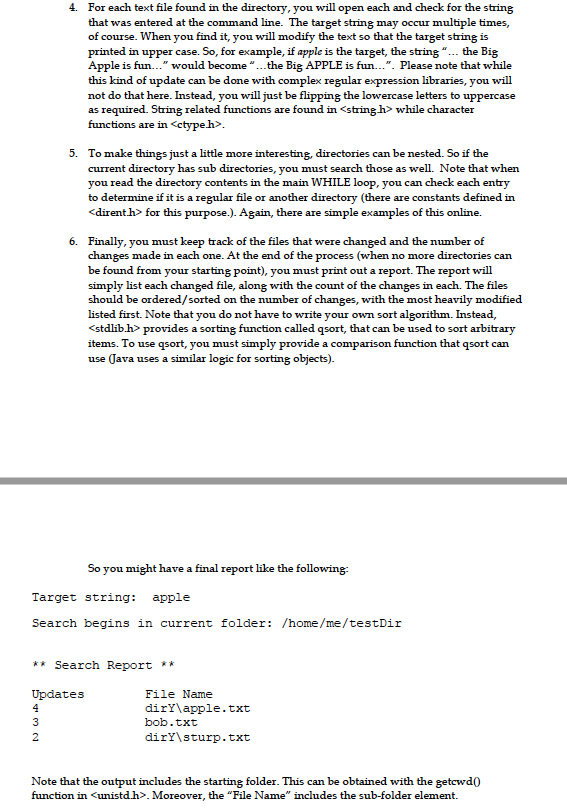
4. For each text file found in the directory, you will open each and check for the string
that was entered at the command line. The target string may occur multiple times,
of course. When you find it, you will modify the text so that the target string is
printed in upper case. So, for example, if apple is the target, the string the Big
Apple is fun would become the Big APPLE is fun. Please note that while
this kind of update can be done with complex regular expression libraries, you will
not do that here. Instead, you will just be flipping the lowercase letters to uppercase
as required. String related functions are found in
functions are in
5. To make things just a little more interesting, directories can be nested. So if the
current directory has sub directories, you must search those as well. Note that when
you read the directory contents in the main WHILE loop, you can check each entry
to determine if it is a regular file or another directory (there are constants defined in
6. Finally, you must keep track of the files that were changed and the number of
changes made in each one. At the end of the process (when no more directories can
be found from your starting point), you must print out a report. The report will
simply list each changed file, along with the count of the changes in each. The files
should be ordered/sorted on the number of changes, with the most heavily modified
listed first. Note that you do not have to write your own sort algorithm. Instead,
items. To use qsort, you must simply provide a comparison function that qsort can
use (Java uses a similar logic for sorting objects).
Can you please comment on the lines too please.
4. For each text file found i the directory, you will open each and check for the string that was entered at the command line. The target string may occur multiple times, of course. When you find it, you will modify the text so that the target string is printed in upper case. So, for example, if apple is the target, the string "... the Big Apple is fun..." would become "...the Big APPLE is fun...". Please note that while this kind of update can be done with complex regular expression libraries, you will not do that here. Instead, you will just be flipping the lowercase letters to uppercase as required. String related functions are found in
Step by Step Solution
There are 3 Steps involved in it

Get step-by-step solutions from verified subject matter experts
 Study Help