







Question: In this final project you will create a movie ticket sales application. The program displays the movie theater seating chart with the current ticket assignments
In this final project you will create a movie ticket sales application. The program
displays the movie theater seating chart with the current ticket assignments Adult
Senior, Child, or period for unassigned Selecting a row in the list box will display the
current assignments in the bottom eight text boxes. Clicking a text box will display a
second form with four radio buttons for seat assignment. When the seat is assigned,
the second form closes and returns to the first form to display the updated data. The
Display Statistics button displays the number of each ticket type and the total revenue at
that point. Adult tickets are $ Senior tickets are $ and Child tickets are $ At
the end of the day the Save Ticket Sales Data button can be clicked to save the seat
assignment data in CSV format in a file named TicketSalesmmddyyyytxt where mm
ddyyyy is the current date. The program requirements and form designs are shown
below. Choose meaningful names for the form controls and the event procedure
variables. Program Design Requirements
Form Variables
Declare a classlevel variable to store the seat assignments in a twodimension array so
that the data can be updated from Form or Form
Declare classlevel constants to store the three ticket prices ADULTPRICE is $
SENIORPRICE is $ and CHILDPRICE is $
Form Procedures
A Form load event procedure will use two nested For loops to set each seat array item
to a period This event procedure will also display the initial rows of data in the list
box seating chart.
A list box SelectedIndexChanged event procedure will store the index number for the
row selected by the user in an integer variable. If the selected index number is greater
than zero then the ShowRow procedure will be called with one parameter for the row
number.
The ShowRow procedure will display row number and the current value for the eight
seats A through H in that row in the text boxes near the bottom of the form.
Eight separate event procedures will be needed to handle the situation where the user
clicks on a text box for a seat to start the process to assign a seat. This procedure will
only need one statement Assign for txtA, Assign for txtB etc. The Assign sub
procedure will set up Form call it to start the assignment process using the
ShowDialog method, and then display the new assignment information in the seating
chart list box and in the appropriate bottom text box. The procedure will also clear the
left side list box that displays the seat assignment statistics.
The Display Statistics click event procedure will use two nest For loops to calculate how
many of each ticket type has been sold, display the results, and also calculate and
display the total revenue. A CalculateTotalRevenue function can be used to calculate
the total revenue based on the number of adult, senior, and child tickets sold up to that
point.
A Save Ticket Sales Data click event procedure will create a text file named
TicketSalesmmddyyyytxt where the current mmddyyyy data can be found in the
systems DateString variable. Use a CSV format for each record in the file. The last
field in each record will not require an ending comma. Form Variables
Declare a classlevel String variable named seat to store the value of the newly
assigned seat based on which radio button the user selects. Use A for adult, S for
senior, C for child, and period for unassigned.
Form Procedures
A Form load event procedure will use a Select Case statement to set the appropriate
radio button Checked property to True based on the value of the seat variable. This
displays the current seat assignment in Form so the user can select a new assignment
value.
Create four CheckedChanged event procedures one for each seat assignment option
These event procedures will be called if the user selects a new assignment for that seat.
Assign the A S C or period value to the seat variable and then close the form using
MeClose This returns the program back to Form
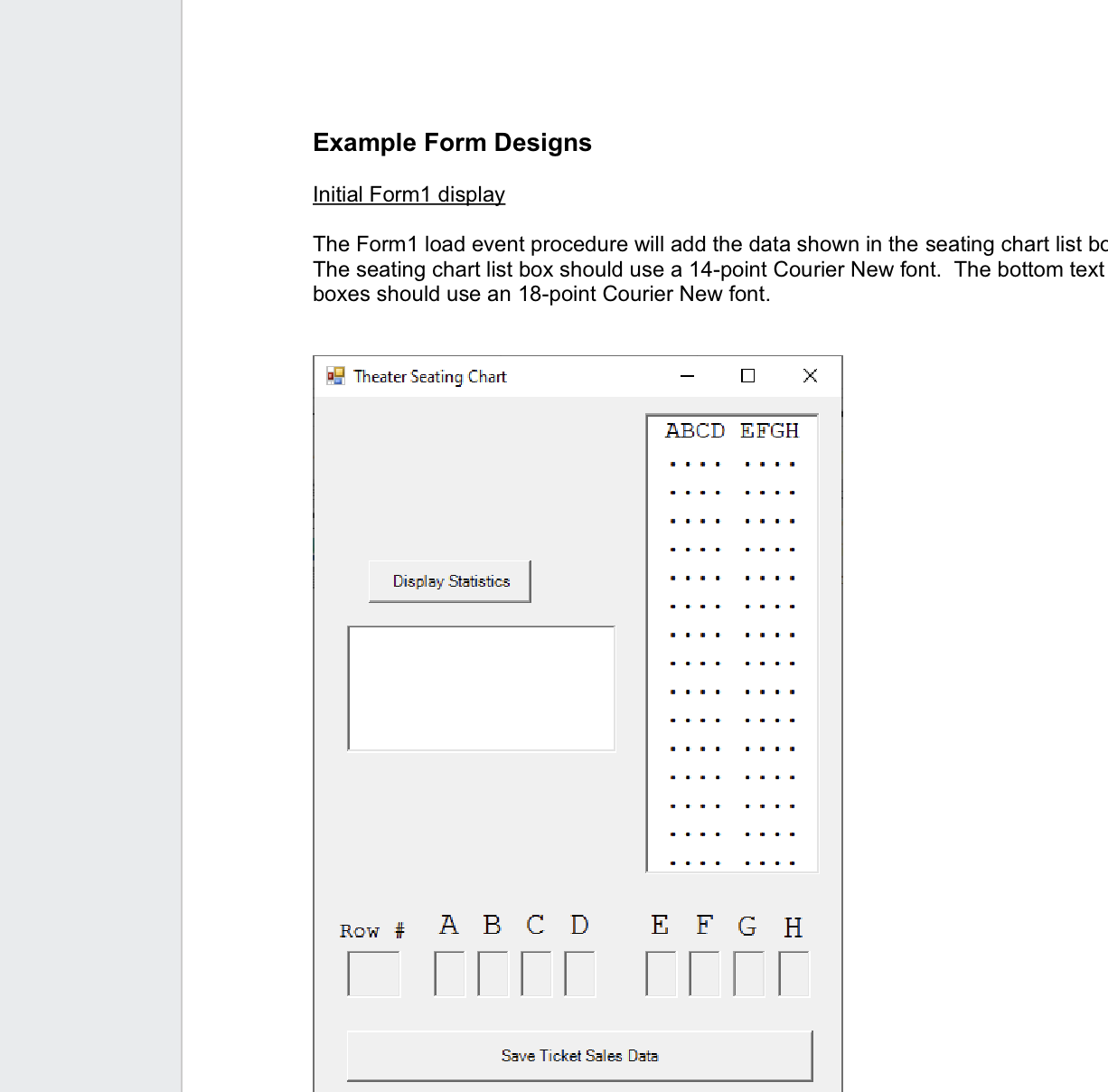
Example Form Designs
Initial Form display
The Form load event procedure will add the data shown in the seating chart list bc The seating chart list box should use a point Courier New font. The bottom text boxes should use an point Courier New font.
Step by Step Solution
There are 3 Steps involved in it
1 Expert Approved Answer
Step: 1 Unlock

Question Has Been Solved by an Expert!
Get step-by-step solutions from verified subject matter experts
Step: 2 Unlock
Step: 3 Unlock
 Study Help