







Question: jumptable: prompt: top: casel: case2: case3: output: .data align 2 .word top, casel, case2, case3 -asciiz Input a value from 1 to 3:
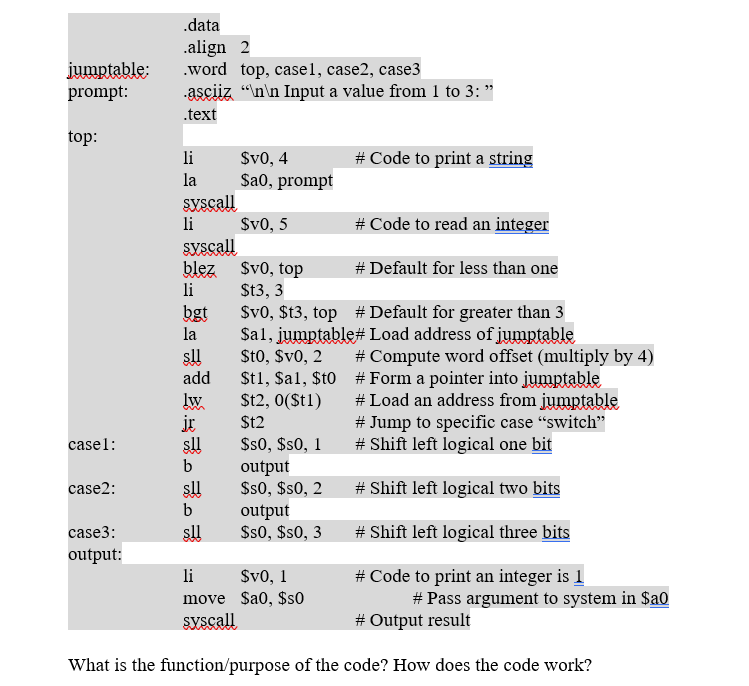

jumptable: prompt: top: casel: case2: case3: output: .data align 2 .word top, casel, case2, case3 -asciiz " Input a value from 1 to 3: " .text li la syscall li syscall blez li bgt la sll add lw it s!! b sll b sll $v0, 4 $a0, prompt $v0, 5 output $s0, $s0, 2 $v0, top St3, 3 $v0, $t3, top # Default for greater than 3 $al, jumptable# Load address of jumptable $t0, $v0, 2 $t1,$al, $t0 $t2, 0($t1) $12 $s0, $s0, 1 output $s0, $s0, 3 # Code to print a string li $v0, 1 move $a0, $s0 syscall # Code to read an integer # Default for less than one # Compute word offset (multiply by 4) # Form a pointer into jumptable # Load an address from jumptable # Jump to specific case "switch" # Shift left logical one bit # Shift left logical two bits # Shift left logical three bits # Code to print an integer is 1 # Pass argument to system in $a0 # Output result What is the function/purpose of the code? How does the code work? Run the program. It is supposed to not be able to show the anticipated answer. How do you change the code so that it can output something as it is expected to do? Paste your code and screenshot here (highlight the changes you made in different colors).
Step by Step Solution
3.46 Rating (162 Votes )
There are 3 Steps involved in it
The provided code appears to be an assembly code snippet written for the MIPS architecture It seems ... View full answer

Get step-by-step solutions from verified subject matter experts
 Study Help