







Question: Lab07: Create a Python source file called Lab07.py that asks for prices of items, -1 for the subtotal, or 0 for the total. When
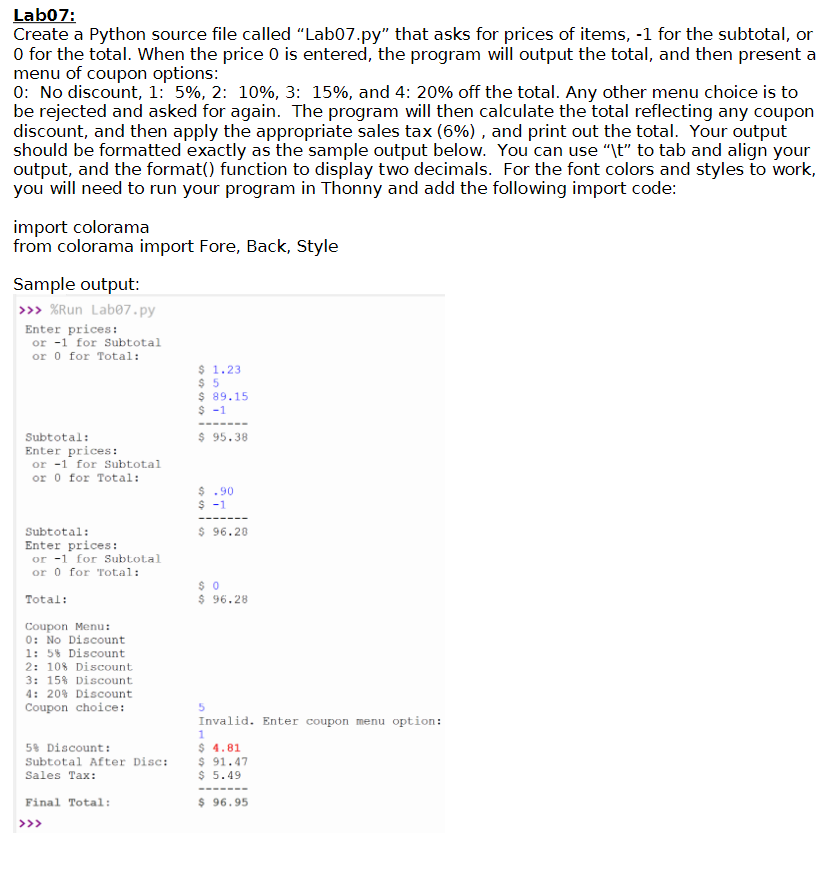
Lab07: Create a Python source file called "Lab07.py" that asks for prices of items, -1 for the subtotal, or 0 for the total. When the price 0 is entered, the program will output the total, and then present a menu of coupon options: 0: No discount, 1: 5%, 2: 10%, 3: 15%, and 4: 20% off the total. Any other menu choice is to be rejected and asked for again. The program will then calculate the total reflecting any coupon discount, and then apply the appropriate sales tax (6%), and print out the total. Your output should be formatted exactly as the sample output below. You can use "\t" to tab and align your output, and the format() function to display two decimals. For the font colors and styles to work, you will need to run your program in Thonny and add the following import code: import colorama from colorama import Fore, Back, Style Sample output: >>> %Run Lab07.py Enter prices: or -1 for Subtotal or 0 for Total: Subtotal: Enter prices: or -1 for Subtotal or 0 for Total: Subtotal: Enter prices: or -1 for Subtotal or 0 for Total: Total: Coupon Menu: 0: No Discount 1: 5% Discount 2: 10% Discount 3: 15% Discount 4: 20% Discount Coupon choice: 5% Discount: Subtotal After Disc: Sales Tax: Final Total: $ 1.23 $5 $ 89.15 $ -1 95.38 $.90 $-1 $ 96.20 $0 $96.28 5 Invalid. Enter coupon menu option: 1 $ 4.81 $ 91.47 $ 5.49 $96.95
Step by Step Solution
3.43 Rating (159 Votes )
There are 3 Steps involved in it
I have provided PYTHON CODE along with CODE SCREENSHOT ... View full answer

Get step-by-step solutions from verified subject matter experts
 Study Help