



Question: Need help with this second part of my calendar assignment that is being down in java on jgrasp. first i will put up the assignment
Need help with this second part of my calendar assignment that is being down in java on jgrasp. first i will put up the assignment details and then i can post what coding i have done thus far for this assignment. I want to keep the exact same layout from my calendar before, with the border and the rick and morty above the calendar. Mainly need help with making the days correct for each month and the user menu that is talked about below. Thanks for your help!!
Want calendar output to still look like this for the layout, as it is already in my code.
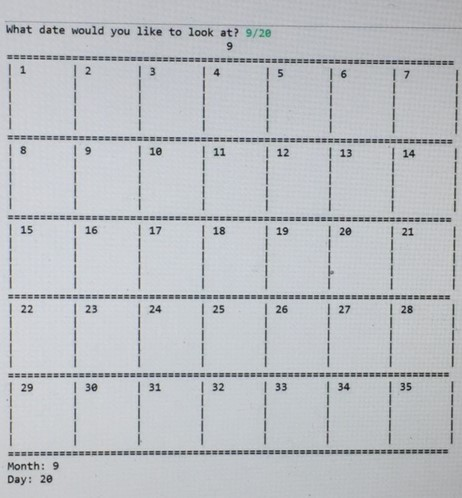
Task:
Your task is to build upon your calendar from Assignment 1. You will begin by fixing a few things then adding more functionality to your program. Over the course of the quarter, we will be adding to this calendar to make it more functional and robust. For this part, you will be adding more functionality to make it more usable and user friendly. At the end of this assignment, your calendar should still work as intended for Assignment 1, but with additional features.
The first part of this assignment will be to add a user menu. The user of your program should be able to interact with your program through the console. You should include these commands for the user: q to quit the program, n to display the next month, p to display the previous month, e for the user to enter a date and display the calendar for that month, t to get todays date and display a calendar for this month. To implement this user menu, you will need to have a while loop in your main. If the user enters an unknown command, your program should prompt them to enter a valid command. An image of the menu and the behavior for unknown commands is to the right:
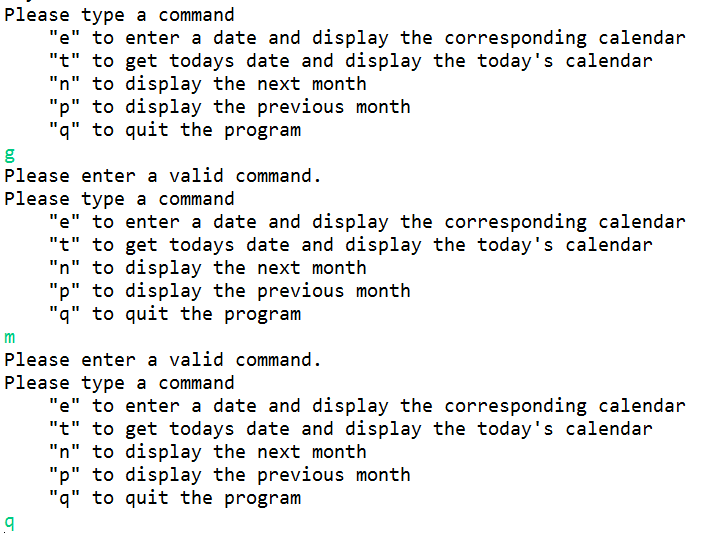
If the user has not already displayed a month, the next month and previous month commands should tell the user that they need to have a calendar displayed first. Your program should not crash in this instance. Additionally, if the calendar displayed is 12 or 1 and next month or previous month are called, your calendar should proceed accordingly wrapping around to 1 and 12 like a regular calendar would.
The user should be able to select several different commands in one run of your program. After each command is finished running, the menu should be displayed again and wait for the users next command. This should continue until the user selects q to quit the program.
In addition to the menu, you should add a few fixes to our first calendar. At the end of this assignment, your calendar should display the correct number of days for each month. Also, each month displayed should start on the correct day of the week. For example, if you were printing out the calendar to display October, October 1st should start on Saturday.
As the user enters a specific date and today is a specific date, your calendar should also have some sort of indication on the users date or today (depending on what command the user gave). You might draw something in the cell to indicate that date or write date in the cell. It is up to you how you provide the indication of the date, but some sort of visual indication must be made in the cell of the specific date.
Implementation Details:
Your program should include all the methods from the previous assignment. You may introduce your own new methods as well. You will need to modify some of the methods you have written to add the new functionality for this assignment. You may use different parameters and returns the methods.
Helpful Information:
To get todays date, you will likely want to make use of a Calendar object that is already implemented by Java. This object stores basic information that we can access. To use this object, you will want to create a new Calendar object (be careful that your class is also not named Calendar or Java will get confused). The code for that would look like Calendar name = Calendar.getInstance(). This gets the current date and stores it in this Calendar object.
To access the information we want, we need to use the Calendars get method. For instance, if we wanted the month we would use name.get(Calendar.MONTH), or if we wanted the day we would usename.get(Calendar.DATE). Calendar.MONTH and Calendar.DATE are just ways to refer to the locations where those values are stored.
You also may make use of a number of String functions. The indexOf and substring methods could be of particular use. The indexOf method finds the index of the first occurrence of the given character in the String you call the function on. For example, if we had Hello store in a variable x, calling x.indexOf(l) would return a value of 2 since the first l is located at index 2 in the String Hello.
The substring method creates a new string from the starting index given to the ending index given (it does not include the character in the ending index). If not ending index is given, then a substring from the beginning index to the end of the String is created. If we wanted a substring of Hello that just captured ell and if Hello was stored in variable x, we could call x.substring(1, 4). If we wanted just llo, we could call x.substring(2).
Finally, you may find it useful to convert a number as a String into an integer value. To do this, we can call Integer.parseInt(String), where String is the String value of the integer we want.
Style:
It is important that you get used to writing code in good style. What is demonstrated in examples in class is considered good style. Additionally, you should look at the style guide located on Canvas. Badly styled code will lose points.
You may not use material beyond Chapter 5 for this assignment. You may make use of the tools we have learned up through Chapter 5 and those stated in the Helpful Information section on this specification. String, Math, Scanner and other objects and their functionality that we have gone over in class and that are covered in the book through Chapter 5 are acceptable to use. We have also use random, and booleans and for loops and while loops and if/else's.
And here is what code i have so far from the first part of the assignment:
import java.util.Calendar; import java.util.Scanner;
public class Assignment1 { //sets the width of each cell in the calendar private static int SIZE = 10; private static char HORIZONTAL = '='; private static char VERTICAL = '|'; public static void drawMonth(int month){ //calculate the near center where to display month number int center = SIZE * 3; String space = " "; //display blanks upto center System.out.println(); for(int i = 0; i
Step by Step Solution
There are 3 Steps involved in it

Get step-by-step solutions from verified subject matter experts