







Question: One of the easiest ways to make a program user - friendly is to make it menu driven. That is , rather than prompting the
One of the easiest ways to make a program userfriendly is to make it menu driven. That israther than prompting the user in some vague sort of way, we present them with a menu of the choices available to them. This provides a friendly interface for the user, thus making the program easy to use. For example, a simple function calculator program might prompt the user by providing the following menu: Please enter: to add to subtract nd from st to multiply to divide st by nd The menu tells the user exactly what to enter. Write a Cprogram that asks the user to enter two integers and then displays the previous menu. The program displays its result based on user selection. The program displays the result of adding the two numbers if the user selection is The program displays the result of subtracting nd number from st number if user selection is The program displays the result of multiplying the two numbers if user selection is The program displays the result of dividing st number by nd number if user selection is Dont forget to check for zerodivisor if the operation to be performed is division. Your programs output should be similar to the sample below. One of the easiest ways to make a program userfriendly is to make it menu driven. That israther than prompting the user in some vague sort of way, we present them with a menu of the choices available to them. This provides a friendly interface for the user, thus making the program easy to use.
For example, a simple function calculator program might prompt the user by providing the following menu:
Please enter:
to add
to subtract from
to multiply
to divide at by
The menu tells the user exactly what to enter.
Write a Cprogram that asks the user to enter two integers and then displays the previous menu. The program displays its result based on user selection.
The program displays the result of adding the two numbers if the user selection is
The program displays the result of subtracting text nd number from text st number if user selection is
The program displays the result of multiplying the two numbers if user selection is star
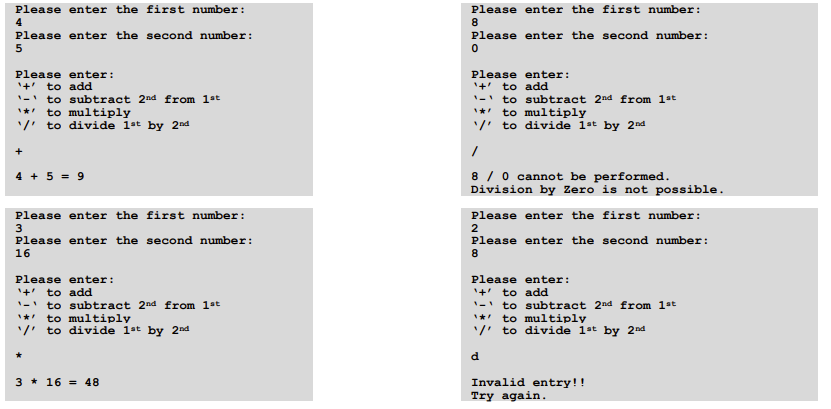
The program displays the result of dividing text st number by text nd number if user selection is Dont forget to check for 'zero' divisor if the operation to be performed is division. Your program's output should be similar to the sample below.
Step by Step Solution
There are 3 Steps involved in it
1 Expert Approved Answer
Step: 1 Unlock

Question Has Been Solved by an Expert!
Get step-by-step solutions from verified subject matter experts
Step: 2 Unlock
Step: 3 Unlock
 Study Help