







Question: Part 1 - Forms and Validation 1. In this assignment, you will create a new JavaScript file to include all of the existing validation
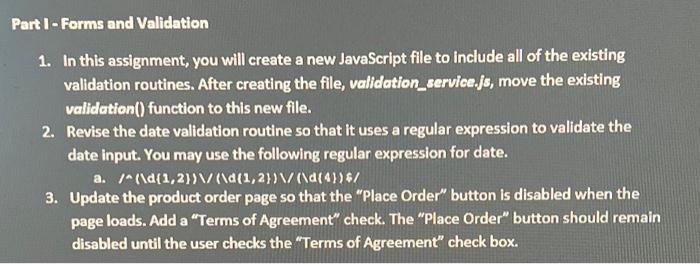
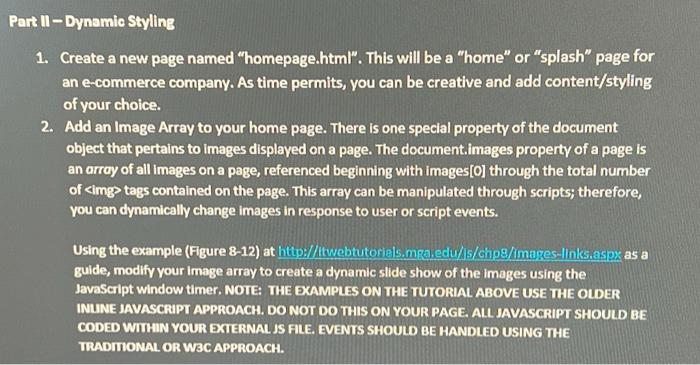
Part 1 - Forms and Validation 1. In this assignment, you will create a new JavaScript file to include all of the existing validation routines. After creating the file, validation service.js, move the existing validation() function to this new file. 2. Revise the date validation routine so that it uses a regular expression to validate the date input. You may use the following regular expression for date. /^\d(1,2))\/(\d(1,2})\/(\d(4})$/ a. 3. Update the product order page so that the "Place Order" button is disabled when the page loads. Add a "Terms of Agreement" check. The "Place Order" button should remain disabled until the user checks the "Terms of Agreement" check box. Part II-Dynamic Styling 1. Create a new page named "homepage.html". This will be a "home" or "splash" page for an e-commerce company. As time permits, you can be creative and add content/styling of your choice. 2. Add an Image Array to your home page. There is one special property of the document object that pertains to Images displayed on a page. The document.images property of a page is an array of all images on a page, referenced beginning with images [0] through the total number of tags contained on the page. This array can be manipulated through scripts; therefore, you can dynamically change images in response to user or script events. Using the example (Figure 8-12) at http://ttwebtutorials.mga.edu/is/chp8/images-links.aspx as a guide, modify your image array to create a dynamic slide show of the images using the JavaScript window timer. NOTE: THE EXAMPLES ON THE TUTORIAL ABOVE USE THE OLDER INLINE JAVASCRIPT APPROACH. DO NOT DO THIS ON YOUR PAGE. ALL JAVASCRIPT SHOULD BE CODED WITHIN YOUR EXTERNAL JS FILE. EVENTS SHOULD BE HANDLED USING THE TRADITIONAL OR W3C APPROACH.
Step by Step Solution
3.47 Rating (167 Votes )
There are 3 Steps involved in it
To complete the given tasks follow the instructions below Part 1 Forms and Validation 1 Create a new JavaScript file called validationservicejs and in... View full answer

Get step-by-step solutions from verified subject matter experts
 Study Help