







Question: Part I: Copy and paste the Data Definition Commands in the file Sailor Query DDL and Data to create the database and tables for the
Part I: Copy and paste the Data Definition Commands in the file "Sailor Query DDL and Data" to create the database and tables for the boat reservation system
Part II: Populating Tables 1. copy and paste the Insert Statements to populate the tables with the data:
Part III: Basic Queries write the queries to satisfy the following 1. List the Sailor ID, Sailor Name and Age for all of the Sailors 2. List the Boat ID, Boat Name for all of the Boats 3. List the reservations dates for all Reservations 4. Find all of the Boats that are Red and list boat name and boat color
5. Find all of the Boats with the name Interlake only list the Boat ID 6. Find all sailors with a rating greater than 7. List the Sailor name and age 7. Find the names and ages of all sailors. 8. Find the reservations on 9/8/1998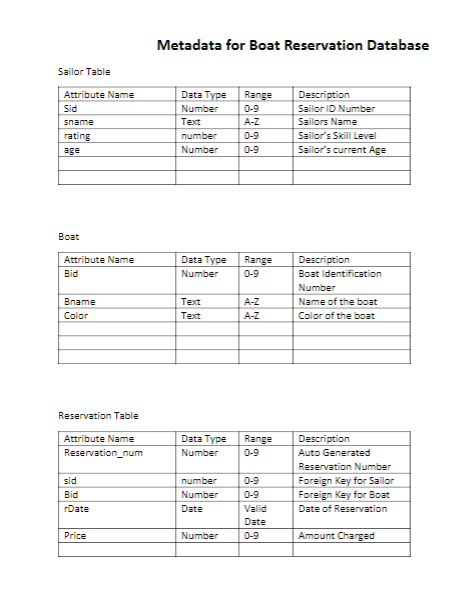
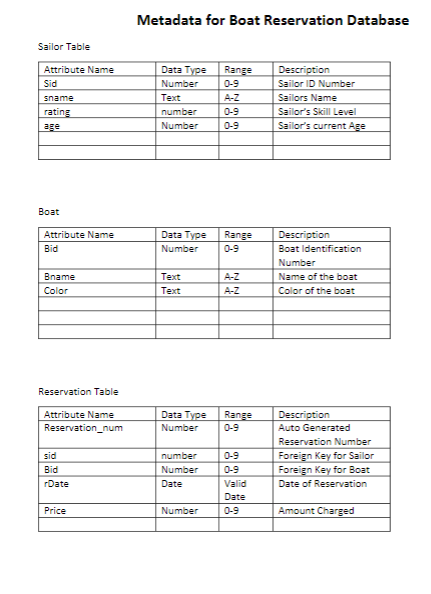
Metadata for Boat Reservation Database Sailor Table Attribute Name Data Type Range Description Number Text number Number 0-9 Sailor ID Number Sailors Name Sailors Skill Level Sailor's current Age sname 0-9 0-9 age Boat Attribute Name Data Type Range Description Number 09 Boat Identification Number Name of the boat Color of the boat Bname Text Text A-Z Reservation Table Attribute Name Data Type Range Number 09 Description Auto Generated Reservation Number Foreign Key for Sailor Reservation_num sid Bid rDate number Number Date 0-9 0-9 Valid Date 0-9 for Boat Date of Reservation Price Number Amount Charged
Step by Step Solution
There are 3 Steps involved in it

Get step-by-step solutions from verified subject matter experts
 Study Help