







Question: Please answer quickly if possible!!!!! thank you!! Soccer Tournament Simulator (soccer_tournament.py) Your friend is a member of the UVM Women's Soccer Team and they have
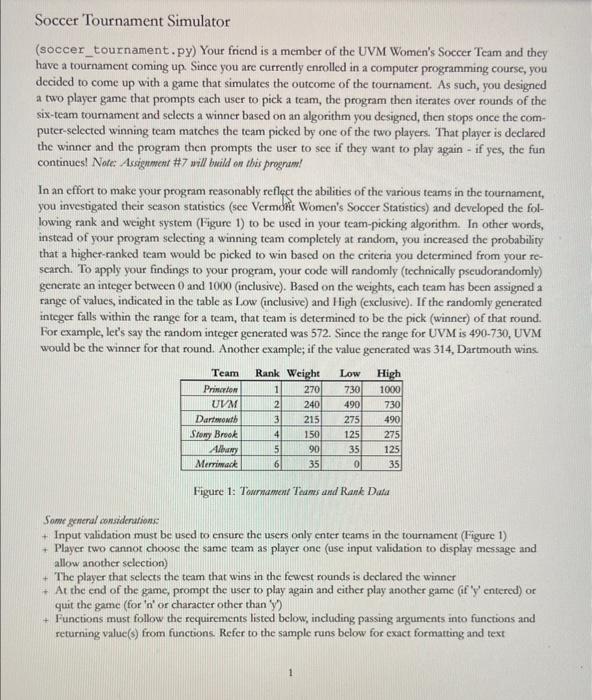
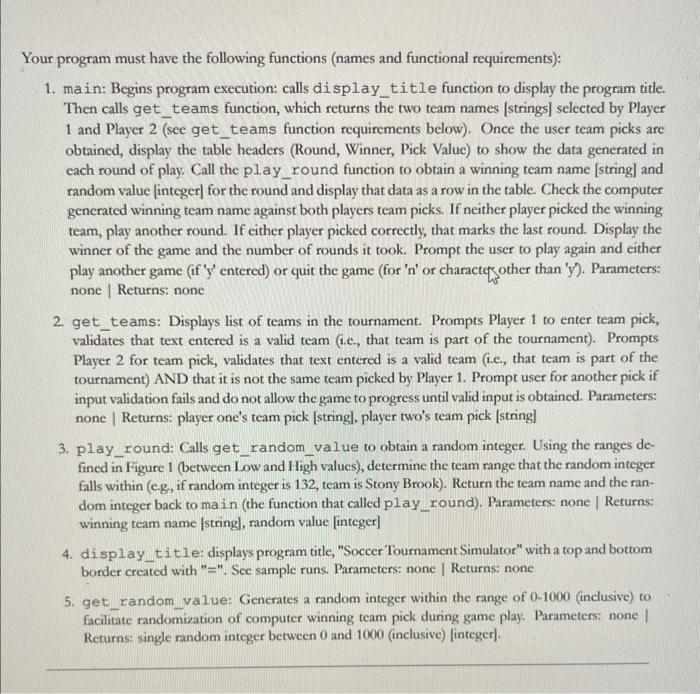
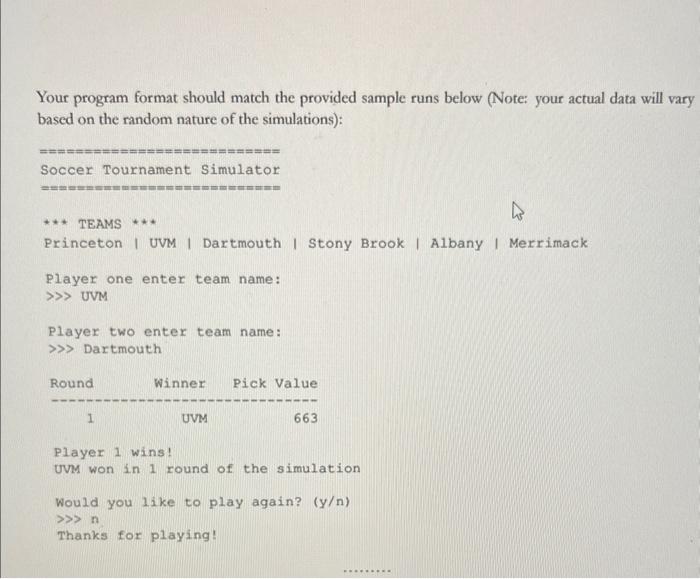
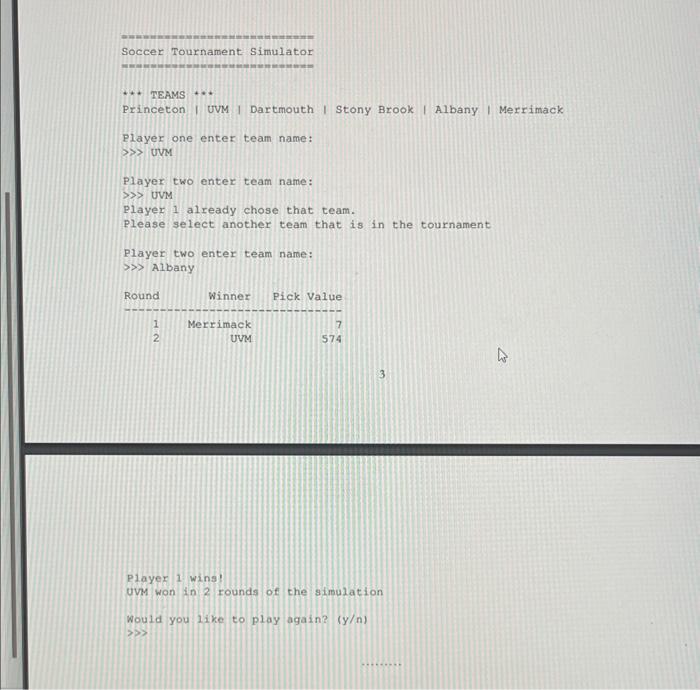
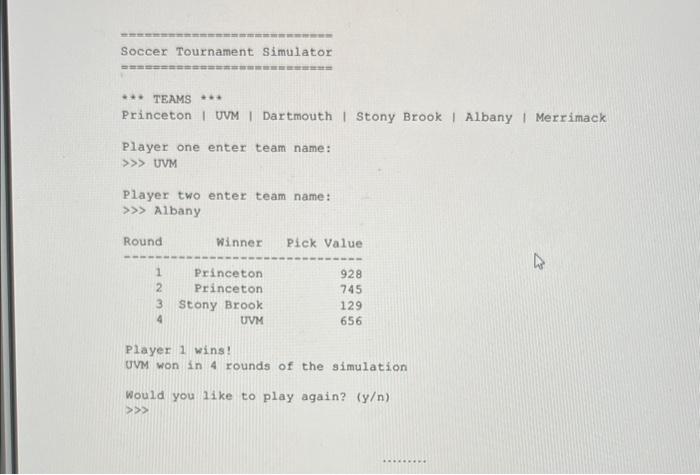
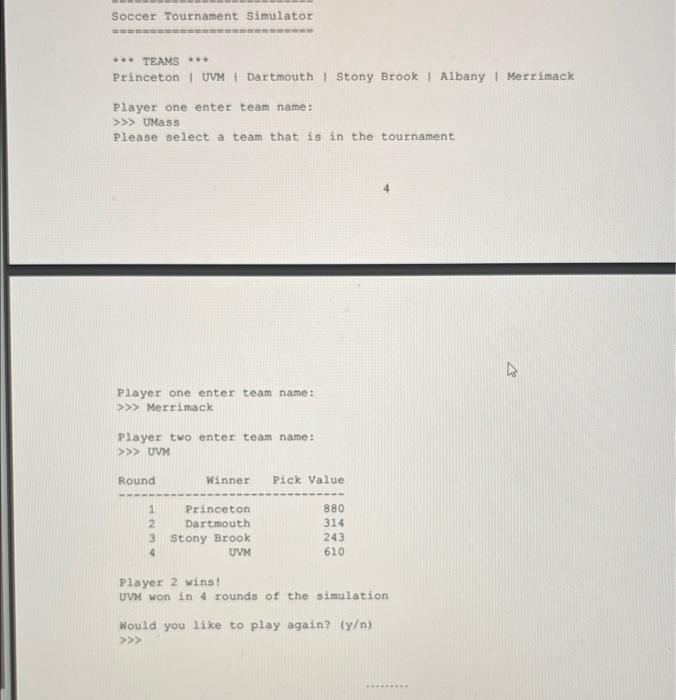
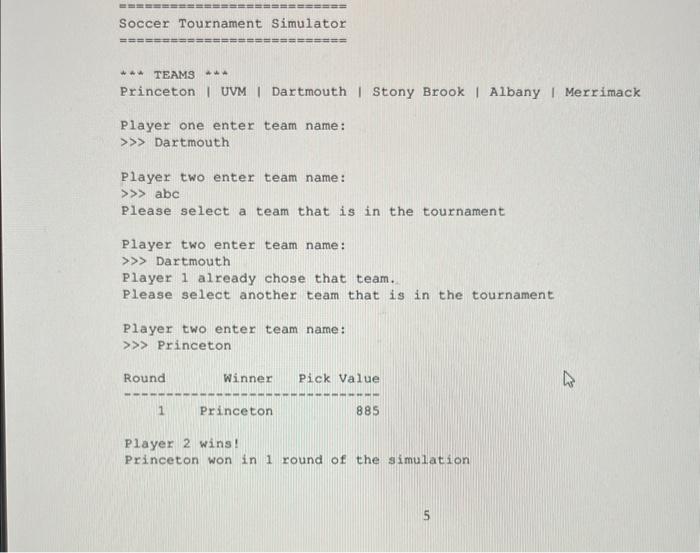
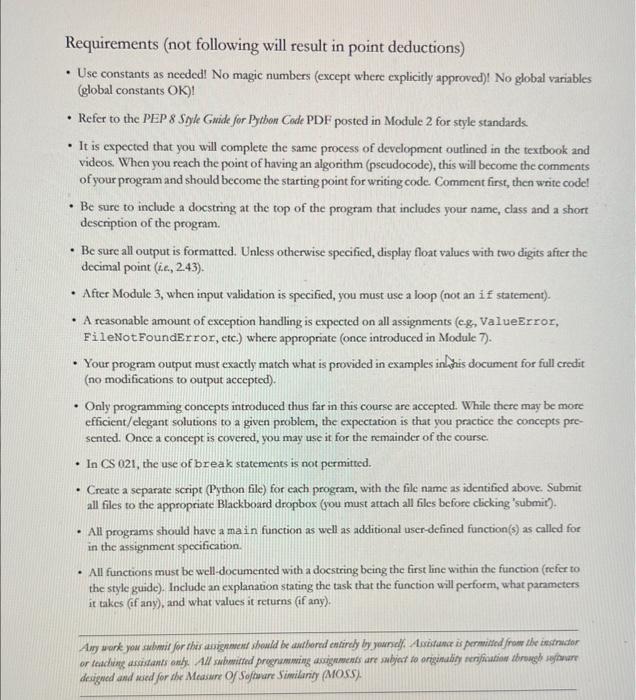
Soccer Tournament Simulator (soccer_tournament.py) Your friend is a member of the UVM Women's Soccer Team and they have a tournament coming up. Since you are currently enrolled in a computer programming course, you decided to come up with a game that simulates the outcome of the tournament. As such, you designed a two player game that prompts each user to pick a team, the program then iterates over rounds of the six-team tournament and selects a winner based on an algorithm you designed, then stops once the computer-selected winning team matches the team picked by one of the two players. That player is declared the winner and the program then prompts the user to see if they want to play again - if yes, the fun continues! Note: Assignment \# 7 will build on this prognam! In an effort to make your program reasonably reflect the abilities of the various teams in the tournament, you investigated their season statistics (see Vermoht Women's Soccer Statistics) and developed the following rank and weight system (Figure 1) to be used in your team-picking algorithm. In other words, instead of your program sclecting a winning team completely at random, you increased the probability that a higher-ranked team would be picked to win based on the criteria you determined from your research. To apply your findings to your program, your code will mandomly (technically pseudorandomly) generate an integer between 0 and 1000 (inclusive). Based on the weights, each team has been assigned a range of values, indicated in the table as Low (inclusive) and High (exclusive). If the randomly generated integer falls within the range for a team, that team is determined to be the pick (winner) of that round. For example, le's say the mandom integer generated was 572 . Since the range for UVM is 490-730, UVM would be the winner for that round. Another example; if the value generated was 314 , Dartmouth wins Figure 1: Tournament Tams and Rank Data Some general considerutions + Input validation must be used to ensure the users only enter teams in the tournament (Figure 1) + Player two cannot choose the same team as player one (use input validation to display message and allow another selection) + The player that selects the team that wins in the fewest rounds is declared the winner + At the end of the game, prompt the user to play again and cither plyy another game (if ' 'entered) or quit the game (for ' n ' or character other than ' y ') + Functions must follow the requirements listed below, including passing arguments into functions and returning value(s) from functions Refer to the sample runs below for exact formatting and text Your program must have the following functions (names and functional requirements): 1. main: Begins program execution: calls display title function to display the program title. Then calls get_teams function, which returns the two team names [strings] selected by Player 1 and Player 2 (see get_teams function requirements below). Once the user team picks are obtained, display the table headers (Round, Winner, Pick Value) to show the data generated in each round of play. Call the play_round function to obtain a winning team name [string] and random value [integer] for the round and display that data as a row in the table. Check the computer generated winning team name against both players team picks. If neither player picked the winning team, play another round. If either player picked correctly, that marks the last round. Display the winner of the game and the number of rounds it took. Prompt the user to play again and either play another game (if ' y ' entered) or quit the game (for ' n ' or characteq other than ' y '). Panameters: none | Returns: none 2. get_teams: Displays list of teams in the tournament. Prompts Player 1 to enter team pick, validates that text entered is a valid team (i.e., that team is part of the tournament). Prompts Player 2 for team pick, validates that text entered is a valid team (i.e, that team is part of the tournament) AND that it is not the same team picked by Player 1. Prompt user for another pick if input validation fails and do not allow the game to progress until valid input is obtained. Pammeters: none I Returns: player one's team pick [string], player two's team pick [string] 3. play_round: Calls get_random_value to obtain a random integer. Using the ranges defined in Figure 1 (between Low and High values), determine the team range that the random integer falls within (e.g, if random integer is 132, team is Stony Brook). Return the team name and the random integer back to main (the function that called play_round). Parameters: none | Returns: winning team name [string], random value [integer] 4. display title: displays program title, "Soccer Tournament Simulator" with a top and bottom border created with "=". See sample runs. Parameters: none | Returns: none 5. get_random_yalue: Generates a random integer within the range of 0-1000 (inclusive) to facilitate randomization of computer winning team pick during game play. Parameters: none I Returns: single random integer between 0 and 1000 (inclusive) [integer]. Your program format should match the provided sample runs below (Note: your actual data will vary based on the random nature of the simulations): Soccer Tournament Simulator TEAMS *** Princeton I UVM I Dartmouth I Stony Brook I Albany I Merrimack Player one enter team name: UVM Player two enter team name: Dartmouth Player 1 wins! UvM won in 1 round of the simulation Would you like to play again? (y) n Thanks for playing! Soccer Tournament Simulator TEAMS ** Princeton I UVM I Dartmouth I Stony Brook I Albany I Merrimack Player one enter team name: P> UVM Player two enter team name: uvM Player 1 already chose that team. Please select another team that is in the tournament Player two enter team name: Albany 3 Player 1 wings uvM won in 2 rounds of the simulation Would you like to play again? (y) 3 Soccer Tournament Simulator TEAMS Princeton I UVM I Dartmouth I Stony Brook I Albany I Merrimack Player one enter team name: UVM Player two enter team name: > Albany Player 1 wins! UVM won in 4 rounds of the simulation Would you like to play again? (y) > Soccer Tournament Simulator TEAMS * Princeton I UVM I Dartmouth I Stony Brook I Albany I Merrimack Player one enter team name: UMass Please select a team that is in the tournament Player one enter team name: Merrimack Player two enter team name: > UVM Player 2 wins? UVM won in 4 rounds of the simulation Would you like to play again? (y) Soccer Tournament Simulator *A TEAMS Princeton I UVM I Dartmouth I Stony Brook I Albany I Merrimack Player one enter team name: Dartmouth Player two enter team name: abc Please select a team that is in the tournament Player two enter team name: Dartmouth Player 1 already chose that team. Please select another team that is in the tournament Player two enter team name: Princeton Player 2 wins! Princeton won in 1 round of the simulation Requirements (not following will result in point deductions) - Use constants as needed! No magic numbers (except where explicitly approved)! No global variables (global constants OK )! - Refer to the PEP 8 Syle Gaide for Python Code PDF posted in Module 2 for style standards. - It is expected that you will complete the same process of development outlined in the textbook and videos. When you reach the point of having an algonithm (pseudocode), this will become the comments of your program and should become the starting point for writing code. Comment first, then write codel - Be sure to include a docstring at the top of the program that includes your name, class and a short description of the program. - Be sure all output is formatted. Unless otherwise specified, display float values with two digits after the decimal point (i.e, 2.43). - After Module 3, when input validation is specified, you must use a loop (not an if statement). - A reasonable amount of exception handling is expected on all assignments (cg, ValueError, FileNotFoundError, cte.) where appropriate (once introduced in Module 7). - Your program output must exactly match what is provided in examples in this document for full credit (no modifications to output accepted). - Only programming concepts introduced thus far in this course are accepted. While there may be more efficient/clegant solutions to a given problem, the expectation is that you practice the concepts presented. Once a concept is covered, you may use it for the remainder of the course. - In CS021, the use of break statements is not permitted. - Create a separate script. (Python file) for each program, with the file name as identified above. Submit all files to the appropriate Blackboard dropbos (you must attach all files before clicking 'submit'). - All programs should have a main function as well as additional user-defined function(s) as called for in the assignment specification. - All functions must be well-documented with a docstring being the first line within the function (refer to the style guide). Include an explanation stating the task that the function will perform, what pammeters it takes (if any), and what values it returns (if any). drigeed and wed for ake Measure Of Softuvare Similanig (MOSS). Soccer Tournament Simulator (soccer_tournament.py) Your friend is a member of the UVM Women's Soccer Team and they have a tournament coming up. Since you are currently enrolled in a computer programming course, you decided to come up with a game that simulates the outcome of the tournament. As such, you designed a two player game that prompts each user to pick a team, the program then iterates over rounds of the six-team tournament and selects a winner based on an algorithm you designed, then stops once the computer-selected winning team matches the team picked by one of the two players. That player is declared the winner and the program then prompts the user to see if they want to play again - if yes, the fun continues! Note: Assignment \# 7 will build on this prognam! In an effort to make your program reasonably reflect the abilities of the various teams in the tournament, you investigated their season statistics (see Vermoht Women's Soccer Statistics) and developed the following rank and weight system (Figure 1) to be used in your team-picking algorithm. In other words, instead of your program sclecting a winning team completely at random, you increased the probability that a higher-ranked team would be picked to win based on the criteria you determined from your research. To apply your findings to your program, your code will mandomly (technically pseudorandomly) generate an integer between 0 and 1000 (inclusive). Based on the weights, each team has been assigned a range of values, indicated in the table as Low (inclusive) and High (exclusive). If the randomly generated integer falls within the range for a team, that team is determined to be the pick (winner) of that round. For example, le's say the mandom integer generated was 572 . Since the range for UVM is 490-730, UVM would be the winner for that round. Another example; if the value generated was 314 , Dartmouth wins Figure 1: Tournament Tams and Rank Data Some general considerutions + Input validation must be used to ensure the users only enter teams in the tournament (Figure 1) + Player two cannot choose the same team as player one (use input validation to display message and allow another selection) + The player that selects the team that wins in the fewest rounds is declared the winner + At the end of the game, prompt the user to play again and cither plyy another game (if ' 'entered) or quit the game (for ' n ' or character other than ' y ') + Functions must follow the requirements listed below, including passing arguments into functions and returning value(s) from functions Refer to the sample runs below for exact formatting and text Your program must have the following functions (names and functional requirements): 1. main: Begins program execution: calls display title function to display the program title. Then calls get_teams function, which returns the two team names [strings] selected by Player 1 and Player 2 (see get_teams function requirements below). Once the user team picks are obtained, display the table headers (Round, Winner, Pick Value) to show the data generated in each round of play. Call the play_round function to obtain a winning team name [string] and random value [integer] for the round and display that data as a row in the table. Check the computer generated winning team name against both players team picks. If neither player picked the winning team, play another round. If either player picked correctly, that marks the last round. Display the winner of the game and the number of rounds it took. Prompt the user to play again and either play another game (if ' y ' entered) or quit the game (for ' n ' or characteq other than ' y '). Panameters: none | Returns: none 2. get_teams: Displays list of teams in the tournament. Prompts Player 1 to enter team pick, validates that text entered is a valid team (i.e., that team is part of the tournament). Prompts Player 2 for team pick, validates that text entered is a valid team (i.e, that team is part of the tournament) AND that it is not the same team picked by Player 1. Prompt user for another pick if input validation fails and do not allow the game to progress until valid input is obtained. Pammeters: none I Returns: player one's team pick [string], player two's team pick [string] 3. play_round: Calls get_random_value to obtain a random integer. Using the ranges defined in Figure 1 (between Low and High values), determine the team range that the random integer falls within (e.g, if random integer is 132, team is Stony Brook). Return the team name and the random integer back to main (the function that called play_round). Parameters: none | Returns: winning team name [string], random value [integer] 4. display title: displays program title, "Soccer Tournament Simulator" with a top and bottom border created with "=". See sample runs. Parameters: none | Returns: none 5. get_random_yalue: Generates a random integer within the range of 0-1000 (inclusive) to facilitate randomization of computer winning team pick during game play. Parameters: none I Returns: single random integer between 0 and 1000 (inclusive) [integer]. Your program format should match the provided sample runs below (Note: your actual data will vary based on the random nature of the simulations): Soccer Tournament Simulator TEAMS *** Princeton I UVM I Dartmouth I Stony Brook I Albany I Merrimack Player one enter team name: UVM Player two enter team name: Dartmouth Player 1 wins! UvM won in 1 round of the simulation Would you like to play again? (y) n Thanks for playing! Soccer Tournament Simulator TEAMS ** Princeton I UVM I Dartmouth I Stony Brook I Albany I Merrimack Player one enter team name: P> UVM Player two enter team name: uvM Player 1 already chose that team. Please select another team that is in the tournament Player two enter team name: Albany 3 Player 1 wings uvM won in 2 rounds of the simulation Would you like to play again? (y) 3 Soccer Tournament Simulator TEAMS Princeton I UVM I Dartmouth I Stony Brook I Albany I Merrimack Player one enter team name: UVM Player two enter team name: > Albany Player 1 wins! UVM won in 4 rounds of the simulation Would you like to play again? (y) > Soccer Tournament Simulator TEAMS * Princeton I UVM I Dartmouth I Stony Brook I Albany I Merrimack Player one enter team name: UMass Please select a team that is in the tournament Player one enter team name: Merrimack Player two enter team name: > UVM Player 2 wins? UVM won in 4 rounds of the simulation Would you like to play again? (y) Soccer Tournament Simulator *A TEAMS Princeton I UVM I Dartmouth I Stony Brook I Albany I Merrimack Player one enter team name: Dartmouth Player two enter team name: abc Please select a team that is in the tournament Player two enter team name: Dartmouth Player 1 already chose that team. Please select another team that is in the tournament Player two enter team name: Princeton Player 2 wins! Princeton won in 1 round of the simulation Requirements (not following will result in point deductions) - Use constants as needed! No magic numbers (except where explicitly approved)! No global variables (global constants OK )! - Refer to the PEP 8 Syle Gaide for Python Code PDF posted in Module 2 for style standards. - It is expected that you will complete the same process of development outlined in the textbook and videos. When you reach the point of having an algonithm (pseudocode), this will become the comments of your program and should become the starting point for writing code. Comment first, then write codel - Be sure to include a docstring at the top of the program that includes your name, class and a short description of the program. - Be sure all output is formatted. Unless otherwise specified, display float values with two digits after the decimal point (i.e, 2.43). - After Module 3, when input validation is specified, you must use a loop (not an if statement). - A reasonable amount of exception handling is expected on all assignments (cg, ValueError, FileNotFoundError, cte.) where appropriate (once introduced in Module 7). - Your program output must exactly match what is provided in examples in this document for full credit (no modifications to output accepted). - Only programming concepts introduced thus far in this course are accepted. While there may be more efficient/clegant solutions to a given problem, the expectation is that you practice the concepts presented. Once a concept is covered, you may use it for the remainder of the course. - In CS021, the use of break statements is not permitted. - Create a separate script. (Python file) for each program, with the file name as identified above. Submit all files to the appropriate Blackboard dropbos (you must attach all files before clicking 'submit'). - All programs should have a main function as well as additional user-defined function(s) as called for in the assignment specification. - All functions must be well-documented with a docstring being the first line within the function (refer to the style guide). Include an explanation stating the task that the function will perform, what pammeters it takes (if any), and what values it returns (if any). drigeed and wed for ake Measure Of Softuvare Similanig (MOSS)
Step by Step Solution
There are 3 Steps involved in it

Get step-by-step solutions from verified subject matter experts
 Study Help