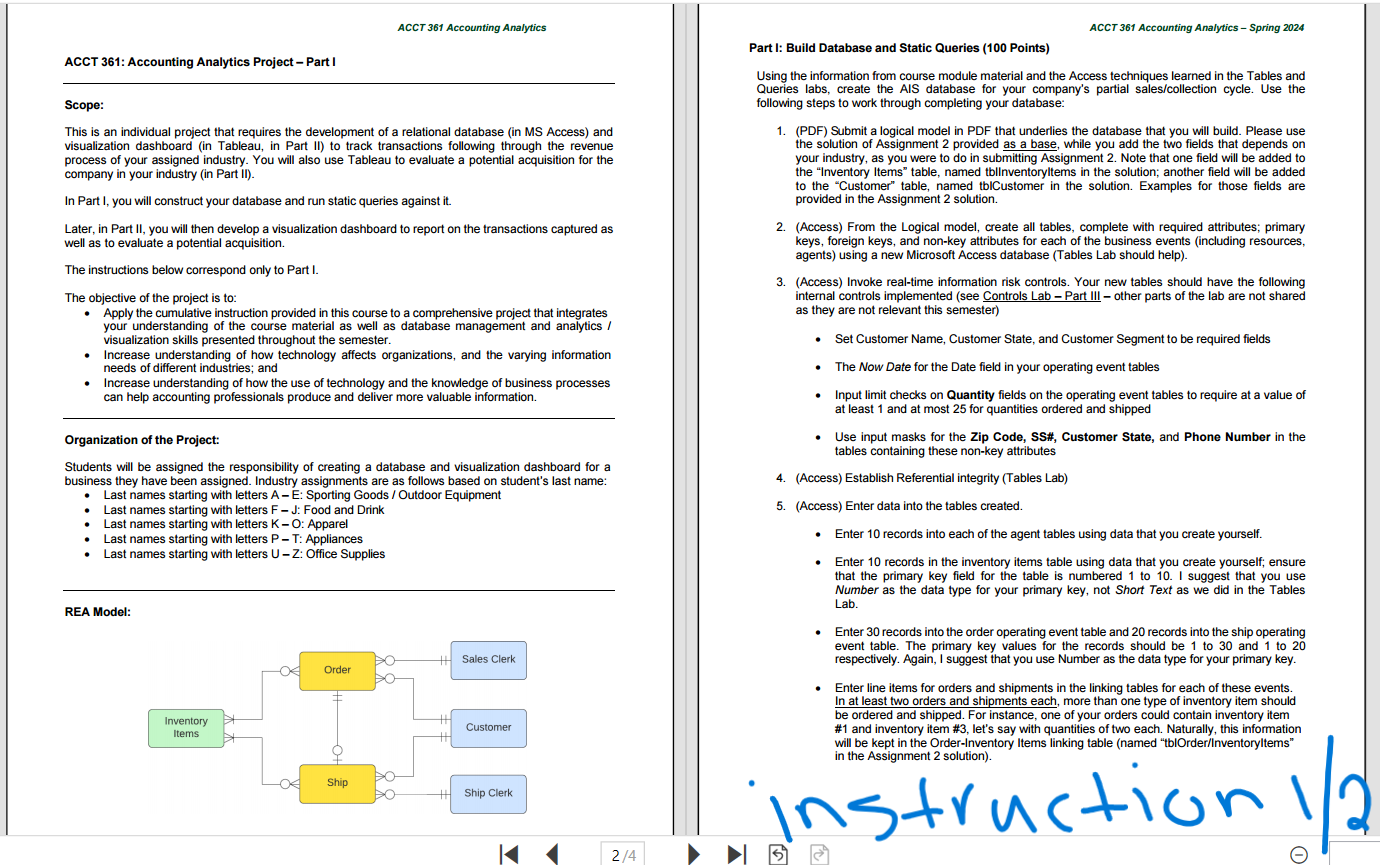
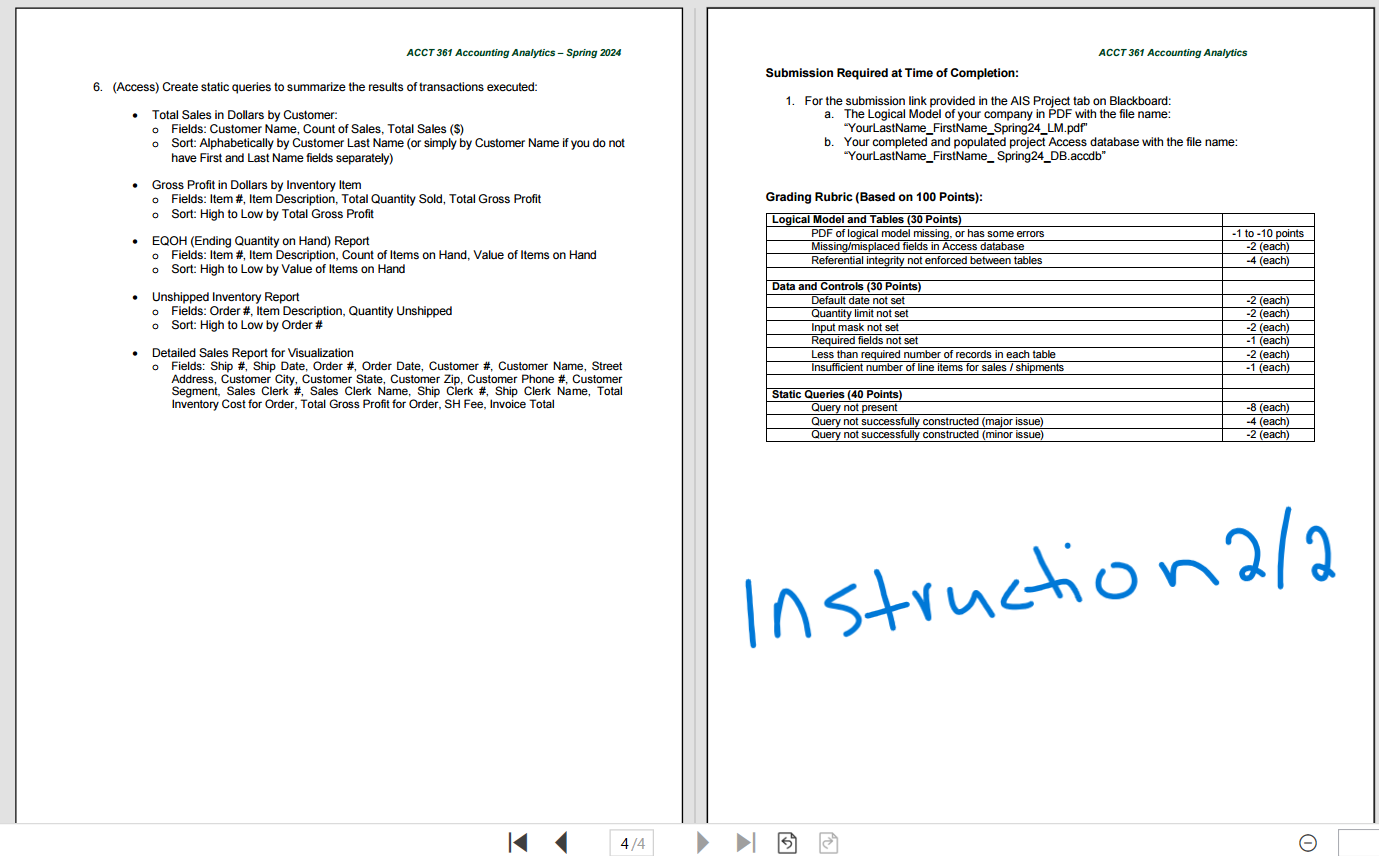
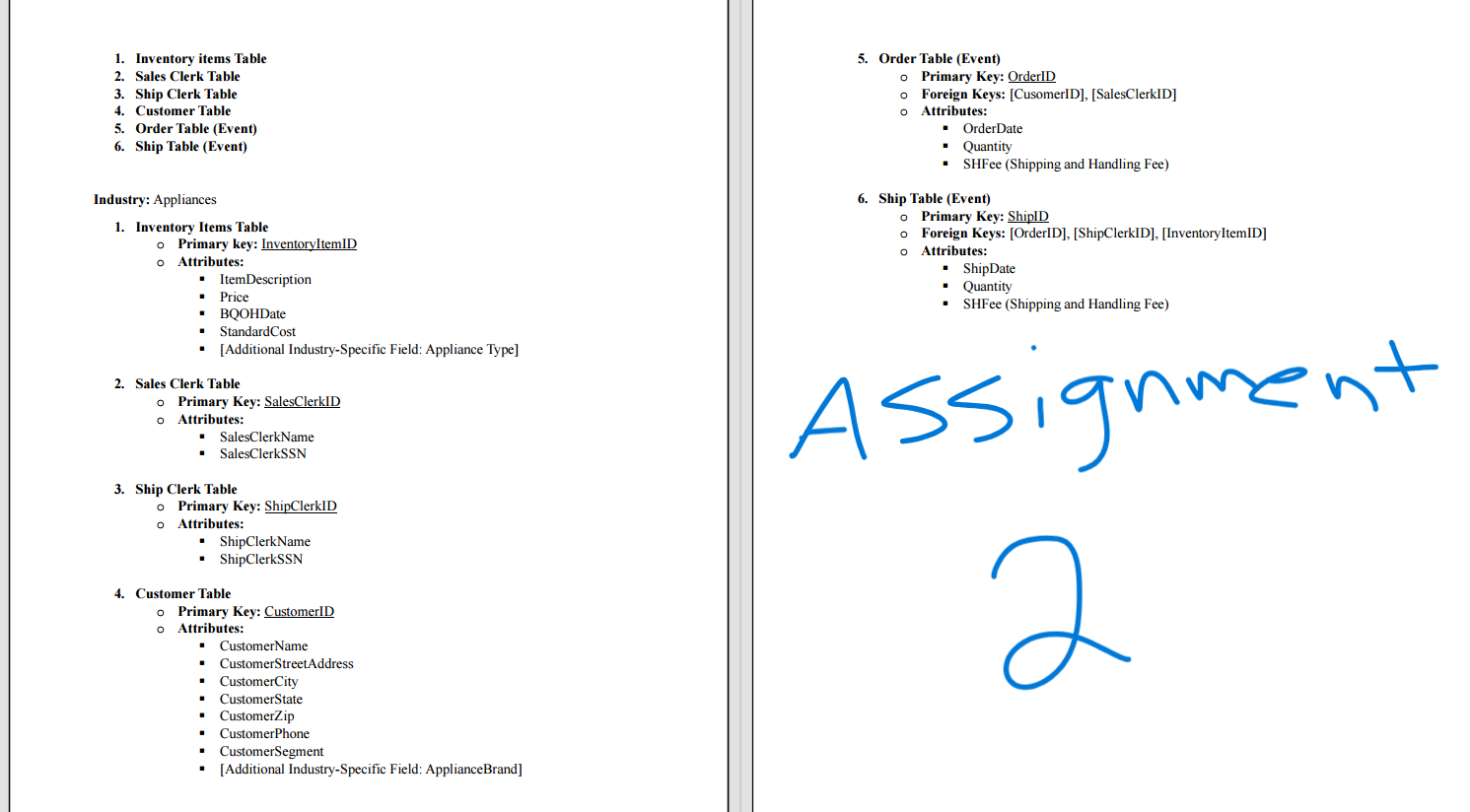
Question: Please Build Database and Static Queries. MY LAST NAME STARTS WITH R, SO MY INDUSTRY IS APPLIANCES. Two of the images are the instruction for
Please Build Database and Static Queries. MY LAST NAME STARTS WITH R, SO MY INDUSTRY IS APPLIANCES. Two of the images are the instruction for this project and one image is the assignment 2 that I completed before this project, which you have to use for reference for this project. PLEASE READ THE INSTRUCTION, THERE SHOULD BE 6 STEPS TO COMEPLETE. THANK YOU SO MUCH.
ACCT 361 Accounting Analytics ACCT 361: Accounting Analytics Project - Part | Scope: This is an individual project that requires the development of a relational database (in MS Access) and visualization dashboard (in Tableau, in Part 1I) to track transactions following through the revenue process of your assigned industry. You will also use Tableau to evaluate a potential acquisition for the company in your industry (in Part Il). In Part |, you will construct your database and run static queries against it. Later, in Part |I, you will then develop a visualization dashboard to report on the transactions captured as well as to evaluate a potential acquisition The instructions below correspond only to Part |. The objective of the project is to: Apply the cumulative instruction provided in this course to a comprehensive project that integrates your understanding of the course material as well as database management and analytics / wvisualization skills presented throughout the semester. Increase understanding of how technology affects organizations, and the varying information needs of different industries; and Increase understanding of how the use of technology and the knowledge of business processes can help accounting professionals produce and deliver more valuable information. Organization of the Project: Students will be assigned the responsibility of creating a database and visualization dashboard for a business they have been assigned. Induslry assignments are as follows based on student's last name: + Last names starting with letters A E: Sporting Goods / Outdoor Equipment Last names starting with letters F J: Food and Drink Last names starting with letters K = O: Apparel Last names starting with letters P = T: Appliances Last names starting with letters U = Z: Office Supplies REA Model: t Sales Clerk Customer ' Inventory ems Ship Clerk ACCT 361 Accounting Analytics Spring 2024 Part |: Build Database and Static Queries (100 Points) Using the information from course medule material and the Access techniques leamed in the Tables and Queries labs, creale the AIS database for your company's partial sales/collection cycle. Use the following steps to work through completing your database: 1. (PDF) Submit a logical model in PDF that underlies the database that you will build. Please use the solution of Assignment 2 provided as a base, while you add the two fields that depends on your industry, as you were to do in submitting Assignment 2. Note that one field will be added to the \"Inventory ltems\" table, named thlinventoryltems in the solution; another field will be added to the \"Customer\" table, named thiCustomer in the solution. Examples for those fields are provided in the Assignment 2 solution. 2. (Access) From the Logical model, create all tables, complete with required attributes; primary keys, foreign keys, and non-key attributes for each of the business events (including resources, agents) using a new Microsoft Access database (Tables Lab should help). 3. (Access) Invoke real-time information risk controls. Your new tables should have the following internal controls implemented (see Controls Lab Part Ill - other parts of the lab are not shared as they are not relevant this semester) + Sel Customer Name, Cuslomer State, and Customer Segment to be required fields The New Date for the Date field in your operating event tables = Input limit checks on Quantity fields on the operating event tables 1o require at a value of at least 1 and at most 25 for quantities ordered and shipped Use input masks for the Zip Code, SS#, Customer State, and Phone Number in the tables containing these non-key attributes 4. (Access) Eslablish Referential integrity (Tables Lab) 5. (Access) Enter dala into the lables crealed. = Enter 10 records into each of the agent tables using data that you create yourself. = Enter 10 records in the inventory items table using data that you create yourself, ensure that the primary key field for the table is numbered 1 to 10. | suggest that you use Number as the data type for your primary key, not Short Text as we did in the Tables Lab. Entter 30 records into the order operating event table and 20 records into the ship operating event table. The primary key values for the records should be 1 to 30 and 1 to 20 respectively. Again, | suggest that you use Number as the data type for your primary key. Enter line items for orders and shipments in the linking tables for each of these events In at least two orders and shipments each, more than one type of inventory item should be ordered and shipped. For instance, one of your orders could contain inventory item #1 and inventory item #3, let's say with quantities of two each. Naturally, this information will be kept in the Order-Inventory Items linking table (named \"tblOrder/Inventoryltems in the Assignment 2 solution). NS+ AC O \\ 4 2/4 P o ACCT 361 Accounting Analytics - Spring 2024 ACCT 361 Accounting Analytics Submission Required at Time of Completion: 6. (Access) Create static queries to summarize the results of transactions executed: 1. For the submission link provided in the AIS Project tab on Blackboard: Total Sales in Dollars by Customer: a. The Logical Model of your company in PDF with the file name o Fields: Customer Name, Count of Sales, Total Sales ($) "YourLastName_FirstName_Spring24_LM.pdf" o Sort: Alphabetically by Customer Last Name (or simply by Customer Name if you do not b. Your completed and populated project Access database with the file name: have First and Last Name fields separately) "YourLastName_FirstName_ Spring24_DB.accdb" Gross Profit in Dollars by Inventory Item Fields: Item #, Item Description, Total Quantity Sold, Total Gross Profit Grading Rubric (Based on 100 Points): o Sort: High to Low by Total Gross Profit Logical Model and Tables (30 Points) EQOH (Ending Quantity on Hand) Report PDF of logical model missing, or has some errors -1 to -10 points o Fields: Item #, Item Description, Count of Items on Hand, Value of Items on Hand Missing/misplaced fields in Access database -2 (each) Referential integrity not enforced between tables 4 (each) Sort: High to Low by Value of Items on Hand Data and Controls (30 Points) Unshipped Inventory Report Default date not set -2 (each) o Fields: Order #, Item Description, Quantity Unshipped Quantity limit not set -2 (each) Sort: High to Low by Order # Input mask not set -2 (each) Required fields not set -1 (each) Detailed Sales Report for Visualization Less than required number of records in each table -2 (each) Fields: Ship #, Ship Date, Order #, Order Date, Customer #, Customer Name, Street Insufficient number of line items for sales / shipments 1 (each) Address, Customer City, Customer State, Customer Zip, Customer Phone #, Customer Segment, Sales Clerk #, Sales Clerk Name, Ship Clerk #, Ship Clerk Name, Total Static Queries (40 Points) Inventory Cost for Order, Total Gross Profit for Order, SH Fee, Invoice Total Query not present -8 (each) Query not successfully constructed (major issue) 4 (each) Query not successfully constructed (minor issue) -2 (each) Instruction 2/2 4/4 O1. Inventory items Table 5. Order Table (Event) 2. Sales Clerk Table o Primary Key: OrderID 3. Ship Clerk Table o Foreign Keys: [CusomerID], [SalesClerkID] 4. Customer Table o Attributes: 5. Order Table (Event) OrderDate 6. Ship Table (Event) Quantity SHFee (Shipping and Handling Fee) Industry: Appliances 6. Ship Table (Event) o Primary Key: ShipID 1. Inventory Items Table o Foreign Keys: [OrderID], [ShipClerkID], [InventoryItemID] o Primary key: InventoryItemID Attributes: o Attributes: ShipDate ItemDescription Quantity Price SHFee (Shipping and Handling Fee) BQOHDate StandardCost [Additional Industry-Specific Field: Appliance Type] 2. Sales Clerk Table o Primary Key: SalesClerkID o Attributes: Assignment SalesClerkName SalesClerkSSN 3. Ship Clerk Table o Primary Key: ShipClerkID o Attributes: ShipClerkName ShipClerkSSN 4. Customer Table Primary Key: CustomerID o Attributes: CustomerName CustomerStreetAddress CustomerCity CustomerState CustomerZip CustomerPhone CustomerSegment [Additional Industry-Specific Field: ApplianceBrand]
Step by Step Solution
There are 3 Steps involved in it
1 Expert Approved Answer
Step: 1 Unlock
Question Has Been Solved by an Expert!
Get step-by-step solutions from verified subject matter experts
Step: 2 Unlock
Step: 3 Unlock
Students Have Also Explored These Related Accounting Questions!









 Study Help