







Question: * Required Consider the following description and the Sequence Diagram below (Total 14 Points) The following objects and its description are identified during the use
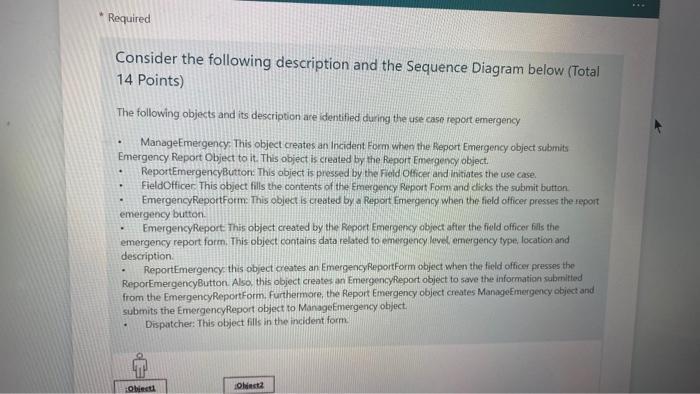
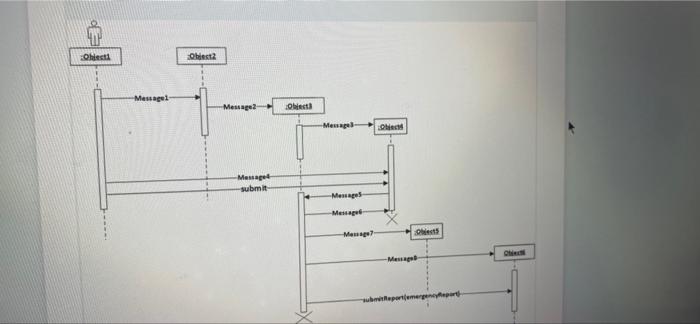
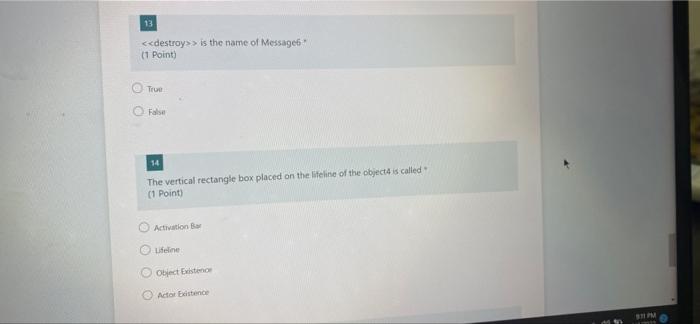
* Required Consider the following description and the Sequence Diagram below (Total 14 Points) The following objects and its description are identified during the use case report emergency ManageEmergency. This object creates an Incident Form when the Report Emergency object submits Emergency Report Object to it. This object is created by the Report Emergency object. ReportEmergencyButton: This object is pressed by the Field Officer and initiates the use case. FieldOfficer. This object fills the contents of the Emergency Report Form and dicks the submit button EmergencyReportForm. This object is created by a Report Emergency when the field officer presses the report emergency button Emergency Report. This object created by the Report Emergency object after the field officer fills the emergency report form. This object contains data related to emergency level emergency type, location and description ReportEmergency, this object creates an Emergency ReportForm object when the field officer presses the ReporEmergencyButton. Also, this object creates an EmergencyReport object to save the information submitted from the EmergencyReportForm. Furthermore, the Report Emergency object creates ManageEmergency object and submits the Emergency Report object to Managemergency object. Dispatcher: This object fills in the incident form. Obiect Olet2 Obiect Obieta Message Message? Obiect Message Menage submit Messages Message Mense? Osts Message emergency 13 > is the name of Message (1 Point) TO false 14 The vertical rectangle box placed on the lifeline of the object is called (1 Point) Activation Lifeline Object Existo Actors
Step by Step Solution
There are 3 Steps involved in it

Get step-by-step solutions from verified subject matter experts
 Study Help