







Question: Small Display Medium Display Large Display Petraite B Pasta SER a. Configure the Co. Launch tutor and past pacto shoot the west achieve Layout that
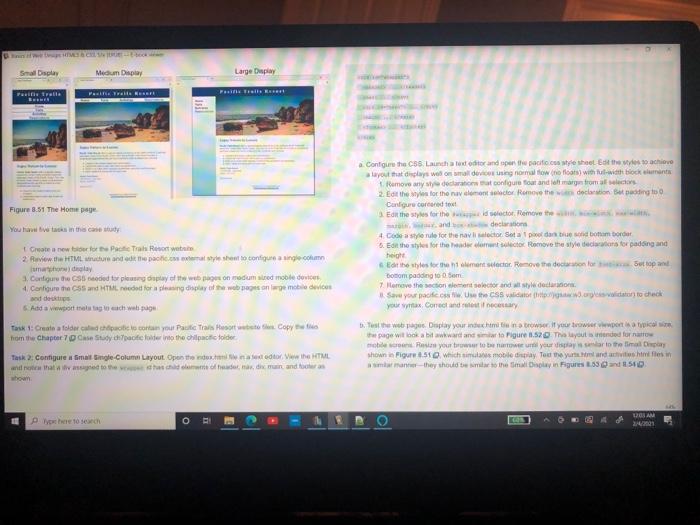
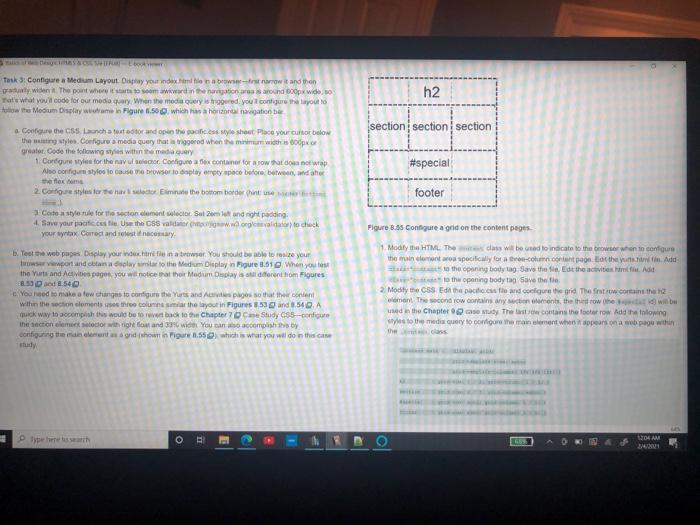
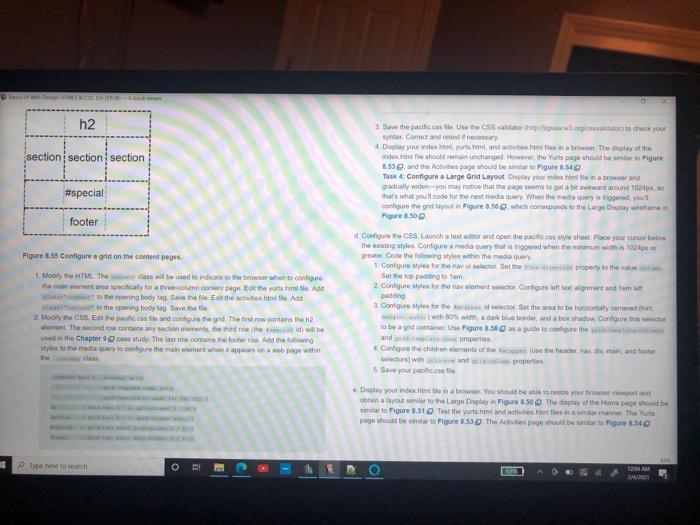
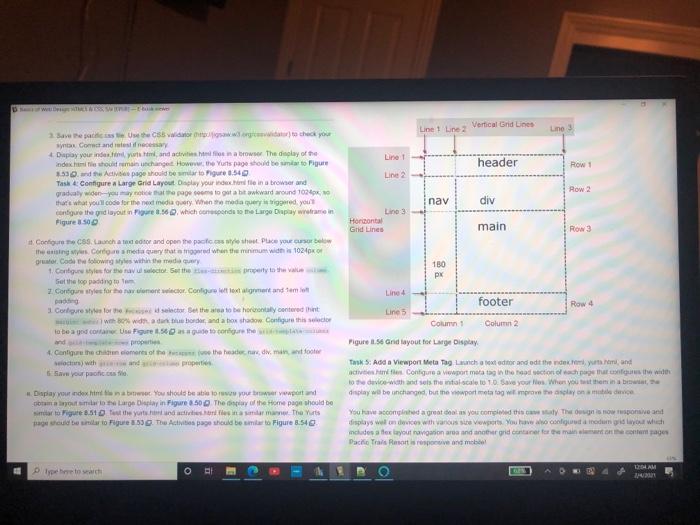
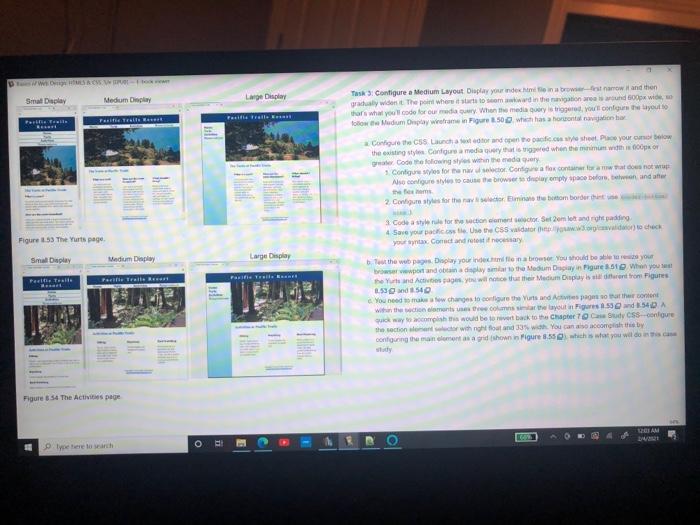
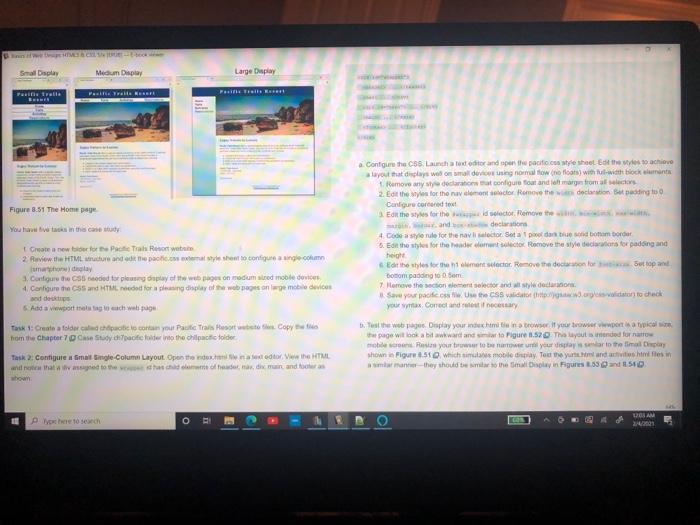
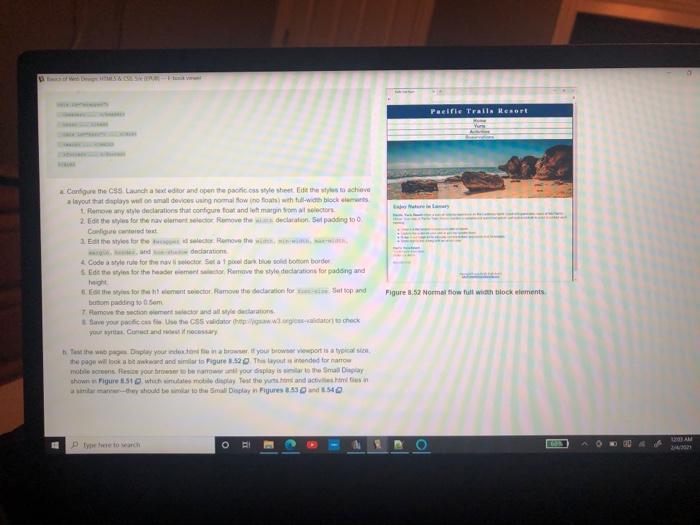
Small Display Medium Display Large Display Petraite B Pasta SER a. Configure the Co. Launch tutor and past pacto shoot the west achieve Layout that displays wil on ming mallow the footswithul-width bockans tomove any wydeclaration configure out and forges from alles 2. Edit them for the name or Remove the declaration stadig to Configure corrett Eon the styles for the selector Remove the Figure 8.51 The Home page Grate a new for Para Root web 2 view the HTML cure and the calls to configure a single com lumatay 3. Configure the sted for play on modum sed mobile devices 4. Configure the CSS and HTML for a day of the whole mobil devices od de And a wwport me cachweisugu Task 1: Create a folder adipicocoran your Paris Copy from the Chapter 7 Case Study ofcode into the choic folder 4 Colule for the navictor Sota para un boom bordo 6. Eoin the style for the recent to move the style for pading and high Eat the shes for ment socio Remove the decolore Domom padding to Som Homove the consent sector and style de Save your own the story witry to check your wax Correct and if necessary Tust the web pages Display your inchinatow if you wewport is typical the page wit look at wwward to figure 1.52. The layout ended for i Resi yoututo nawet until your display to the mal por shown in Figure 51 @ which mobile day to the users and the manner they should be the main Figure 1.53 and 5N0 Task 2: Configure imatgle-Column Layout Open the next to the HTML and that the whole of dediminando WOJAM Power to see o E el Task 3: Configure a Medium Layout pay your next na browserstrow and then a wide The point where it starts to mawardination areas around box wideo Tats what you'll code for our media query Win the media query is red, you configure the layout to flow the Medium Display women Figure 1.500whishon nation h2 section section section a Configure the Co. Launch att tor and open the poole.css stylesheet Place your cursor below the waiting Nyles. Configure a media query that is triggered when he width odpor Greater Code the following yes within the medier 1 Congress for the auctor Configue ex container for a row that does not wrap Also configure styles to cause to browser to play empty space before betw, daher theme 2. Cantiles for a sector imate the bottom border hinte #special footer Figure B.35 Configure a grid on the content pages Code style rule for the sectonclement sector. Salome and right padding: 4. Save your feet Use the CSS valdar valor to check your tax Correct and testinacomary Test the web pages Display your destinatser. You should be able to realize your Servewport and obtain a limit the Medium Display in Figure 3.51 When you test the Yurts and Actis page you will notice that their Medium Deplay store hom Figures 8.50 8.54 You need to make a few changes to contigure Yuts and Act pages so that their content within the section clements to columns ma the layout in Figures 53 and 54. A muck way to accomplish this would be to evert back to Chapter 7 Case Study 083-configure the section et lector with right out and 339 wich you can accomplish thay configuring the manner grid shown in Figure 1.55 which is what you will do in this case 1 Modify the HTML Thedass will be used to indicate to the browser when to contie the main contra speciwly for a con contant page the sun. Add the cooning body tag Save the Edit the activities. Add to the opening body tag Save the 2. Modify the CSS the pace and configure the grid. The first row contain the mont Thond row contains any contents, the throw he will be used in the Chapter These contains the locker row Add the long to the media uery to confirma element woppeurs na web page with thes O 04 AM h2 section section section Save the patients with you syntax Correct and testinos 4 Day your index yurtdisit The delay of the dex should run unchanged. However, the Yurts page should be to Figure 5.53and the Activitage should be to Figure 11.54 Tusk : Configure a large and Layout play your new in a browser and gradually wide you may notice that these gotation und 1024 that what you'll code for the next mediacy When the modery is there you configure the geid te sigure 3.56 which respond to the Lavaplay wie Figure 3.500 #special footer Figure 3.55 Configure agrid on the content pages. 1. Madily the HTML The class will be used to dical to the browser who con e mentre specifically for the concert page Edit the term Add to the pening body Save the Edit the activitate Add to the opening body tog Save the 2 Montily S. Ecco ile and configurd The first row.contains the 2 ment. The second row contains any sections, then the will be und in the Chapter estudy. The last row contains cher row Add the following to the media query to configure the main cont when appears on a web page with d Cowhore CS Launch a lot editor and open the past Place your curbelow the wings Configure a media guy that is triggered when the minimum woh 104 Gear Code the wings within the media que 1. Configure styles for Set the property to the Bet op die totam 2. Configure wyles for the nav lemont ledo Configure out alignment and tem padding 1 Configure styles for Set the costobocontacter who wiado border and a box shadow. Configurator to be a container Use Figure 1,58 sa guidato configure the and properties Configurat children conents of the the head and toler selections with properties 5 Save your pacifico Deply your site in a brow You should be able to use your browser por con layout or to the Largo play in Figure 6.500 The display of the Home page should be simtar to Figure 3.1 Test they and others in a manner. There page odd be to Figure 6.53 The Avis page should be to Figure 1.54 Type to search O BI T 10 AM DES Line Line Vertical Grid Lines Line Line header Row 1 Line 2 Row 2 nav div Save the path or www to check you wyt Command les necessary Dapay your indoor and action or the delay of the index.hehorman unchanget How the Yus page should be stato igre 53.d the Act page should be to Figure 654 Tash Configure a Large Grid Layout Disclay your own in a browser and gradually you may page come to get a hit award wound 1000 that what you'll code for the next media wery When medio gred yout configure the prilayout in Pige. which concede no me Large Display wramin Figure 3.500 Confiscaunch a deditor and open the police shut Puce your cursor below the assing scores medauery that is when the minimum widis 1024 greater Code foliowing Myles within the day Congress for the nav slott. So the Get the top padidingum 2. Contigre styles for the women wir Coolique et mondtam lot Line Horizontal Grid Lines main Row 3 180 Line 4 footer Row 4 Lines Column 1 Column 2 1 Carlore style for the selector Better to be holy centered in with water and a box shadow Configure this to be a yod contan gure 1.5 to configure the and properties 4. Cantech comes of the end minor lacunawth properties Save your poco Pigure 1.56 Grid tayout for Large Day Tasks: Add a Viewport Meta Tag Lunch at ditor and edit the detare, and active Contigure a viewport matatag in the road section of each others with to the device with and sel antal scaleto 10. Save your lies. When you them in a be display be incharond, but the viewport meta tag wil mprove the play on music Display your indexhibw You should be able to row your owport and numa route to the Large Delay in Figure 850 They of the Home page should be ar to Figure 3.5 to the yurtsunde in tara. Thus age odborato Figures. The Activities page should be smart Figure 8.542 You have come a great as you complied this way the gove and displays welon devices with anos se ww You would you which includes a fex layout navigation area and another grid container for manage Pacio Trails Resort is pove and mobil TEAM het wach O Dww Smal Display Medium Diply Large Display Task Configure a Medium Layout Display your index in a browstanowi and then grachly wident. The point where to win the gation and Sox wide thare what you'll code for our media Gry. When the media Gry strigge, you configure out follow the Mudium Day weer in Figure 350 which has a horonto Pastratives Configure the CS Launch for and to pacific style sheet Place your own the iting style Configure mediated when them with ROT Code the following style within the medias 1. Configure styles for the nato Configura flex contrados no As configure outros delaympty space before and theo 2 Columns for the racer Elite om border Code ser for the section to Setem lot and reading 4 Save your photo Use the vidator.world) to check your tax Concreto say Figure 53 The Yurts page Smal Deplay Medium Display Large Display Tel. Tule Pelle Trail Fasiliteter Tout the web pages Display your infomate You should be bres you wwwport and obtain a display the Medium Day in Figure 31 When you see Yurt and Aage you will notice that the Medium Duplayron trom Figures 53 54 You need changes to come the Vunts and Aparthe content With the womens com layout Figures 5540.A Suick way this would be to it back to the Chapter 7 Candy CSS-congue the section with right found 33 You can also come by conting the moment as a grid shown in Figure 3.55 which is what you will do Figure 54 The Activis page AM o ! E e 1 3 Small Display Medium Display Large Display Petraite B Pasta SER a. Configure the Co. Launch tutor and past pacto shoot the west achieve Layout that displays wil on ming mallow the footswithul-width bockans tomove any wydeclaration configure out and forges from alles 2. Edit them for the name or Remove the declaration stadig to Configure corrett Eon the styles for the selector Remove the Figure 8.51 The Home page Grate a new for Para Root web 2 view the HTML cure and the calls to configure a single com lumatay 3. Configure the sted for play on modum sed mobile devices 4. Configure the CSS and HTML for a day of the whole mobil devices od de And a wwport me cachweisugu Task 1: Create a folder adipicocoran your Paris Copy from the Chapter 7 Case Study ofcode into the choic folder 4 Colule for the navictor Sota para un boom bordo 6. Eoin the style for the recent to move the style for pading and high Eat the shes for ment socio Remove the decolore Domom padding to Som Homove the consent sector and style de Save your own the story witry to check your wax Correct and if necessary Tust the web pages Display your inchinatow if you wewport is typical the page wit look at wwward to figure 1.52. The layout ended for i Resi yoututo nawet until your display to the mal por shown in Figure 51 @ which mobile day to the users and the manner they should be the main Figure 1.53 and 5N0 Task 2: Configure imatgle-Column Layout Open the next to the HTML and that the whole of dediminando WOJAM Power to see o E el Pacific Tralls Resort Carees launch a exteditor and open the patiess stylesheet days to achieve layout that plays won all devices using normal how no oth with block Romwe declarations that configure for andre margin om selector 2. Eat the former move the declaration 5e padding 100 Contatos Ett storther. Remove the win dodations Code a style rule for the victor Sota 1 pelo sodboom border side the sys for the Row the style deditions for puding and Figure 3.52 Normal flow all with block elements for the forment sector, Remove the declaration for at top and boom padding to som 7 Remove the section comentando Be your poco Use the GSS viitor wordt check hehe wa Dplay your doctor it your wwwport is a typical the page will brindinio Pigure 1.52 This layout de tornar mobile se po ben your display the Small shows gure 151 which in meil Tout the sand in manushy to the play in Figures and 154 LAM Pe toch ORI Small Display Medium Display Large Display Petraite B Pasta SER a. Configure the Co. Launch tutor and past pacto shoot the west achieve Layout that displays wil on ming mallow the footswithul-width bockans tomove any wydeclaration configure out and forges from alles 2. Edit them for the name or Remove the declaration stadig to Configure corrett Eon the styles for the selector Remove the Figure 8.51 The Home page Grate a new for Para Root web 2 view the HTML cure and the calls to configure a single com lumatay 3. Configure the sted for play on modum sed mobile devices 4. Configure the CSS and HTML for a day of the whole mobil devices od de And a wwport me cachweisugu Task 1: Create a folder adipicocoran your Paris Copy from the Chapter 7 Case Study ofcode into the choic folder 4 Colule for the navictor Sota para un boom bordo 6. Eoin the style for the recent to move the style for pading and high Eat the shes for ment socio Remove the decolore Domom padding to Som Homove the consent sector and style de Save your own the story witry to check your wax Correct and if necessary Tust the web pages Display your inchinatow if you wewport is typical the page wit look at wwward to figure 1.52. The layout ended for i Resi yoututo nawet until your display to the mal por shown in Figure 51 @ which mobile day to the users and the manner they should be the main Figure 1.53 and 5N0 Task 2: Configure imatgle-Column Layout Open the next to the HTML and that the whole of dediminando WOJAM Power to see o E el Task 3: Configure a Medium Layout pay your next na browserstrow and then a wide The point where it starts to mawardination areas around box wideo Tats what you'll code for our media query Win the media query is red, you configure the layout to flow the Medium Display women Figure 1.500whishon nation h2 section section section a Configure the Co. Launch att tor and open the poole.css stylesheet Place your cursor below the waiting Nyles. Configure a media query that is triggered when he width odpor Greater Code the following yes within the medier 1 Congress for the auctor Configue ex container for a row that does not wrap Also configure styles to cause to browser to play empty space before betw, daher theme 2. Cantiles for a sector imate the bottom border hinte #special footer Figure B.35 Configure a grid on the content pages Code style rule for the sectonclement sector. Salome and right padding: 4. Save your feet Use the CSS valdar valor to check your tax Correct and testinacomary Test the web pages Display your destinatser. You should be able to realize your Servewport and obtain a limit the Medium Display in Figure 3.51 When you test the Yurts and Actis page you will notice that their Medium Deplay store hom Figures 8.50 8.54 You need to make a few changes to contigure Yuts and Act pages so that their content within the section clements to columns ma the layout in Figures 53 and 54. A muck way to accomplish this would be to evert back to Chapter 7 Case Study 083-configure the section et lector with right out and 339 wich you can accomplish thay configuring the manner grid shown in Figure 1.55 which is what you will do in this case 1 Modify the HTML Thedass will be used to indicate to the browser when to contie the main contra speciwly for a con contant page the sun. Add the cooning body tag Save the Edit the activities. Add to the opening body tag Save the 2. Modify the CSS the pace and configure the grid. The first row contain the mont Thond row contains any contents, the throw he will be used in the Chapter These contains the locker row Add the long to the media uery to confirma element woppeurs na web page with thes O 04 AM h2 section section section Save the patients with you syntax Correct and testinos 4 Day your index yurtdisit The delay of the dex should run unchanged. However, the Yurts page should be to Figure 5.53and the Activitage should be to Figure 11.54 Tusk : Configure a large and Layout play your new in a browser and gradually wide you may notice that these gotation und 1024 that what you'll code for the next mediacy When the modery is there you configure the geid te sigure 3.56 which respond to the Lavaplay wie Figure 3.500 #special footer Figure 3.55 Configure agrid on the content pages. 1. Madily the HTML The class will be used to dical to the browser who con e mentre specifically for the concert page Edit the term Add to the pening body Save the Edit the activitate Add to the opening body tog Save the 2 Montily S. Ecco ile and configurd The first row.contains the 2 ment. The second row contains any sections, then the will be und in the Chapter estudy. The last row contains cher row Add the following to the media query to configure the main cont when appears on a web page with d Cowhore CS Launch a lot editor and open the past Place your curbelow the wings Configure a media guy that is triggered when the minimum woh 104 Gear Code the wings within the media que 1. Configure styles for Set the property to the Bet op die totam 2. Configure wyles for the nav lemont ledo Configure out alignment and tem padding 1 Configure styles for Set the costobocontacter who wiado border and a box shadow. Configurator to be a container Use Figure 1,58 sa guidato configure the and properties Configurat children conents of the the head and toler selections with properties 5 Save your pacifico Deply your site in a brow You should be able to use your browser por con layout or to the Largo play in Figure 6.500 The display of the Home page should be simtar to Figure 3.1 Test they and others in a manner. There page odd be to Figure 6.53 The Avis page should be to Figure 1.54 Type to search O BI T 10 AM DES Line Line Vertical Grid Lines Line Line header Row 1 Line 2 Row 2 nav div Save the path or www to check you wyt Command les necessary Dapay your indoor and action or the delay of the index.hehorman unchanget How the Yus page should be stato igre 53.d the Act page should be to Figure 654 Tash Configure a Large Grid Layout Disclay your own in a browser and gradually you may page come to get a hit award wound 1000 that what you'll code for the next media wery When medio gred yout configure the prilayout in Pige. which concede no me Large Display wramin Figure 3.500 Confiscaunch a deditor and open the police shut Puce your cursor below the assing scores medauery that is when the minimum widis 1024 greater Code foliowing Myles within the day Congress for the nav slott. So the Get the top padidingum 2. Contigre styles for the women wir Coolique et mondtam lot Line Horizontal Grid Lines main Row 3 180 Line 4 footer Row 4 Lines Column 1 Column 2 1 Carlore style for the selector Better to be holy centered in with water and a box shadow Configure this to be a yod contan gure 1.5 to configure the and properties 4. Cantech comes of the end minor lacunawth properties Save your poco Pigure 1.56 Grid tayout for Large Day Tasks: Add a Viewport Meta Tag Lunch at ditor and edit the detare, and active Contigure a viewport matatag in the road section of each others with to the device with and sel antal scaleto 10. Save your lies. When you them in a be display be incharond, but the viewport meta tag wil mprove the play on music Display your indexhibw You should be able to row your owport and numa route to the Large Delay in Figure 850 They of the Home page should be ar to Figure 3.5 to the yurtsunde in tara. Thus age odborato Figures. The Activities page should be smart Figure 8.542 You have come a great as you complied this way the gove and displays welon devices with anos se ww You would you which includes a fex layout navigation area and another grid container for manage Pacio Trails Resort is pove and mobil TEAM het wach O Dww Smal Display Medium Diply Large Display Task Configure a Medium Layout Display your index in a browstanowi and then grachly wident. The point where to win the gation and Sox wide thare what you'll code for our media Gry. When the media Gry strigge, you configure out follow the Mudium Day weer in Figure 350 which has a horonto Pastratives Configure the CS Launch for and to pacific style sheet Place your own the iting style Configure mediated when them with ROT Code the following style within the medias 1. Configure styles for the nato Configura flex contrados no As configure outros delaympty space before and theo 2 Columns for the racer Elite om border Code ser for the section to Setem lot and reading 4 Save your photo Use the vidator.world) to check your tax Concreto say Figure 53 The Yurts page Smal Deplay Medium Display Large Display Tel. Tule Pelle Trail Fasiliteter Tout the web pages Display your infomate You should be bres you wwwport and obtain a display the Medium Day in Figure 31 When you see Yurt and Aage you will notice that the Medium Duplayron trom Figures 53 54 You need changes to come the Vunts and Aparthe content With the womens com layout Figures 5540.A Suick way this would be to it back to the Chapter 7 Candy CSS-congue the section with right found 33 You can also come by conting the moment as a grid shown in Figure 3.55 which is what you will do Figure 54 The Activis page AM o ! E e 1 3 Small Display Medium Display Large Display Petraite B Pasta SER a. Configure the Co. Launch tutor and past pacto shoot the west achieve Layout that displays wil on ming mallow the footswithul-width bockans tomove any wydeclaration configure out and forges from alles 2. Edit them for the name or Remove the declaration stadig to Configure corrett Eon the styles for the selector Remove the Figure 8.51 The Home page Grate a new for Para Root web 2 view the HTML cure and the calls to configure a single com lumatay 3. Configure the sted for play on modum sed mobile devices 4. Configure the CSS and HTML for a day of the whole mobil devices od de And a wwport me cachweisugu Task 1: Create a folder adipicocoran your Paris Copy from the Chapter 7 Case Study ofcode into the choic folder 4 Colule for the navictor Sota para un boom bordo 6. Eoin the style for the recent to move the style for pading and high Eat the shes for ment socio Remove the decolore Domom padding to Som Homove the consent sector and style de Save your own the story witry to check your wax Correct and if necessary Tust the web pages Display your inchinatow if you wewport is typical the page wit look at wwward to figure 1.52. The layout ended for i Resi yoututo nawet until your display to the mal por shown in Figure 51 @ which mobile day to the users and the manner they should be the main Figure 1.53 and 5N0 Task 2: Configure imatgle-Column Layout Open the next to the HTML and that the whole of dediminando WOJAM Power to see o E el Pacific Tralls Resort Carees launch a exteditor and open the patiess stylesheet days to achieve layout that plays won all devices using normal how no oth with block Romwe declarations that configure for andre margin om selector 2. Eat the former move the declaration 5e padding 100 Contatos Ett storther. Remove the win dodations Code a style rule for the victor Sota 1 pelo sodboom border side the sys for the Row the style deditions for puding and Figure 3.52 Normal flow all with block elements for the forment sector, Remove the declaration for at top and boom padding to som 7 Remove the section comentando Be your poco Use the GSS viitor wordt check hehe wa Dplay your doctor it your wwwport is a typical the page will brindinio Pigure 1.52 This layout de tornar mobile se po ben your display the Small shows gure 151 which in meil Tout the sand in manushy to the play in Figures and 154 LAM Pe toch ORI
Step by Step Solution
There are 3 Steps involved in it

Get step-by-step solutions from verified subject matter experts
 Study Help