







Question: Task 1 Develop an IP Addressing Scheme using the following informtion: Starting Network = 172.16.80.0/24 Blue LAN subnet hosts = 100 18 Red LAN
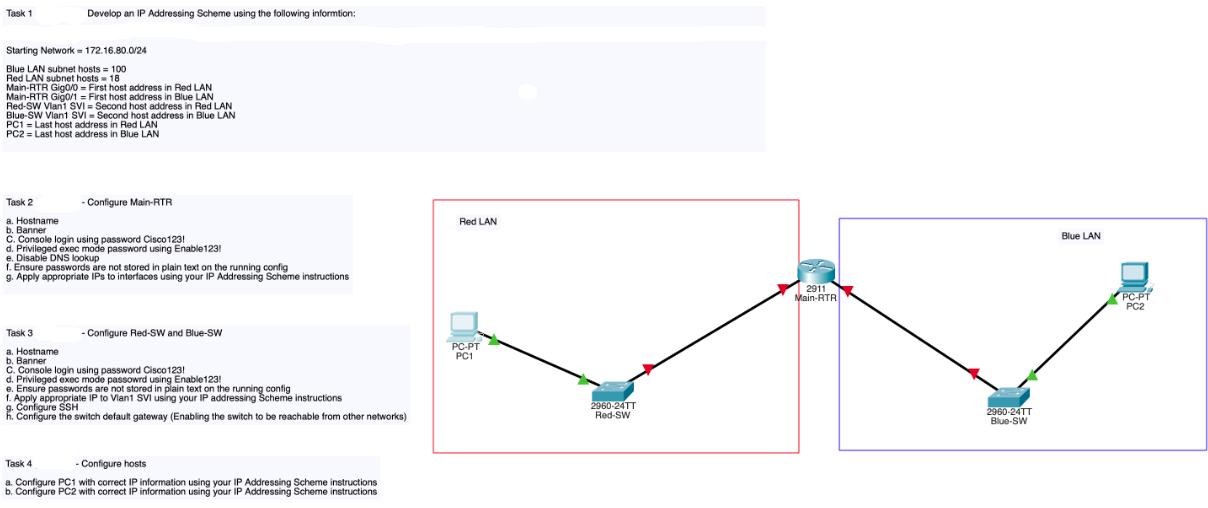
Task 1 Develop an IP Addressing Scheme using the following informtion: Starting Network = 172.16.80.0/24 Blue LAN subnet hosts = 100 18 Red LAN subnet hosts Main-RTR Gig0/0= First host address in Red LAN Main-RTR Gig0/1 = First host address in Blue LAN Red-SW Vian1 SVI = Second host address in Red LAN Blue-SW Vian1 SVI Second host address in Blue LAN PC1 Last host address in Red LAN PC2= Last host address in Blue LAN - Configure Main-RTR Task 2 a. Hostname b. Banner C. Console login using password Cisco1231 C. d. Privileged exec mode password using Enable123! e. Disable DNS lookup 1. Ensure passwords are not stored in plain text on the running config g. Apply appropriate IPs to interfaces using your IP Addressing Scheme instructions - Configure Red-SW and Blue-SW. Task 3 a. me b. Banner C. Console login using password Cisco123! d. Privileged exec mode passowrd using Enable123! e. Ensure passwords are not stored in plain text on the running config f. Apply appropriate IP to Vian1 SVI using your IP addressing Scheme instructions g. Configure SSH h. Configure the switch default gateway (Enabling the switch to be reachable from other networks) Task 4 - Configure hosts a. Configure PC1 with correct IP information using your IP Addressing Scheme instructions b. Configure PC2 with correct IP information using your IP Addressing Scheme instructions Red LAN PC-PT PC1 2960-24TT Red-SW 2911 Main-RTR 2960-24TT Blue-SW Blue LAN PC-PT PC2
Step by Step Solution
3.38 Rating (157 Votes )
There are 3 Steps involved in it
appears to be a network diagram with four devices MainRTR This is likely a router that serves as the central device in the network RedSW This is likely a switch that connects devices on the red LAN Bl... View full answer

Get step-by-step solutions from verified subject matter experts
 Study Help