







Question: The above image is he data that has been loaded This option allows the user to see the list of the items available for purchasing.
 The above image is he data that has been loaded
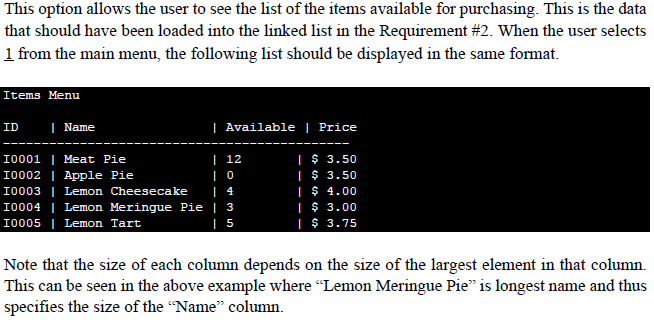
This option allows the user to see the list of the items available for purchasing. This is the data that should have been loaded into the linked list in the Requirement #2. When the user selects 1 from the main menu, the following list should be displayed in the same format Items Menu ID Name | Available | Price I 12 I0001 Meat Pie I0002 I Apple Pie I0003 | Lemon Cheesecake4 I0004 I Lemon Meringue Pie | 3 I0005 I Lemon Tart I S 3.50 I 3.50 I 4.00 I 3.00 I 3.75 Note that the size of each column depends on the size of the largest element in that column. This can be seen in the above example where "Lemon Meringue Pie" is longest name and thus specifies the size of the "Name" column. This option allows the user to see the list of the items available for purchasing. This is the data that should have been loaded into the linked list in the Requirement #2. When the user selects 1 from the main menu, the following list should be displayed in the same format Items Menu ID Name | Available | Price I 12 I0001 Meat Pie I0002 I Apple Pie I0003 | Lemon Cheesecake4 I0004 I Lemon Meringue Pie | 3 I0005 I Lemon Tart I S 3.50 I 3.50 I 4.00 I 3.00 I 3.75 Note that the size of each column depends on the size of the largest element in that column. This can be seen in the above example where "Lemon Meringue Pie" is longest name and thus specifies the size of the "Name" column
Step by Step Solution
There are 3 Steps involved in it

Get step-by-step solutions from verified subject matter experts
 Study Help