







Question: The exponentiation operator () is used to raise a number to a power. If the exponent is an integer >=0, then: 1 x^n= x*x^(n-1) 1.
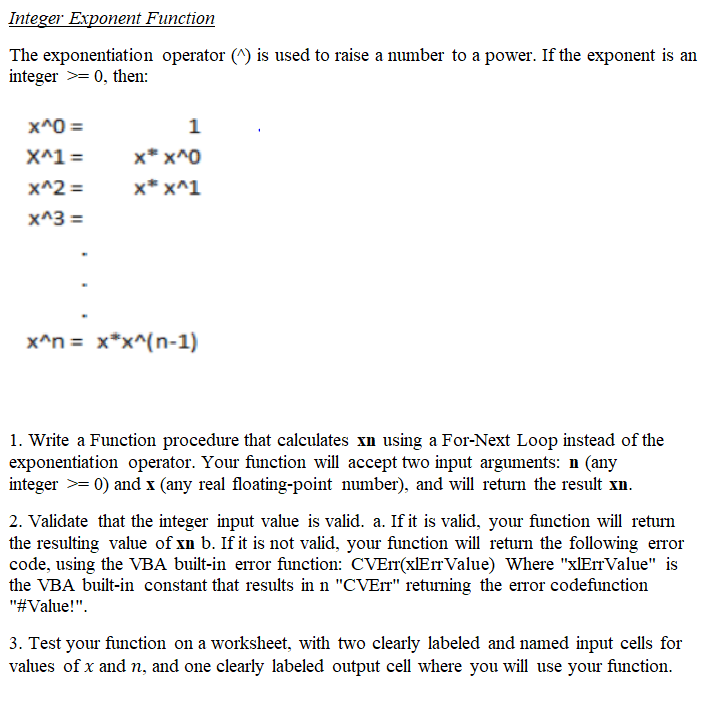
The exponentiation operator () is used to raise a number to a power. If the exponent is an integer >=0, then: 1 x^n= x*x^(n-1) 1. Write a Function procedure that calculates xn using a For-Next Loop instead of the exponentiation operator. Your function will accept two input arguments: n (any integer >= 0) and x (any real floating-point number), and will return the result xn. 2. Validate that the integer input value is valid. a. If it is valid, your function wl returm the resulting value of xn b. If it is not valid, your function will return the following error code, using the VBA built-in error function: CVErr(xlErrValue) Where "xlErrValue" is the VBA built-in constant that results in n "CVErr" retuming the error codefunction "#Value!". 3. Test your function on a worksheet, with two clearly labeled and named input cells for values of x and n, and one clearly labeled output cell where you will use your function. The exponentiation operator () is used to raise a number to a power. If the exponent is an integer >=0, then: 1 x^n= x*x^(n-1) 1. Write a Function procedure that calculates xn using a For-Next Loop instead of the exponentiation operator. Your function will accept two input arguments: n (any integer >= 0) and x (any real floating-point number), and will return the result xn. 2. Validate that the integer input value is valid. a. If it is valid, your function wl returm the resulting value of xn b. If it is not valid, your function will return the following error code, using the VBA built-in error function: CVErr(xlErrValue) Where "xlErrValue" is the VBA built-in constant that results in n "CVErr" retuming the error codefunction "#Value!". 3. Test your function on a worksheet, with two clearly labeled and named input cells for values of x and n, and one clearly labeled output cell where you will use your function
Step by Step Solution
There are 3 Steps involved in it

Get step-by-step solutions from verified subject matter experts
 Study Help