







Question: The following shell script is used to check if the input IP address is invalid or not. rs = 1 while [$rs -gt 0]; do
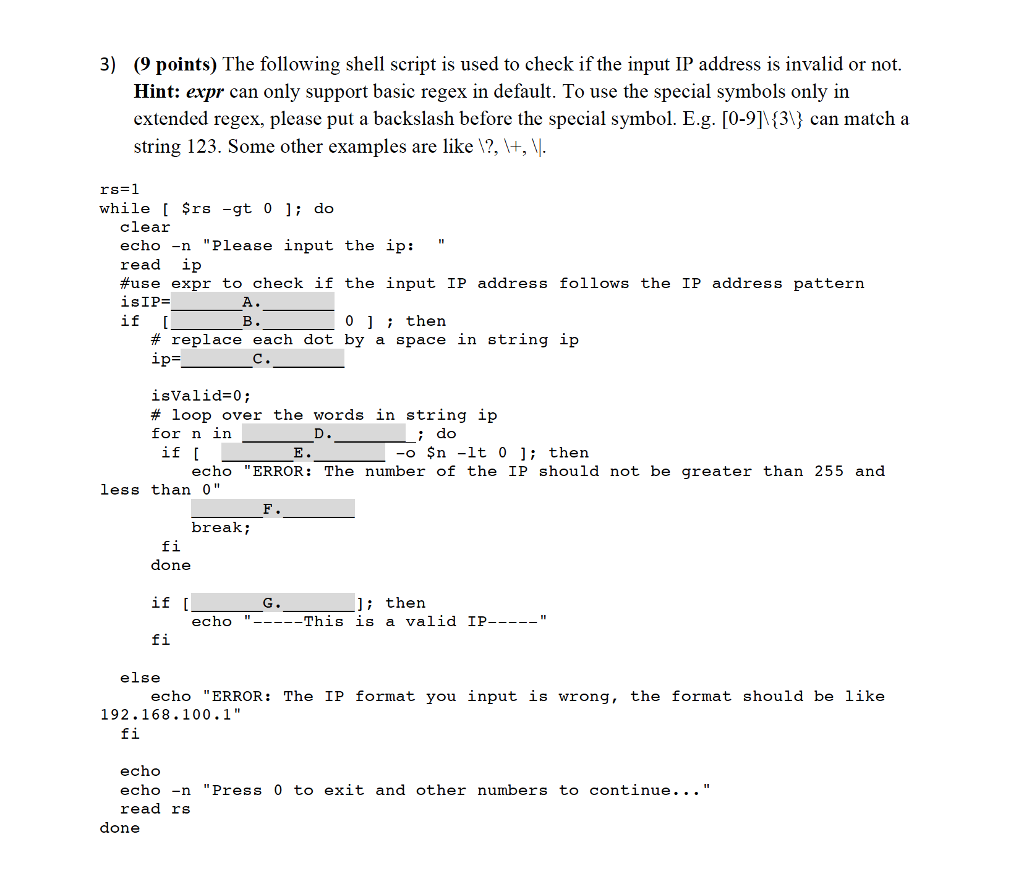
The following shell script is used to check if the input IP address is invalid or not. rs = 1 while [$rs -gt 0]; do clear echo -n "Please input the ip: " read ip #use expr to check if the input IP address follows the IP address pattern is IP = A. if [B. 0]; then # replace each dot by a space in string ip ip = C. isValid = 0; # loop over the words in string ip for n in D.; do if [E. -o $n -lt 0]; then echo "ERROR: The number of the IP should not be greater than 255 and less than 0" F. break; fi done if [G.]; then echo " This is a valid IP " fi else echo "ERROR: The IP format you input is wrong, the format should be like 192.168.100.1" fi echo echo -n "Press 0 to exit and other numbers to continue ellipsis" read rs done The following shell script is used to check if the input IP address is invalid or not. rs = 1 while [$rs -gt 0]; do clear echo -n "Please input the ip: " read ip #use expr to check if the input IP address follows the IP address pattern is IP = A. if [B. 0]; then # replace each dot by a space in string ip ip = C. isValid = 0; # loop over the words in string ip for n in D.; do if [E. -o $n -lt 0]; then echo "ERROR: The number of the IP should not be greater than 255 and less than 0" F. break; fi done if [G.]; then echo " This is a valid IP " fi else echo "ERROR: The IP format you input is wrong, the format should be like 192.168.100.1" fi echo echo -n "Press 0 to exit and other numbers to continue ellipsis" read rs done
Step by Step Solution
There are 3 Steps involved in it

Get step-by-step solutions from verified subject matter experts
 Study Help