







Question: The lab is split into two parts, each one requires you to write a small program in Java. Use JavaDoc to comment your program remembering
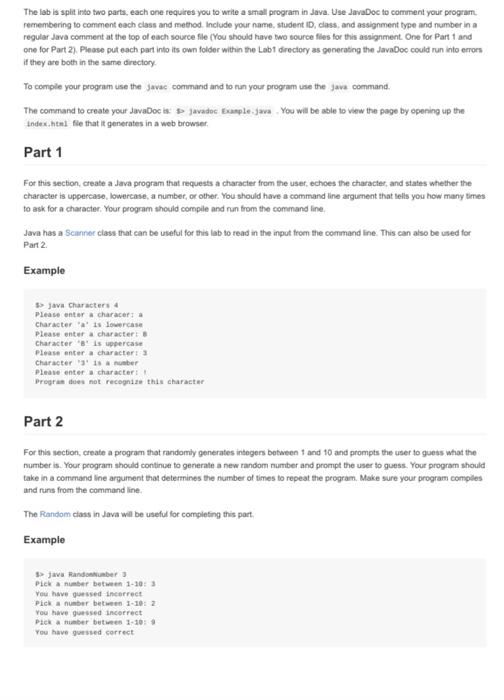
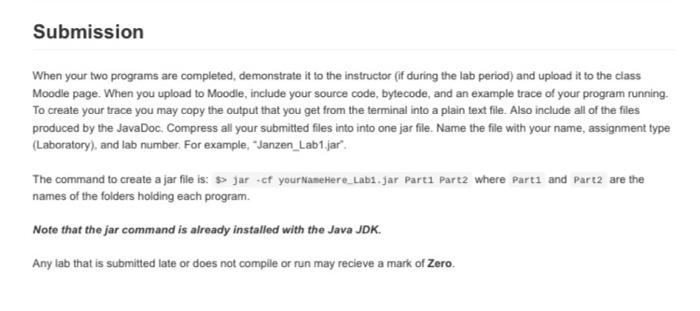
The lab is split into two parts, each one requires you to write a small program in Java. Use JavaDoc to comment your program remembering to comment each class and method. Include your name, student ID, class, and assignment type and number in a regular Java comment at the top of each source file (You should have two source files for this assignment. One for Part 1 and one for Part 2) Please put each part into its own folder within the Labt directory as generating the JavaDoc could run into errors if they are both in the same directory To comple your program use the Javac command and to run your program use the Java command. The command to create your JuvaDoc is javadoc Example Java You will be able to view the page by opening up the Index.htal file that it generates in a web browser Part 1 For this section, create a Java program that requests a character from the user echoes the character, and states whether the character is uppercase, lowercase, a number, or other. You should have a command line argument that tells you how many times to ask for a character. Your program should compile and run from the command line Java has a Scanner class that can be useful for this limb to read in the input from the command line. This can also be used for Part 2 Example > Java Characters 4 Please enter a characer a Character is lowercase Please enter a characters Character is uppercase Please enter a character: 3 Character ' 1 number Please enter a character: Program does not recognize this character Part 2 For this section, create a program that randomly generates integers between 1 and 10 and prompts the user to guess what the number is. Your program should continue to generate a new random number and prompt the user to guess. Your program should take in a command line argument that determines the number of times to repeat the program. Make sure your program comples and runs from the command line. The Random class in Java will be useful for completing this part Example > java Randaber3 Pick a number between 1-103 You have guessed incorrect Pick a number between 1-10: 2 You have guessed incorrect Pack a number between 1-10 You have guessed correct Submission When your two programs are completed, demonstrate it to the instructor (if during the lab period) and upload it to the class Moodle page. When you upload to Moodle, include your source code, bytecode, and an example trace of your program running. To create your trace you may copy the output that you get from the terminal into a plain text file. Also include all of the files produced by the JavaDoc. Compress all your submitted files into into one jar file. Name the file with your name assignment type (Laboratory), and lab number. For example, "Janzen_Lab1.jar" The command to create a jar file is: >> jar of your Name Here_tab1.jar Parti Part2 where Part1 and Part2 are the names of the folders holding each program. Note that the jar command is already installed with the Java JDK. Any lab that is submitted late or does not compile or run may recieve a mark of Zero
Step by Step Solution
There are 3 Steps involved in it

Get step-by-step solutions from verified subject matter experts
 Study Help