



Question: The purpose of this assignment is to demonstrate steganographic encryption using Python. Encrypt the simple text message Gotcha! into the photo. Use LopesUp! as your
The purpose of this assignment is to demonstrate steganographic encryption using Python.
Encrypt the simple text message "Gotcha!" into the photo.
Use "LopesUp!" as your encryption key.
Assignment Instructions:
Generate a secret text message.
Within the same code, prompt the use to encode or decode the steganography algorithm and provide the decode functionality to match
-I already encoded the picture with a message. But now I must decode the message prompting the user to use a password in JES. Please see my attached code thus far for part two.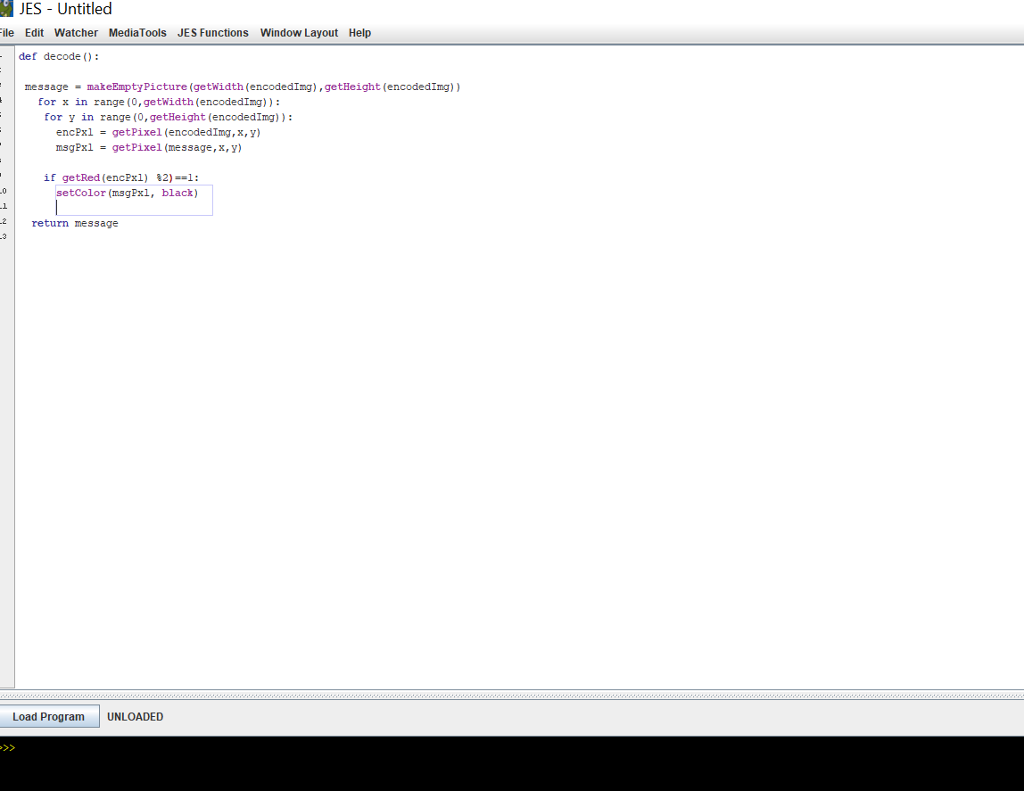
Thanks!
JES - Untitled ile Edit Watcher MediaTools JES Functions Window Layout Help def decode): message makeEmptyPicture (getwidth (encodedImg),getHeight (encodedImg)) for x in range (0, getwidth (encodedImg)) for y in range (0, getHeight (encodedImg)): encPxl msgPx1 getPixel (encodedImg, x, y getPixel (message, x,y) if getRed (encPx1) setColor (msgPxl, 2)--1: black) .1 return message Load Program UNLOADED
Step by Step Solution
There are 3 Steps involved in it

Get step-by-step solutions from verified subject matter experts