







Question: This is Arduino. I have written my code accordingly, but it is miscopying the value inputVal from the one I am inputting, and it is
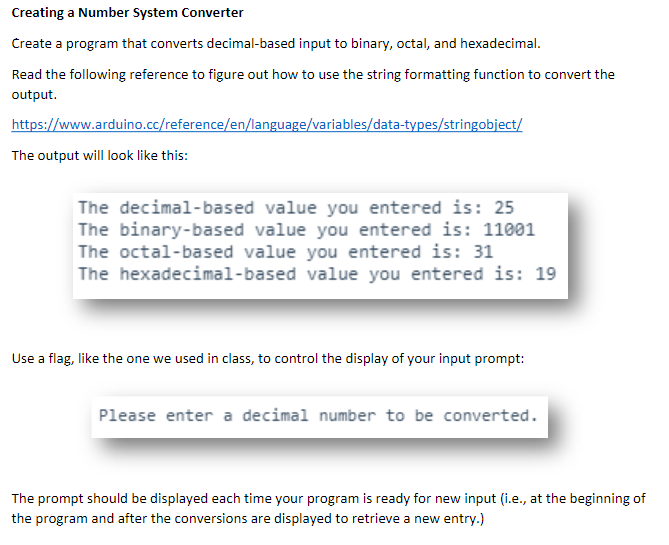
This is Arduino.
I have written my code accordingly, but it is miscopying the value inputVal from the one I am inputting, and it is repeating the printing process two, or sometimes three times.
This is the code I could come up with:
int inputVal;
void setup() { Serial.begin(9600); Serial.print("Please enter a decimal number to be converted. "); }
void loop() { if (Serial.available() > 0) { inputVal = Serial.read(); String inputBinary = String(inputVal, BIN); String inputOctal = String(inputVal, OCT); String inputHexa = String(inputVal, HEX); Serial.print("The decimal-based value you entered is: "); Serial.println(inputVal); Serial.print(" The binary-based value you entered is: "); Serial.println(inputBinary); Serial.print(" The octal-based value you entered is: "); Serial.println(inputOctal); Serial.print(" The hexadecimal-based value you entered is: "); Serial.println(inputHexa); Serial.print(" "); } }
Creating a Number System Converter Create a program that converts decimal-based input to binary, octal, and h ad the following reference to to use the string formatting function to convertt output https://www.arduino.cc/reference/en/language/variables/data-types/stringobject/ The output will look like this: The decimal-based value you entered is: 25 The binary-based value you entered is: 11001 The octal-based value you entered is: 31 The hexadecimal-based value you entered is: 19 Use a flag, like the one we used in class, to control the display of your input prompt: Please enter a decimal number to be converted The prompt should be displayed each time your program is ready for new input (i.e., at the beginning of the program and after the conversions are displayed to retrieve a new entry.) Creating a Number System Converter Create a program that converts decimal-based input to binary, octal, and h ad the following reference to to use the string formatting function to convertt output https://www.arduino.cc/reference/en/language/variables/data-types/stringobject/ The output will look like this: The decimal-based value you entered is: 25 The binary-based value you entered is: 11001 The octal-based value you entered is: 31 The hexadecimal-based value you entered is: 19 Use a flag, like the one we used in class, to control the display of your input prompt: Please enter a decimal number to be converted The prompt should be displayed each time your program is ready for new input (i.e., at the beginning of the program and after the conversions are displayed to retrieve a new entry.)
Step by Step Solution
There are 3 Steps involved in it

Get step-by-step solutions from verified subject matter experts
 Study Help