







Question: UREGENT PLEASE HELP DUE IN 6 HOURS!!! Please modify the attached code and follow the instructions given. The code must be written in MIPS 32
UREGENT PLEASE HELP DUE IN 6 HOURS!!! Please modify the attached code and follow the instructions given. The code must be written in MIPS 32 Assembly language. I reccommend using MARS 4.5 Simulator to write the code.
.data prompt1: .asciiz " Enter 1st Number: " prompt2: .asciiz "Select Operator: " prompt3: .asciiz " Enter 2nd Number: " prompt4: .asciiz "Result: " prompt5: .asciiz " Remainder: " prompt6: .asciiz "Invalid input" Num1: .word 0 Num2: .word 0 result: .word 0
.text main: # Displays a prompt to the user and then wait for a numerical input # The users input will get stored to the (word) address pointed by $a1 GetInput: li $v0, 4 la $a0, prompt1 syscall li $v0, 5 syscall move $t0, $v0
# Displays a prompt to the user and then wait for a single character input GetOperator: li $v0, 4 la $a0, prompt2 syscall li $v0, 12 syscall move $t3, $v0
# Displays a prompt to the user and then wait for a numerical input # The users input will get stored to the (word) address pointed by $a1
li $v0, 4 la $a0, prompt3 syscall li $v0, 5 syscall move $t1, $v0
sw $t0,Num1 sw $t1,Num2 # Adds two numbers together after user enters the '+' key and stores the result in memory AddNumb: bne $t3, '+', SubNumb lw $a0, Num1 lw $a1, Num2 add $a2, $a0, $a1 sw $a2, result jal DisplayNumb # Subtracts one number from the other after the user enters the '-' key and stores the result in memory SubNumb: bne $t3, '-', MultNumb lw $a0, Num1 lw $a1, Num2 sub $a2, $a0, $a1 sw $a2, result jal DisplayNumb # Multiplies two numbers together after the user enters the '*' key and stores the result in memory MultNumb: bne $t3, '*', DivNumb lw $a0, Num1 lw $a1, Num2 mul $a2, $a0, $a1 sw $a2, result jal DisplayNumb
# Divides on number by the other after the user enters the '/' key and stores the result in memory DivNumb: bne $t3, '/', Error beq $a1, 0, Error lw $a0, Num1 lw $a1, Num2 div $a2, $a0, $a1 mflo $a2 sw $a2, result mfhi $a3 jal DisplayNumb # This outputs an error message to the screen if division by zero is done Error: li $v0, 4 la $a0, prompt6 syscall jal main # DisplayNumb # Displays a message to the user followed by a numerical value DisplayNumb: li $v0, 4 la $a0, prompt4 syscall # Print or show the number lw $a2,result li $v0, 1 move $a0,$a2 syscall bne $t3,'/',main li $v0, 4 la $a0, prompt5 syscall # Print or show the number li $v0, 1 move $a0,$a3 syscall jal main # Exit li $v0, 10 syscall
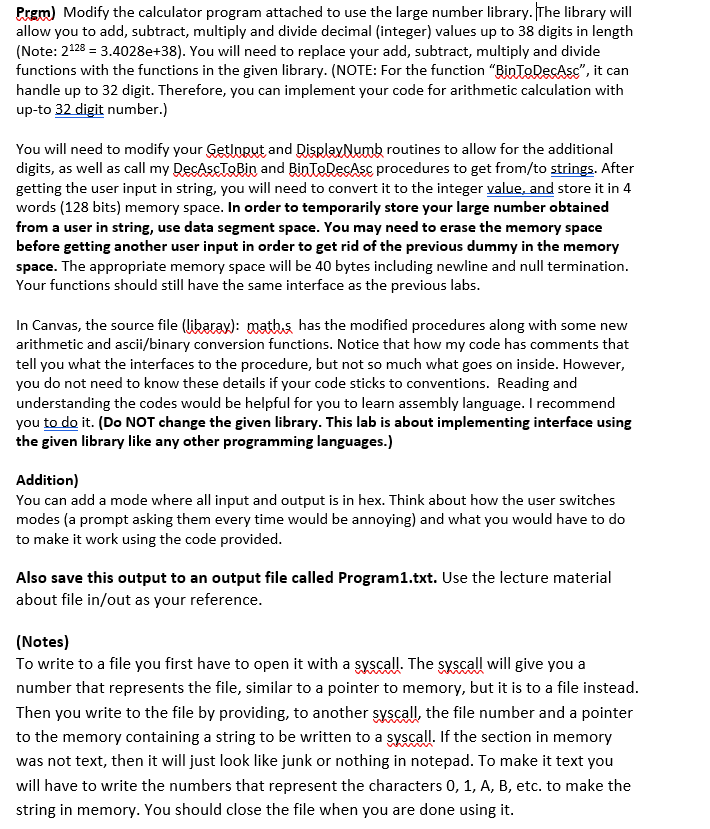
Prem) Modify the calculator program attached to use the large number library. The library will allow you to add, subtract, multiply and divide decimal (integer) values up to 38 digits in length (Note: 2123 = 3.4028e+38). You will need to replace your add, subtract, multiply and divide functions with the functions in the given library. (NOTE: For the function "Binte De Asc, it can handle up to 32 digit. Therefore, you can implement your code for arithmetic calculation with up-to 32 digit number.) You will need to modify your Getloput and DisplayNumb routines to allow for the additional digits, as well as call my DecAscTobin and Binte DesAsc procedures to get from/to strings. After getting the user input in string, you will need to convert it to the integer value, and store it in 4 words (128 bits) memory space. In order to temporarily store your large number obtained from a user in string, use data segment space. You may need to erase the memory space before getting another user input in order to get rid of the previous dummy in the memory space. The appropriate memory space will be 40 bytes including newline and null termination. Your functions should still have the same interface as the previous labs. In Canvas, the source file (libarax): mathis has the modified procedures along with some new arithmetic and ascii/binary conversion functions. Notice that how my code has comments that tell you what the interfaces to the procedure, but not so much what goes on inside. However, you do not need to know these details if your code sticks to conventions. Reading and understanding the codes would be helpful for you to learn assembly language. I recommend you to do it. (Do NOT change the given library. This lab is about implementing interface using the given library like any other programming languages.) Addition) You can add a mode where all input and output is in hex. Think about how the user switches modes (a prompt asking them every time would be annoying) and what you would have to do to make it work using the code provided. Also save this output to an output file called Program1.txt. Use the lecture material about file in/out as your reference. (Notes) To write to a file you first have to open it with a syscall. The syscall will give you a number that represents the file, similar to a pointer to memory, but it is to a file instead. Then you write to the file by providing, to another syscall, the file number and a pointer to the memory containing a string to be written to a syscall. If the section in memory was not text, then it will just look like junk or nothing in notepad. To make it text you will have to write the numbers that represent the characters 0, 1, A, B, etc. to make the string in memory. You should close the file when you are done using it. Prem) Modify the calculator program attached to use the large number library. The library will allow you to add, subtract, multiply and divide decimal (integer) values up to 38 digits in length (Note: 2123 = 3.4028e+38). You will need to replace your add, subtract, multiply and divide functions with the functions in the given library. (NOTE: For the function "Binte De Asc, it can handle up to 32 digit. Therefore, you can implement your code for arithmetic calculation with up-to 32 digit number.) You will need to modify your Getloput and DisplayNumb routines to allow for the additional digits, as well as call my DecAscTobin and Binte DesAsc procedures to get from/to strings. After getting the user input in string, you will need to convert it to the integer value, and store it in 4 words (128 bits) memory space. In order to temporarily store your large number obtained from a user in string, use data segment space. You may need to erase the memory space before getting another user input in order to get rid of the previous dummy in the memory space. The appropriate memory space will be 40 bytes including newline and null termination. Your functions should still have the same interface as the previous labs. In Canvas, the source file (libarax): mathis has the modified procedures along with some new arithmetic and ascii/binary conversion functions. Notice that how my code has comments that tell you what the interfaces to the procedure, but not so much what goes on inside. However, you do not need to know these details if your code sticks to conventions. Reading and understanding the codes would be helpful for you to learn assembly language. I recommend you to do it. (Do NOT change the given library. This lab is about implementing interface using the given library like any other programming languages.) Addition) You can add a mode where all input and output is in hex. Think about how the user switches modes (a prompt asking them every time would be annoying) and what you would have to do to make it work using the code provided. Also save this output to an output file called Program1.txt. Use the lecture material about file in/out as your reference. (Notes) To write to a file you first have to open it with a syscall. The syscall will give you a number that represents the file, similar to a pointer to memory, but it is to a file instead. Then you write to the file by providing, to another syscall, the file number and a pointer to the memory containing a string to be written to a syscall. If the section in memory was not text, then it will just look like junk or nothing in notepad. To make it text you will have to write the numbers that represent the characters 0, 1, A, B, etc. to make the string in memory. You should close the file when you are done using it
Step by Step Solution
There are 3 Steps involved in it

Get step-by-step solutions from verified subject matter experts
 Study Help