







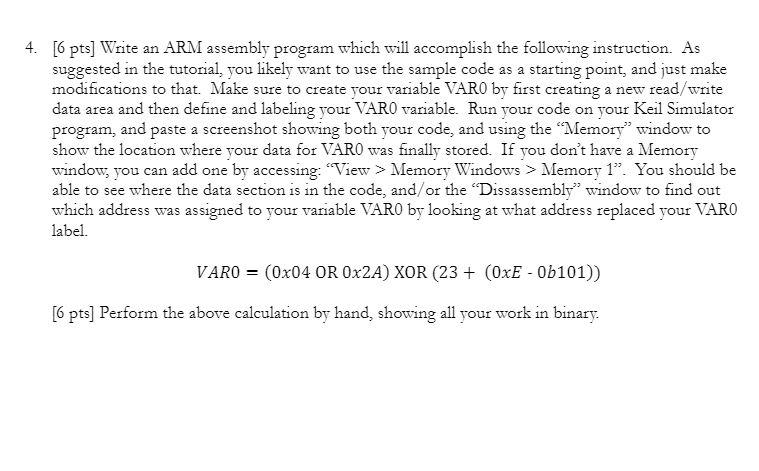
Question: Use any ARM assembly program you like but the Keil simulator would be nice. Sample code: ;;; Directives PRESERVE8 THUMB ; Vector Table Mapped to
Use any ARM assembly program you like but the Keil simulator would be nice.
Sample code:
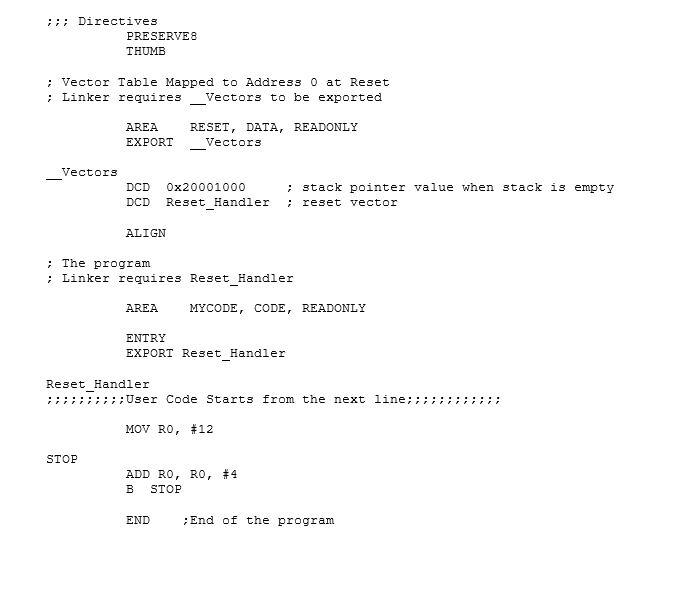
;;; Directives
PRESERVE8
THUMB
; Vector Table Mapped to Address 0 at Reset
; Linker requires __Vectors to be exported
AREA RESET, DATA, READONLY
EXPORT __Vectors
__Vectors
DCD 0x20001000 ; stack pointer value when stack is empty
DCD Reset_Handler ; reset vector
ALIGN
; The program
; Linker requires Reset_Handler
AREA MYCODE, CODE, READONLY
ENTRY
EXPORT Reset_Handler
Reset_Handler
;;;;;;;;;;User Code Starts from the next line;;;;;;;;;;;;
MOV R0, #12
STOP
ADD R0, R0, #4
B STOP
END ;End of the program
;;; Directives PRESERVES THUMB ; Vector Table Mapped to Address O at Reset ; Linker requires Vectors to be exported AREA EXPORT RESET, DATA, READONLY Vectors Vectors DCD DCD Ox20001000 Reset Handler ; stack pointer value when stack is empty reset vector ALIGN ; The program ; Linker requires Reset_Handler AREA MYCODE, CODE, READONLY ENTRY EXPORT Reset_Handler Reset_Handler ;;;;;; User Code Starts from the next line; ; ; ; ; MOV RO, #12 STOP ADD RO, RO, #4 B STOP END ; End of the program ;;; Directives PRESERVES THUMB ; Vector Table Mapped to Address O at Reset ; Linker requires Vectors to be exported AREA EXPORT RESET, DATA, READONLY Vectors Vectors DCD DCD Ox20001000 Reset Handler ; stack pointer value when stack is empty reset vector ALIGN ; The program ; Linker requires Reset_Handler AREA MYCODE, CODE, READONLY ENTRY EXPORT Reset_Handler Reset_Handler ;;;;;; User Code Starts from the next line; ; ; ; ; MOV RO, #12 STOP ADD RO, RO, #4 B STOP END ; End of the program
Step by Step Solution
There are 3 Steps involved in it

Get step-by-step solutions from verified subject matter experts
 Study Help