Question: use PHP to make the page website thank you very much!!!!! F.5. Footer a. Create a file named footer.php inside the folder named includes. b.
use PHP to make the page website thank you very much!!!!!
F.5. Footer a. Create a file named footer.php inside the folder named includes. b. As discussed in class, footer.php must contain the portion of the code at the end of the PHP script/HTML document, which will be reused in several other PHP files. c. footer.php must include
elements and any other reusable elements that appear at the bottom of your templates. d. This must also include the closing body and html tags. e. Include any JavaScript links just above the closing body tag to reduce the delay in displaying your page on the browser window.
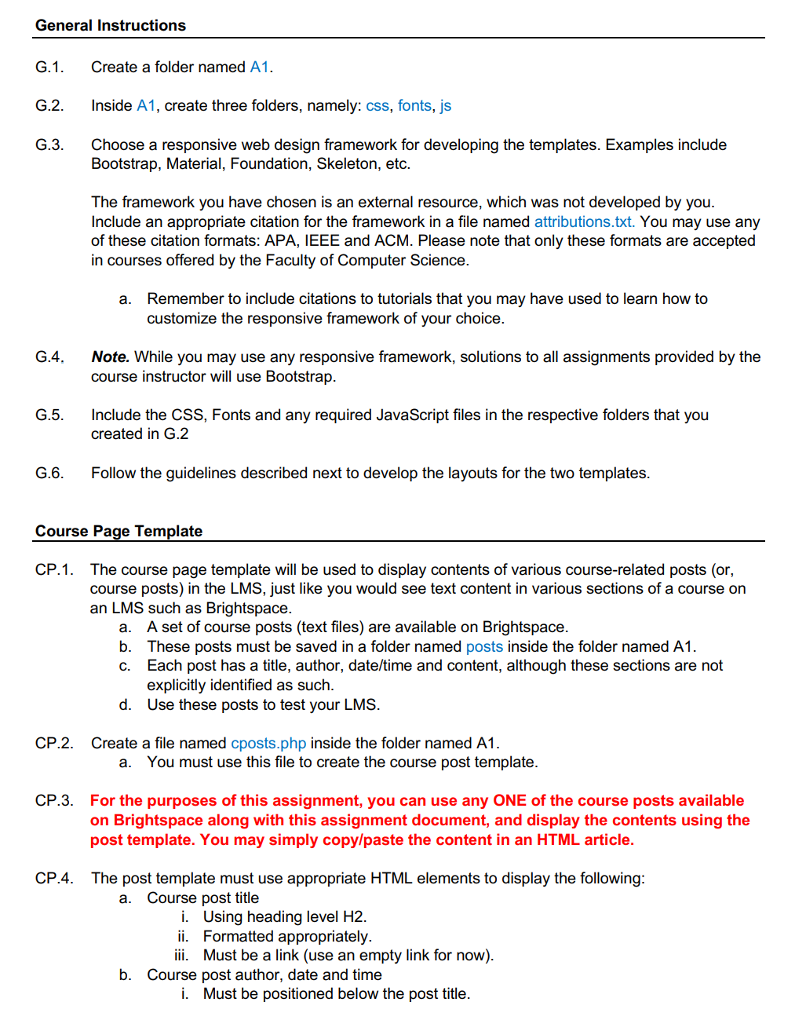
General Instructions G.1 Create a folder named A1 G.2 Inside A1, create three folders, namely: css, fonts, js G.3. Choose a responsive web design framework for developing the templates. Examples include Bootstrap, Material, Foundation, Skeleton, etc. The framework you have chosen is an external resource, which was not developed by you Include an appropriate citation for the framework in a file named attributions.txt. You may use any of these citation formats: APA, IEEE and ACM. Please note that only these formats are accepted in courses offered by the Faculty of Computer Science Remember to include citations to tutorials that you may have used to learn how to customize the responsive framework of your choice a. G.4. Note. While you may use any responsive framework, solutions to all assignments provided by the course instructor will use Bootstrap G.5 Include the CSS, Fonts and any required JavaScript files in the respective folders that you created in G.2 G.6. Follow the guidelines described next to develop the layouts for the two templates Course Page Template CP.1. The course page template will be used to display contents of various course-related posts (or, course posts) in the LMS, just like you would see text content in various sections of a course on an LMS such as Brightspace a. b. c. A set of course posts (text files) are available on Brightspace These posts must be saved in a folder named posts inside the folder named A1 Each post has a title, author, date/time and content, although these sections are not explicitly identified as such Use these posts to test your LMS d. CP.2. Create a file named cposts.php inside the folder named A1 a. You must use this file to create the course post template CP.3. For the purposes of this assignment, you can use any ONE of the course posts available on Brightspace along with this assignment document, and display the contents using the post template. You may simply copylpaste the content in an HTML article CP.4. The post template must use appropriate HTML elements to display the following a. Course post title i. Using heading level H2. ii. Formatted appropriately ii. Must be a link (use an empty link for now) b. Course post author, date and time i. Must be positioned below the post title ii. All may be contained in a paragraph. ii. They must be well spaced to distinguish the three data items iv. The post author must be a link (use an empty link for now) c. Course post content i. ii. Must be positioned below the post author/date/time If there are multiple paragraphs in the blog post, each paragraph must be in a separate
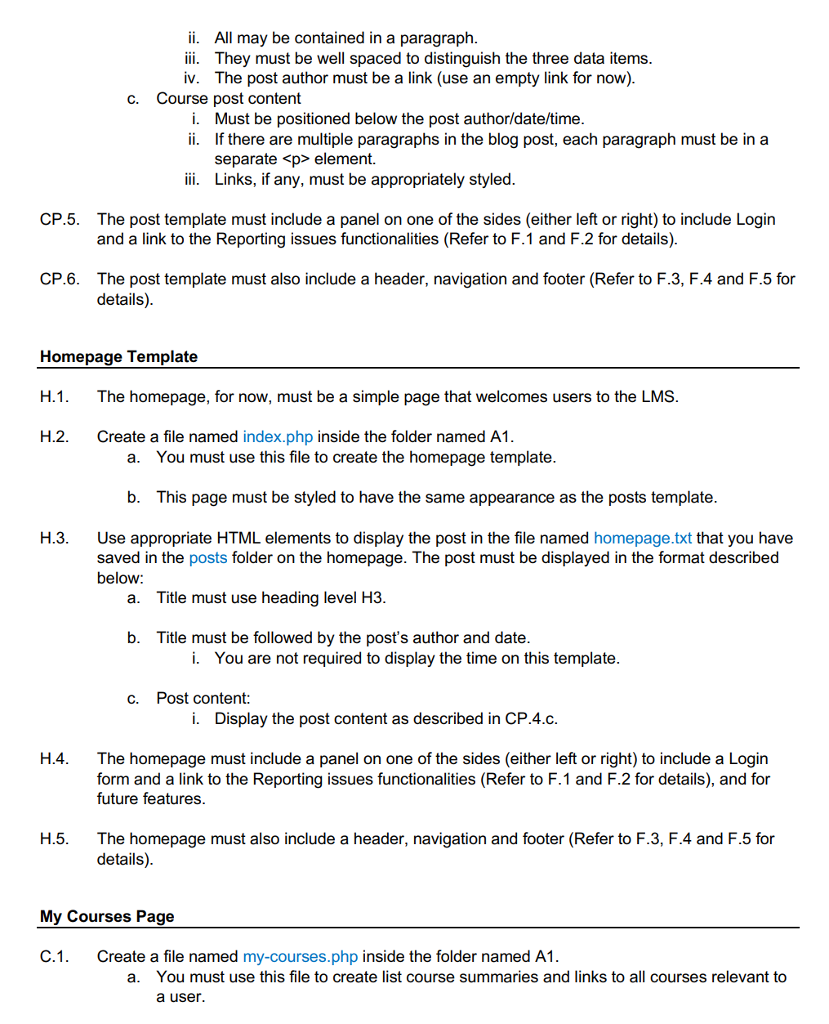
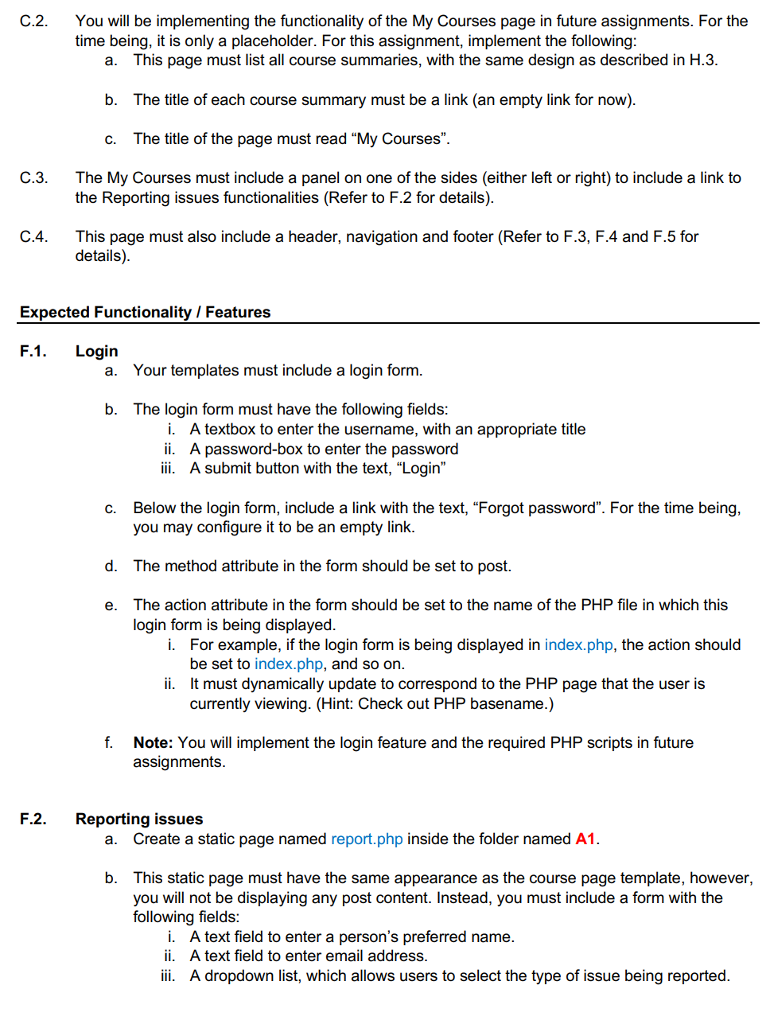
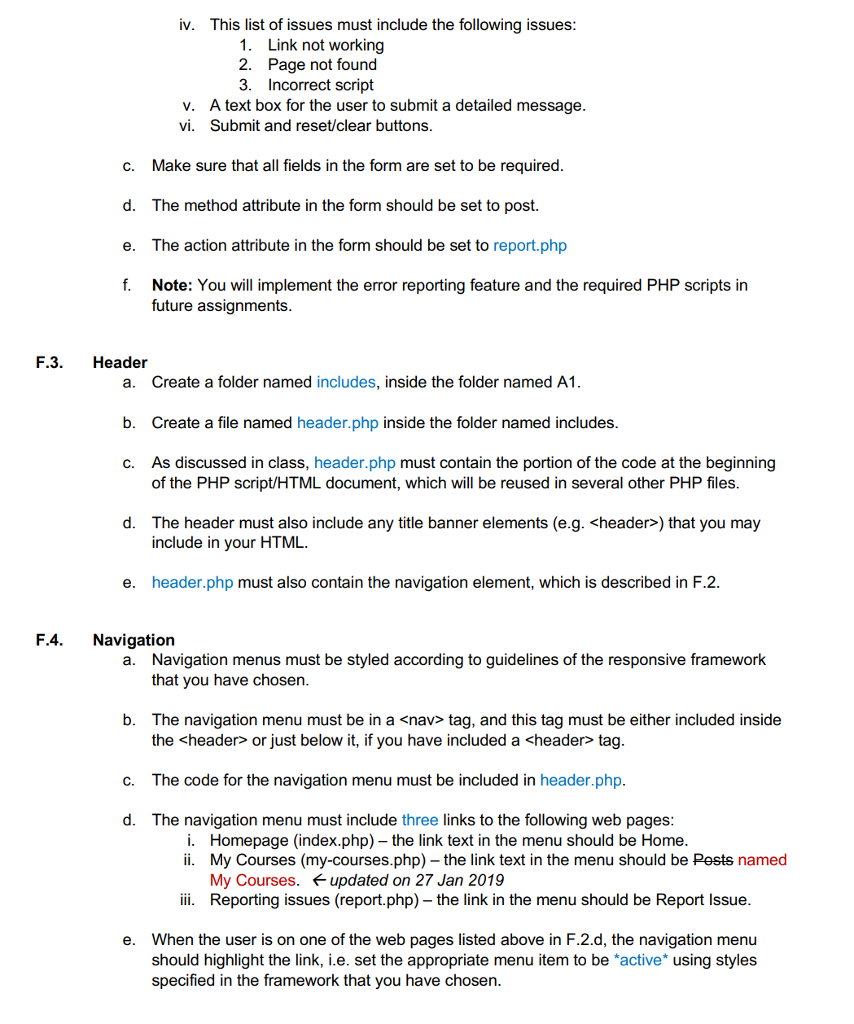
element. ii. Links, if any, must be appropriately styled CP.5. The post template must include a panel on one of the sides (either left or right) to include Login and a link to the Reporting issues functionalities (Refer to F.1 and F.2 for details). CP.6. The post template must also include a header, navigation and footer (Refer to F.3, F.4 and F.5 for details) Homepage Template H.1. The homepage, for now, must be a simple page that welcomes users to the LMS H.2. Create a file named index.php inside the folder named A1. a. You must use this file to create the homepage template b. This page must be styled to have the same appearance as the posts template H.3. Use appropriate HTML elements to display the post in the file named homepage.txt that you have saved in the posts folder on the homepage. The post must be displayed in the format described below: a. Title must use heading level H3 b. Title must be followed by the post's author and date i. You are not required to display the time on this template C. Post content: Display the post content as described in CP4.. H.4. The homepage must include a panel on one of the sides (either left or right) to include a Login form and a link to the Reporting issues functionalities (Refer to F.1 and F.2 for details), and for future features H.5. The homepage must also include a header, navigation and footer (Refer to F.3, F.4 and F.5 for details) My Courses Page C.1. Create a file named my-courses.php inside the folder named A1 a. You must use this file to create list course summaries and links to all courses relevant to a user. C.2. You will be implementing the functionality of the My Courses page in future assignments. For the time being, it is only a placeholder. For this assignment, implement the following This page must list all course summaries, with the same design as described in H.3 The title of each course summary must be a link (an empty link for now) The title of the page must read "My Courses" a. b. c. C.3. The My Courses must include a panel on one of the sides (either left or right) to include a link to the Reporting issues functionalities (Refer to F.2 for details) C.4. This page must also include a header, navigation and footer (Refer to F.3, F.4 and F.5 for details) Expected Functionality Features F.1. Login a. Your templates must include a login form. b. The login form must have the following fields i. A textbox to enter the username, with an appropriate title A password-box to enter the password ii. ii. A submit button with the text, "Login" Below the login form, include a link with the text, "Forgot password". For the time being you may configure it to be an empty link The method attribute in the form should be set to post. The action attribute in the form should be set to the name of the PHP file in which this login form is being displayed c. d. e. For example, if the login form is being displayed in index.php, the action should be set to index.php, and so on. It must dynamically update to correspond to the PHP page that the user is currently viewing. (Hint: Check out PHP basename.) i. ii. f. Note: You will implement the login feature and the required PHP scripts in future assignments F.2. Reporting issues a. Create a static page named report.php inside the folder named A1 This static page must have the same appearance as the course page template, however, you will not be displaying any post content. Instead, you must include a form with the following fields: b. i. A text field to enter a person's preferred name ii. A text field to enter email address ii. A dropdown list, which allows users to select the type of issue being reported iv. This list of issues must include the following issues 1. Link not workingg 2. Page not found 3. Incorrect script v. vi. A text box for the user to submit a detailed message Submit and reset/clear buttons Make sure that all fields in the form are set to be required The method attribute in the form should be set to post. The action attribute in the form should be set to report.php Note: You will implement the error reporting feature and the required PHP scripts in c. d. e. f. future assignments F.3. Header Create a folder named includes, inside the folder named A1 Create a file named header.php inside the folder named includes As discussed in class, header.php must contain the portion of the code at the beginning a. b. c. of the PHP script/HTML document, which will be reused in several other PHP files d. The header must also include any title banner elements (e.g. ) that you may include in your HTML e. header.php must also contain the navigation element, which is described in F.2 F.4. Navigation a. Navigation menus must be styled according to guidelines of the responsive framework that you have chosen b. The navigation menu must be in a
Step by Step Solution
There are 3 Steps involved in it
1 Expert Approved Answer
Step: 1 Unlock
Question Has Been Solved by an Expert!
Get step-by-step solutions from verified subject matter experts
Step: 2 Unlock
Step: 3 Unlock
Students Have Also Explored These Related Databases Questions!









 Study Help