







Question: The following gure shows an expanded version of the Excel spreadsheet described in Using Excel in Capacity Management (page 168). In addition to the break-even
The following figure shows an expanded version of the Excel spreadsheet described in Using Excel in Capacity Management (page 168). In addition to the break-even and indifference points, the expanded spreadsheet calculates financial results for three capacity options under three different demand scenarios.
Re-create this spreadsheet in Excel. You should develop the spreadsheet so that the results will be recalculated if any of the values in the highlighted cells are changed.
Your formatting does not have to be exactly the same, but the numbers should be. (As a test, see what happens if you change the "Max. output" and "Variable cost" for Capacity Option A to 250 units and $35, respectively.
Your new expected value for Capacity Option A should be $14,218.75.)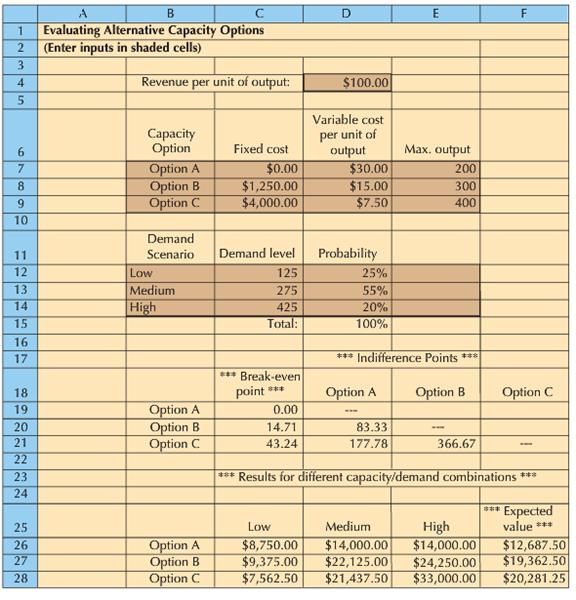
A F Evaluating Alternative Capacity Options (Enter inputs in shaded cells) 1 2 3. Revenue per unit of output: $100.00 Variable cost Capacity Option Option A Option B Option C per unit of output $30.00 $15.00 $7.50 6. Fixed cost Max. output 7 $0.00 200 $1,250.00 $4,000.00 300 400 10 Demand Scenario 11 Demand level Probability 12 Low 125 25% 13 Medium 275 55% 14 High 20% 100% 425 15 Total: 16 17 *** Indifference Points *** * Break-even point *** 18 Option A Option B Option C Option A Option B Option C 19 0.00 20 14.71 83,33 21 43.24 177.78 366,67 22 23 *** Results for different capacity/demand combinations *** 24 High $14,000.00 $24,250.00 $33,000.00 ** Expected value *** $12,687.50 $19,362.50 $20,281.25 25 Low Medium Option A Option B Option C $8,750.00 $9,375.00 $7,562.50 $14,000.00 $22,125.00 $21,437.50 26 27 28
Step by Step Solution
3.37 Rating (172 Votes )
There are 3 Steps involved in it
tr msoheightsourceauto col msowidthsourceauto br msodataplacementsamecell style0 msonumberformatGeneral textaligngeneral verticalalignbottom whitespacenowrap msorotate0 msobackgroundsourceauto msopatt... View full answer

Get step-by-step solutions from verified subject matter experts
Document Format (1 attachment)

436-B-M-L-S-C-M (2667).xlsx
300 KBs Excel File
 Study Help