







Question: How are warning messages identified in the input file? Refer to the PERL script shown in Figures 8.3 and 8.4. C:Users ex hDocumentsBook SQLServerLogCheck.prl -
How are warning messages identified in the input file?
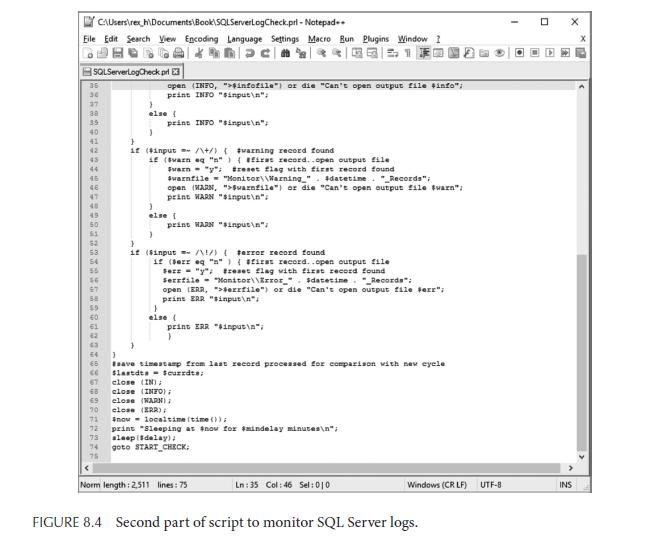
Refer to the PERL script shown in Figures 8.3 and 8.4.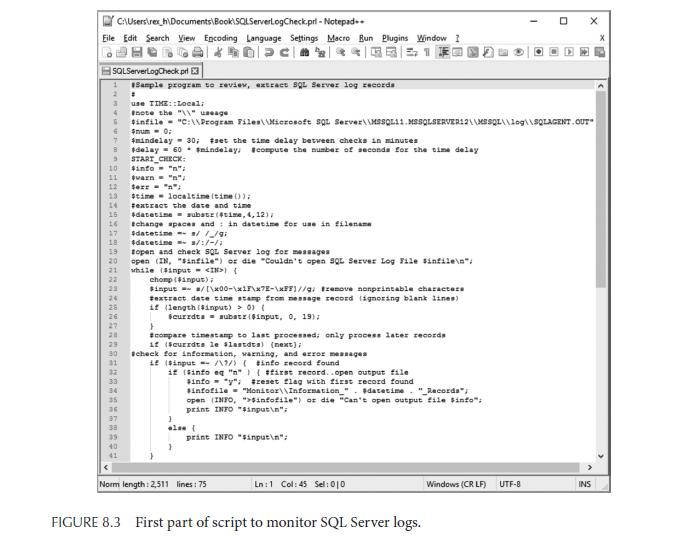
C:\Users ex h\Documents\Book SQLServerLogCheck.prl - Notepad++ Eile Edit Search View Encoding Language Settings Macro Bun Plugins Window I Dac SQLServerLogCheck pri Sample program to review, extract SQL Server log records 1 2 3 # use TIME::Local; #note the "\"usage #infile "C:\\Program Files\\Microsoft SQL Server\\MSSQL11 MSSQLSERVER12\\MSSQL\\log\\SQLAGENT OUT $num - 0: #mindelay= 30; #set the time delay between checks in minutes 8 #delay= 60 smindelay, #compute the number of seconds for the time delay 9 G 6 10 11 12 13 14 16 16 #change spaces and in datetime for use in filename 17 18 19 20 21 22 23 24 28 26 27 20 29 30 35 36 START CHECK: $info - "n": #varn = ""; Sex = "n"; stime 41 localtime (time()); #extract the date and time #datetime substr(4time, 4, 12); $datetimes/ /_/9; #datetime= 3/:/-/ topen and check SQL Server log for messages open (IN, "sinfile") or die "Couldn't open SQL Server Log File sinfile "/ while ($input ) { chomp ($input); Sinput= /[\x00-\x1F\x7E-\xFF)//g/ remove nonprintable characters #extract date time stamp from message record (ignoring blank lines) if (length (input) > 0) { Scurrdts = substr($input, 0, 19); } scompare timestamp to last processed; only process later records if ($currdts le slastdts) (next); #check for information, warning, and error messages if ($input =/\9/) ( #info record found if (sinfo eq "n") ( #first record..open output file sinfo = "y"; #reset flag with first record found #infofile="Monitor\\Information_"datetime. "_Records"; open (INFO, ">$infofile") or die "Can't open output file Sinfo"; print INFO "$input "; } ale ( print Norm length: 2,511 lines: 75 "singut "/ Ln: 1 Col: 45 Sel: 010 FIGURE 8.3 First part of script to monitor SQL Server logs. Windows (CRLF) X UTF-8 INS
Step by Step Solution
3.39 Rating (152 Votes )
There are 3 Steps involved in it
They ... View full answer

Get step-by-step solutions from verified subject matter experts
 Study Help