







Question: If you wanted to expand the search to include additional terms, what would you do? Refer to the PERL script shown in Figures 8.1 and
If you wanted to expand the search to include additional terms, what would you do?
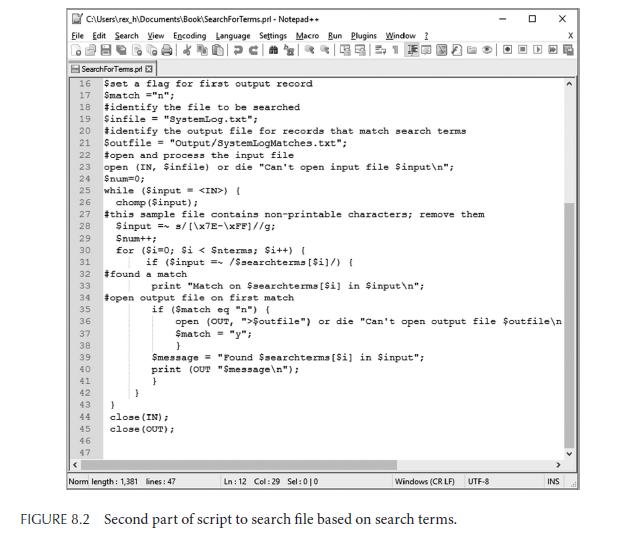
Refer to the PERL script shown in Figures 8.1 and 8.2.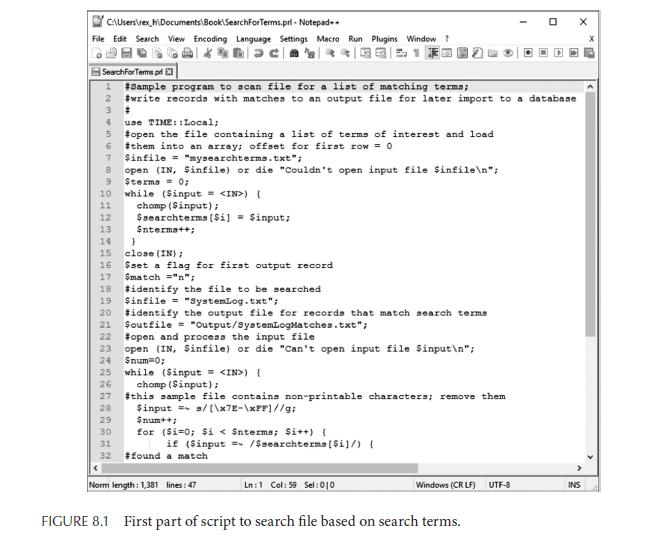
C:\Users ex h\Documents Book\SearchForTerms.pri- Notepad+. File Edit Search View Encoding Language Settings Macro Run Plugins Window? *O 510 SearchForTerms pr 13 #Sample program to scan file for a list of matching terms; #write records with matches to an output file for later import to a database 2 3 6 7 8 9 10 11 12 13 14 15 16 # 28 29 30 31 32 use TIME::Local; #open the file containing a list of terms of interest and load #them into an array; offset for first row = 0 $infile="mysearchterms.txt"; open (IN, Sinfile) or die "Couldn't open input file $infile "; Sterma= 0; while ($input = ) ( chomp (Sinput); $searchterms [Si] $input; $nterms++; } close (IN); $set a flag for first output record Smatch="n"; 17 18 #identify the file to be searched 19 $infile="SystemLog.txt"; 20 identify the output file for records that match search terms 21 Soutfile="Output/SystemLogMatches.txt"; 22 #open and process the input file 23 open (IN, Sinfile) or die "Can't open input file $input "; 24 $num=0; 25 while (Sinput = ) [ 26 chomp (Sinput); 27 #this sample file contains non-printable characters; remove them $input = /[\x7E-\xFF]//g; $num++; for ($i=0; $i < $nterms; $i++) { if ($input = /Ssearchterms [Si]/) ( #found a match Norm length: 1,381 lines: 47 Ln: 1 Col: 59 Sel: 010 Windows (CRLF) UTF-8 0 FIGURE 8.1 First part of script to search file based on search terms. X INS
Step by Step Solution
3.46 Rating (153 Votes )
There are 3 Steps involved in it
Edit the mys... View full answer

Get step-by-step solutions from verified subject matter experts
 Study Help