







Question: Modify the fragment shader in Program 15.8 so that the water caustics are also rendered when the camera is above the top surface as well.
Modify the fragment shader in Program 15.8 so that the water caustics are also rendered when the camera is above the top surface as well. Do you think that the scene appears more realistic or less realistic with the caustics included in this case? If the latter, try to find a way to tune the caustics so that they increase realism rather than detracting from it.
Program 15.8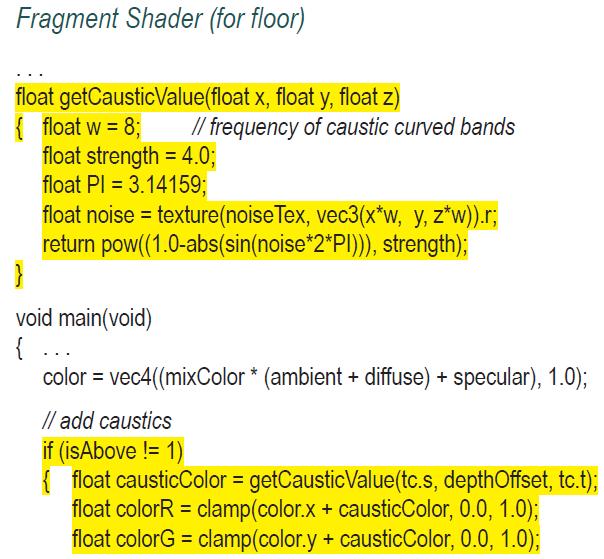
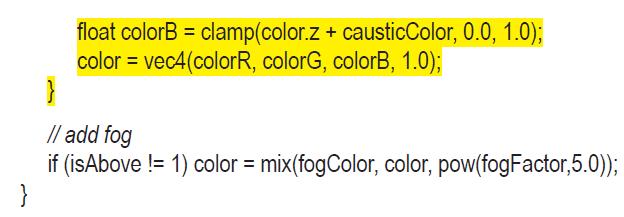
Fragment Shader (for floor) float getCausticValue(float x, float y, float z) { float w = 8; float strength = 4.0; float PI 3.14159; // frequency of caustic curved bands float noise = texture(noise Tex, vec3(x*w, y, z*w)).r; return pow((1.0-abs(sin(noise*2*P))), strength); } void main(void) { ... color = vec4((mixColor * (ambient + diffuse) + specular), 1.0); // add caustics if (isAbove != 1) {float causticColor = getCausticValue(tc.s, depth Offset, tc.t); float colorR = clamp(color.x + causticColor, 0.0, 1.0); float colorG = clamp (color.y + causticColor, 0.0, 1.0);
Step by Step Solution
3.34 Rating (163 Votes )
There are 3 Steps involved in it

Get step-by-step solutions from verified subject matter experts
 Study Help