







Question: 1. Add B-size border (17 x 11). 2. Add title block and populate information in the title block. 3. Adjust dimension size and gap
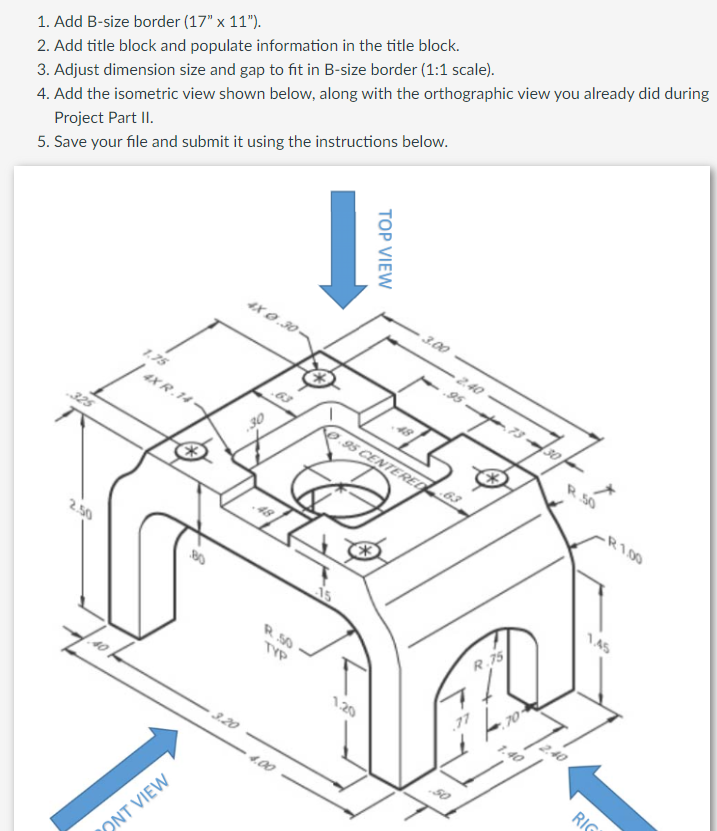
1. Add B-size border (17" x 11"). 2. Add title block and populate information in the title block. 3. Adjust dimension size and gap to fit in B-size border (1:1 scale). 4. Add the isometric view shown below, along with the orthographic view you already did during Project Part II. 5. Save your file and submit it using the instructions below. 325 2.50 7.10 1.75 4X R.14- ONT VIEW -8 4X 0.30- 30 R. 50 TYP 4.00 TOP VIEW 1.20 3.00 95 CENTERED 50 2.40 R.75 1.40 30 2.40 -R100 1.45 RIG
Step by Step Solution
There are 3 Steps involved in it
Instructions Breakdown and Implementation Guide Step 1 Add Bsize Border 17 x 11 Set your drawing she... View full answer

Get step-by-step solutions from verified subject matter experts
 Study Help