







Question: 1. In the Steganography class, after modifying canHide to allow the secret image to be smaller than the source image, write a second version of
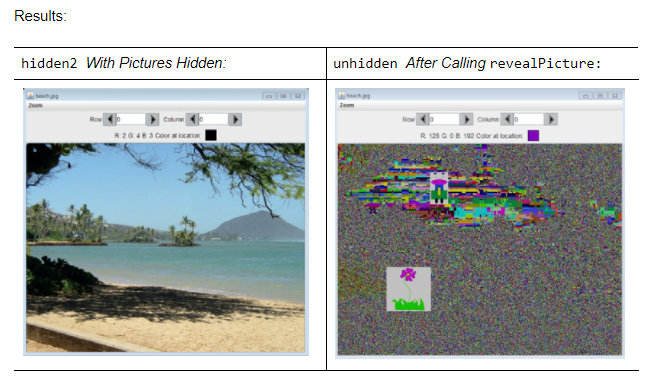
1. In the Steganography class, after modifying canHide to allow the secret image to be smaller than the source image, write a second version of the hidePicture method that allows the user to place the hidden picture anywhere on the modified picture. This means adding two parameters for startRow and startColumn that represent the row and column of the upper left corner where the hidden picture will be placed.
Sample code: Picture beach = new Picture("beach.jpg"); Picture robot = new Picture("robot.jpg"); Picture flower1 = new Picture("flower1.jpg"); beach.explore();
// these lines hide 2 pictures Picture hidden1 = hidePicture(beach, robot, 65, 208); Picture hidden2 = hidePicture(hidden1, flower1, 280, 110); hidden2.explore();
Picture unhidden = revealPicture(hidden2); unhidden.explore();
2. Write a method findDifferences that takes two pictures and makes a list
of the coordinates that are different between them (returns an ArrayList of
points/coordinates).
Sample code:
Picture arch = new Picture("arch.jpg");
Picture koala = new Picture("koala.jpg");
Picture robot1 = new Picture("robot.jpg");
ArrayList
System.out.println("PointList after comparing two identical pictures " + "has a size of " + pointList.size());
pointList = findDifferences(arch, koala);
System.out.println("PointList after comparing two different sized pictures " + "has a size of " + pointList.size());
Picture arch2 = hidePicture(arch, robot1, 65, 102);
pointList = findDifferences(arch, arch2);
System.out.println("Pointlist after hiding a picture has a size of " + pointList.size());
arch.show();
arch2.show();
Results:
PointList after comparing two identical pictures has a size of 0
PointList after comparing two different sized pictures has a size of 0
PointList after hiding a picture has a size of 2909
3. Write a method showDifferentArea that takes a picture and an ArrayList and draws a rectangle around part of picture that is different (returns a Picture).
Tip To provide instructions for the computer to process many different input values, selection statements may need to be nested together to form more than two branches and options. Pathways can be broken down into a series of individual selection statements based on the conditions that need to be checked and nesting together the conditions that should only be checked when other conditions fail or succeed.
Sample code: Picture hall = new Picture("femaleLionAndHall.jpg"); Picture robot2 = new Picture("robot.jpg"); Picture flower2 = new Picture("flower1.jpg"); // hide pictures Picture hall2 = hidePicture(hall, robot2, 50, 300); Picture hall3 = hidePicture(hall2, flower2, 115, 275); hall3.explore(); if(!isSame(hall, hall3)) { Picture hall4 = showDifferentArea(hall, findDiffferences(hall, hall3)); hall4.show(); Picture unhiddenHall3 = revealPicture(hall3); unhiddenHall3.show(); } 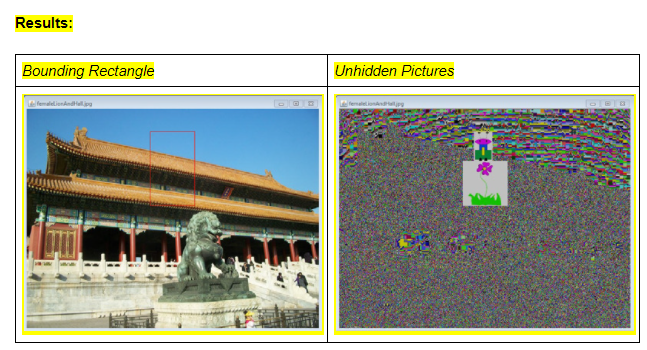
Can anyone do it?
Results: hidden 2 With Pictures Hidden: unhidden After Calling revealPicture: Zoom Colum Colu R26 4B 3 Coloration R 25 GOB 192 Colorat location Results: Bounding Rectangle Unhidden Pictures Line
Step by Step Solution
There are 3 Steps involved in it

Get step-by-step solutions from verified subject matter experts
 Study Help