







Question: 9. (12 points) You are working as a network administrator. You prefer to have DHCP. Please set up DHCP. You want to have the following
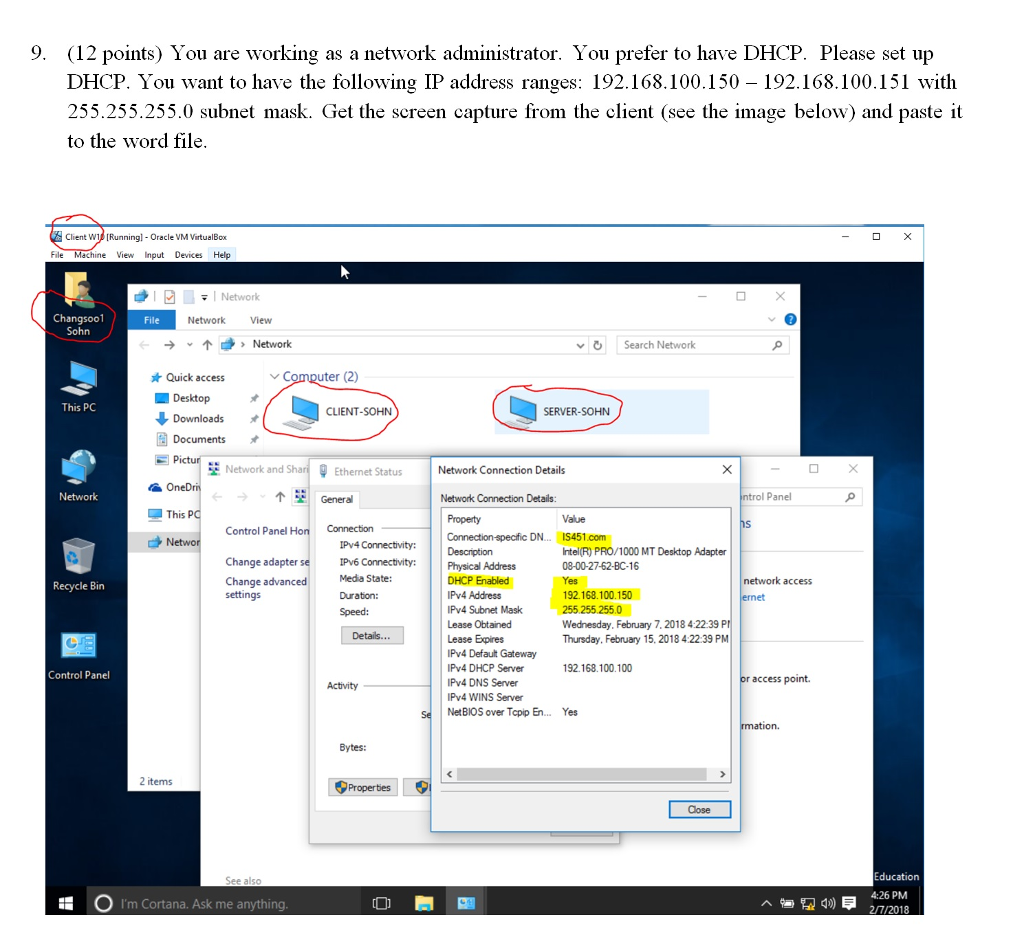
9. (12 points) You are working as a network administrator. You prefer to have DHCP. Please set up DHCP. You want to have the following IP address ranges: 192.168.100.150 - 192.168.100.151 witlh 255.255.255.0 subnet mask. Get the screen capture from the client (see the image below) and paste it to the word file Client Wi Running- Oracle VM VirtualBox hine View InputDes Help File Network View Network Search Network Quick access Computer (2) This PC CLIENT-SOHN SERVER-SOHN Documents Network anaEthermet StatusNetwork Connection Details TGeneral Network Connection Details: l Panel This P Property Value Control Panel H Connection-specfic DN.. IS451.com Intel(R) PRO/1000 MT Desktop Adapter 08-00-27-62-BC-16 Yes 192.168.100.150 255.255.255.0 Wednesday, February 7, 2018 4:22:39 P Thursday, February 15, 2018 4:22:39 PM Change adapter se Change advanced settings Media State: Duration: Speed: Physical Address DHCP Enabled network access Recycle Bin IPy4 Address Pv4 Subnet Mask Lease Obtained Lease Expires IPv4 Defaut Gateway Py4 DHCP Server Pv4 DNS Server IPv4 WINS Server NetBIOS over Topip En.. Yes 192.168.100.100 Control Panel access point. Activity Bytes: 2 items dose 4:26 PM O I'm Cortana. Ask me anything
Step by Step Solution
There are 3 Steps involved in it

Get step-by-step solutions from verified subject matter experts
 Study Help