







Question: Aim: In this experiment, students will be introduced to the INT 21H subroutines provided by DOS operating system for I/O programming. Background: 1- Service 01h:
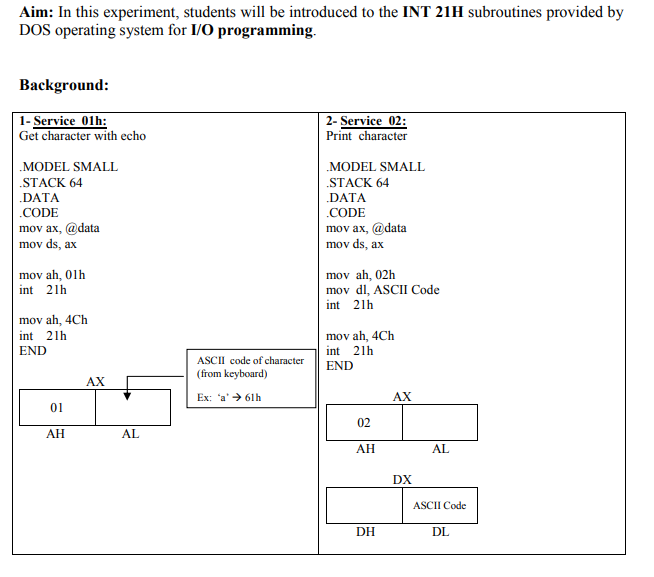
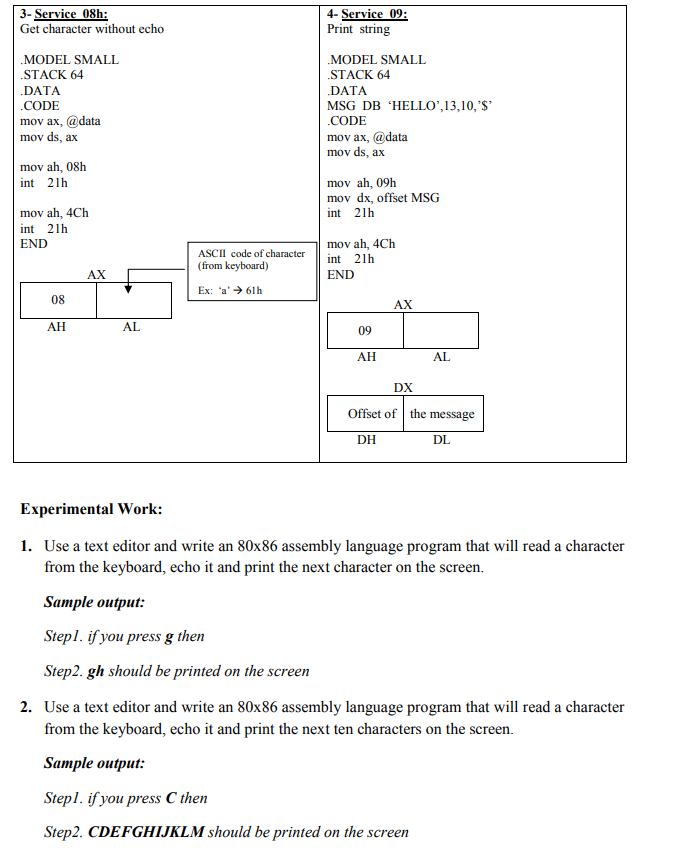
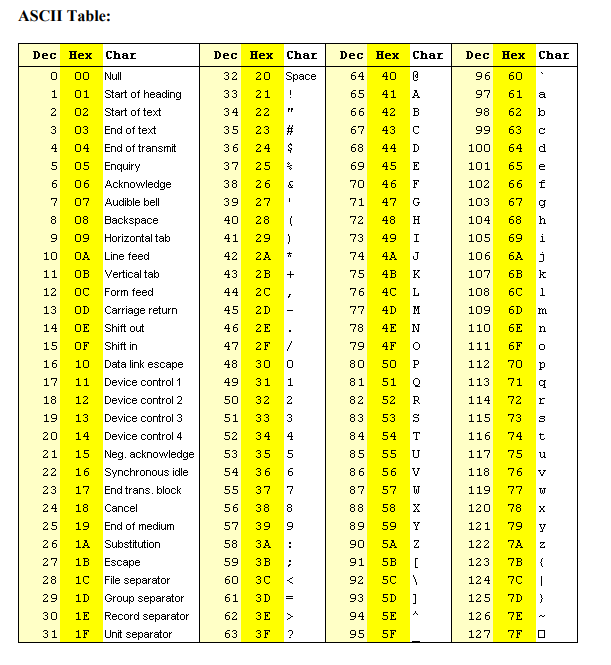
Aim: In this experiment, students will be introduced to the INT 21H subroutines provided by DOS operating system for I/O programming. Background: 1- Service 01h: Get character with echo 2- Service 02: Print character MODEL SMALL STACK 64 .DATA .CODE mov ax, @data mov ds, ax MODEL SMALL STACK 64 .DATA .CODE mov ax, @data mov ds, ax mov ah, 01h int 21h mov ah, 02h mov dl, ASCII Code int 21h mov ah, 4Ch int 21h END mov ah, 4Ch int 21h END AX ASCII code of character (from keyboard) Ex: a' 61h AX 01 02 AH AL AH AL DX ASCII Code DH DL 3- Service 08h: Get character without echo 4- Service 09: Print string .MODEL SMALL STACK 64 .DATA .CODE mov ax, @data mov ds, ax .MODEL SMALL STACK 64 .DATA MSG DB 'HELLO',13,10,'$ .CODE mov ax, @data mov ds, ax mov ah, 08h int 21h mov ah, 09h mov dx, offset MSG int 21h mov ah, 4Ch int 21h END mov ah, 4Ch int 21h END ASCII code of character (from keyboard) Ex: 'a' 61h AX 08 AX AH AL 09 AH AL DX Offset of the message DH DL Experimental Work: 1. Use a text editor and write an 80x86 assembly language program that will read a character from the keyboard, echo it and print the next character on the screen. Sample output: Stepl. if you press g then Step2. gh should be printed on the screen 2. Use a text editor and write an 80x86 assembly language program that will read a character from the keyboard, echo it and print the next ten characters on the screen. Sample output: Stepl. if you press C then Step2. CDEFGHIJKLM should be printed on the screen ASCII Table: Dec Hex Char Dec Hex Char Dec Hex Char Dec Hex Char 0 00 40 @ 60 Space ! 64 65 1 A a 33 34 35 96 97 98 99 61 62 41 42 43 2 3 B 21 22 23 24 b 66 67 # 63 C 04 68 64 d 4 5 $ $ & 44 45 D E 100 101 25 26 6 69 70 71 46 F 65 66 67 102 103 TI 7 27 1 47 g 28 68 8 9 39 40 41 42 48 49 4A H I J h i 69 10 72 73 74 75 76 77 104 105 106 107 108 6A 43 4B 6B 11 12 j k 1 44 4C 6C 6D 13 14 45 46 29 ) 2A * 2B + 2C 2D 2 E 2F / 30 31 1 32 2 4D 4E 109 110 78 N 6E n 79 Null 01 Start of heading 02 Start of text 03 End of text End of transmit 05 Enquiry 06 Acknowledge 07 Audible bell 08 Backspace 09 Horizontal tab OA Line feed OB Vertical tab OC Form feed OD Carriage return OE Shift out OF Shift in 10 Data link escape Device control 1 12 Device control 2 13 Device control 3 14 Device control 4 15 Neg. acknowledge 16 Synchronous idle 17 End trans. block 18 Cancel 19 End of medium 1A Substitution 1B Escape 1C File separator 1D Group separator 1E Record separator 1F Unit separator 15 16 47 48 4F 50 111 112 6F 70 P p 17 11 49 51 0 71 113 114 18 50 52 R 72 sum t 3 115 19 20 51 52 83 84 S T 73 74 116 117 21 53 U 75 u 4 5 6 7 22 54 53 54 55 56 57 58 59 V V 86 87 55 118 119 76 77 W TJ 23 24 25 8 120 X 56 57 88 89 78 79 9 Y 58 . Z 26 27 Z 90 91 121 122 123 5A 5B 72 7B 59 [ { 28 5C 60 61 92 93 7C 7D | } 3D = 5D ] 29 30 31 124 125 126 127 > 7E 62 63 3F 94 95 SE 5F ? 7F Aim: In this experiment, students will be introduced to the INT 21H subroutines provided by DOS operating system for I/O programming. Background: 1- Service 01h: Get character with echo 2- Service 02: Print character MODEL SMALL STACK 64 .DATA .CODE mov ax, @data mov ds, ax MODEL SMALL STACK 64 .DATA .CODE mov ax, @data mov ds, ax mov ah, 01h int 21h mov ah, 02h mov dl, ASCII Code int 21h mov ah, 4Ch int 21h END mov ah, 4Ch int 21h END AX ASCII code of character (from keyboard) Ex: a' 61h AX 01 02 AH AL AH AL DX ASCII Code DH DL 3- Service 08h: Get character without echo 4- Service 09: Print string .MODEL SMALL STACK 64 .DATA .CODE mov ax, @data mov ds, ax .MODEL SMALL STACK 64 .DATA MSG DB 'HELLO',13,10,'$ .CODE mov ax, @data mov ds, ax mov ah, 08h int 21h mov ah, 09h mov dx, offset MSG int 21h mov ah, 4Ch int 21h END mov ah, 4Ch int 21h END ASCII code of character (from keyboard) Ex: 'a' 61h AX 08 AX AH AL 09 AH AL DX Offset of the message DH DL Experimental Work: 1. Use a text editor and write an 80x86 assembly language program that will read a character from the keyboard, echo it and print the next character on the screen. Sample output: Stepl. if you press g then Step2. gh should be printed on the screen 2. Use a text editor and write an 80x86 assembly language program that will read a character from the keyboard, echo it and print the next ten characters on the screen. Sample output: Stepl. if you press C then Step2. CDEFGHIJKLM should be printed on the screen ASCII Table: Dec Hex Char Dec Hex Char Dec Hex Char Dec Hex Char 0 00 40 @ 60 Space ! 64 65 1 A a 33 34 35 96 97 98 99 61 62 41 42 43 2 3 B 21 22 23 24 b 66 67 # 63 C 04 68 64 d 4 5 $ $ & 44 45 D E 100 101 25 26 6 69 70 71 46 F 65 66 67 102 103 TI 7 27 1 47 g 28 68 8 9 39 40 41 42 48 49 4A H I J h i 69 10 72 73 74 75 76 77 104 105 106 107 108 6A 43 4B 6B 11 12 j k 1 44 4C 6C 6D 13 14 45 46 29 ) 2A * 2B + 2C 2D 2 E 2F / 30 31 1 32 2 4D 4E 109 110 78 N 6E n 79 Null 01 Start of heading 02 Start of text 03 End of text End of transmit 05 Enquiry 06 Acknowledge 07 Audible bell 08 Backspace 09 Horizontal tab OA Line feed OB Vertical tab OC Form feed OD Carriage return OE Shift out OF Shift in 10 Data link escape Device control 1 12 Device control 2 13 Device control 3 14 Device control 4 15 Neg. acknowledge 16 Synchronous idle 17 End trans. block 18 Cancel 19 End of medium 1A Substitution 1B Escape 1C File separator 1D Group separator 1E Record separator 1F Unit separator 15 16 47 48 4F 50 111 112 6F 70 P p 17 11 49 51 0 71 113 114 18 50 52 R 72 sum t 3 115 19 20 51 52 83 84 S T 73 74 116 117 21 53 U 75 u 4 5 6 7 22 54 53 54 55 56 57 58 59 V V 86 87 55 118 119 76 77 W TJ 23 24 25 8 120 X 56 57 88 89 78 79 9 Y 58 . Z 26 27 Z 90 91 121 122 123 5A 5B 72 7B 59 [ { 28 5C 60 61 92 93 7C 7D | } 3D = 5D ] 29 30 31 124 125 126 127 > 7E 62 63 3F 94 95 SE 5F ? 7F
Step by Step Solution
There are 3 Steps involved in it

Get step-by-step solutions from verified subject matter experts
 Study Help