







Question: Arrays: In this Lab you will work with arrays. Follow the instructions and implement the code as you read step by step: 1. Create a
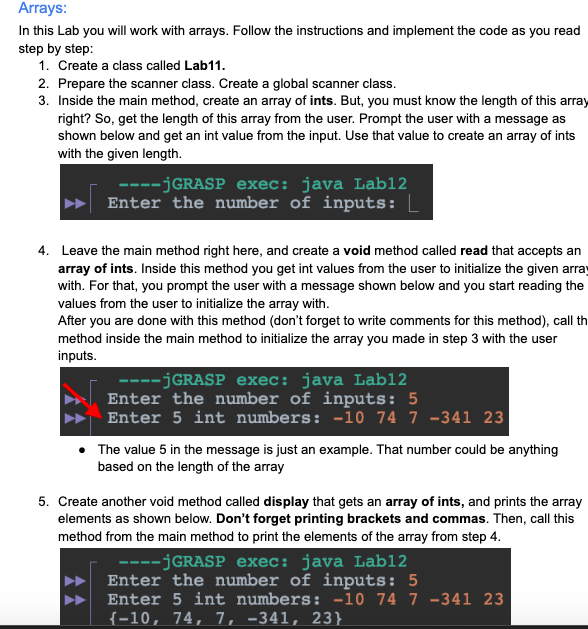
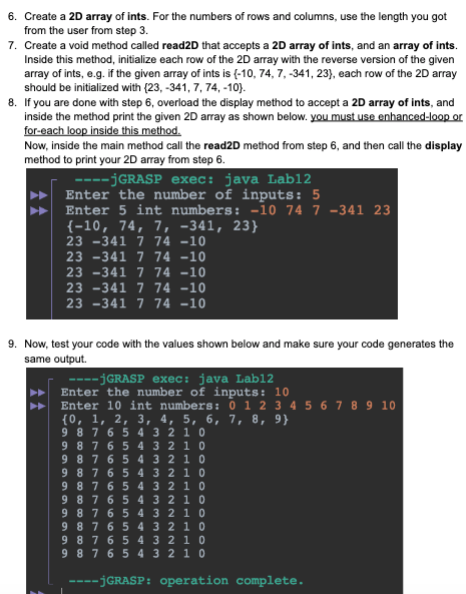
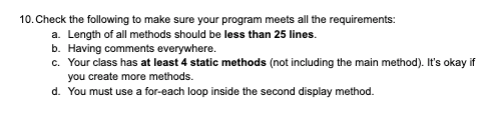
Arrays: In this Lab you will work with arrays. Follow the instructions and implement the code as you read step by step: 1. Create a class called Lab11. 2. Prepare the scanner class. Create a global scanner class. 3. Inside the main method, create an array of ints. But, you must know the length of this arra right? So, get the length of this array from the user. Prompt the user with a message as shown below and get an int value from the input. Use that value to create an array of ints with the given length. 4. Leave the main method right here, and create a void method called read that accepts an array of ints. Inside this method you get int values from the user to initialize the given arra with. For that, you prompt the user with a message shown below and you start reading the values from the user to initialize the array with. After you are done with this method (don't forget to write comments for this method), call th method inside the main method to initialize the array you made in step 3 with the user inputs. - The value 5 in the message is just an example. That number could be anything based on the length of the array 5. Create another void method called display that gets an array of ints, and prints the array elements as shown below. Don't forget printing brackets and commas. Then, call this method from the main method to print the elements of the array from step 4. jGRASPexec:javaLab12Enterthenumberofinputs:5Enter5intnumbers:1074734123{10,74,7,341,23} 6. Create a 2D array of ints. For the numbers of rows and columns, use the length you got from the user from step 3. 7. Create a void method called read2D that accepts a 2D array of ints, and an array of ints. Inside this method, initialize each row of the 2D array with the reverse version of the given array of ints, e.g. If the given array of ints is {10,74,7,341,23}, each row of the 2D array should be initialized with {23,341,7,74,10}. 8. If you are done with step 6, overload the display method to accept a 2D array of ints, and inside the method print the given 2D array as shown below. you must use enhanced-loop or. for-each loop inside this method. Now, inside the main method call the read2D method from step 6 , and then call the display method to print your 2D array from step 6. 9. Now, test your code with the values shown below and make sure your code generates the same output. 10. Check the following to make sure your program meets all the requirements: a. Length of all methods should be less than 25 lines. b. Having comments everywhere. c. Your class has at least 4 static methods (not including the main method). It's okay if you create more methods. d. You must use a for-each loop inside the second display method
Step by Step Solution
There are 3 Steps involved in it

Get step-by-step solutions from verified subject matter experts
 Study Help