







Question: Assume we are given the task of sorting a large amount of data stored in files. However,our data is too large to fit in memory.
Assume we are given the task of sorting a large amount of data stored in files. However,our data is too large to fit in memory. So, we cannot directly take advantage of the nifty sorting algorithms we learned in class. In this project your job is to sort multiple files, whilst requiring minimum storage and run time.
You'll read the plain text files that contain unsorted numbers. Then, sort the data by dividing them into multiple chunks, where the size of each chunk is limited by the size of memory we are simulating. Finally, write the result in an output file.
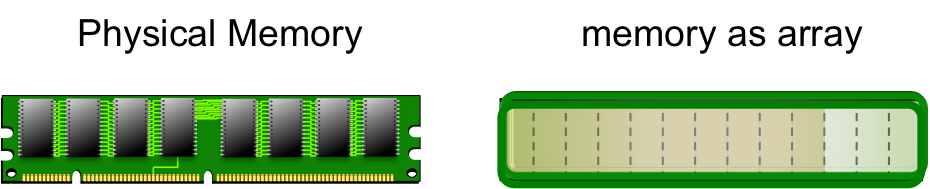
class SimulateChunks
Reads the numbers from file and puts them in an array. Then splits the array according to the given memory size and adds the chunks to the chunks array.
Defines the static splitFileIntoArrayChunks() method to have as argument:
a final int for the simulated memory size,
a String object for the name of the input file,
an ArrayList of Integer[] objects for the array list that holds chunks of arrays of integers.
class BasicSorter
Sorts an individual chunk in place using the static sortChunk() method which receives an Integer[] object as argument. The sorting algorithm should depend on the number of elements.
NOTE: In place means that the sorted result is stored in the argument "chunk".
class SortFileData
An instance of class SortFileData sorts the files in two phases and outputs the result of all sorted numbers.
The two phases are:
void sortChunk(Integer [] array) - Sorts each individual chunk. To determine the sorting algorithm to use, first look at the chunk size. Then based on the number of elements choose the sorting algorithm in the modules that is optimal for the given size.
Uses min heap sorting techniques to sort all chunks with respect to each other.
Sort each array by using minHeap via the method mergeSortedArrays()defined in class heapArrayMerger. Suggestion: Take advantage of the logic from our heap sorting algorithm we studied in modules.
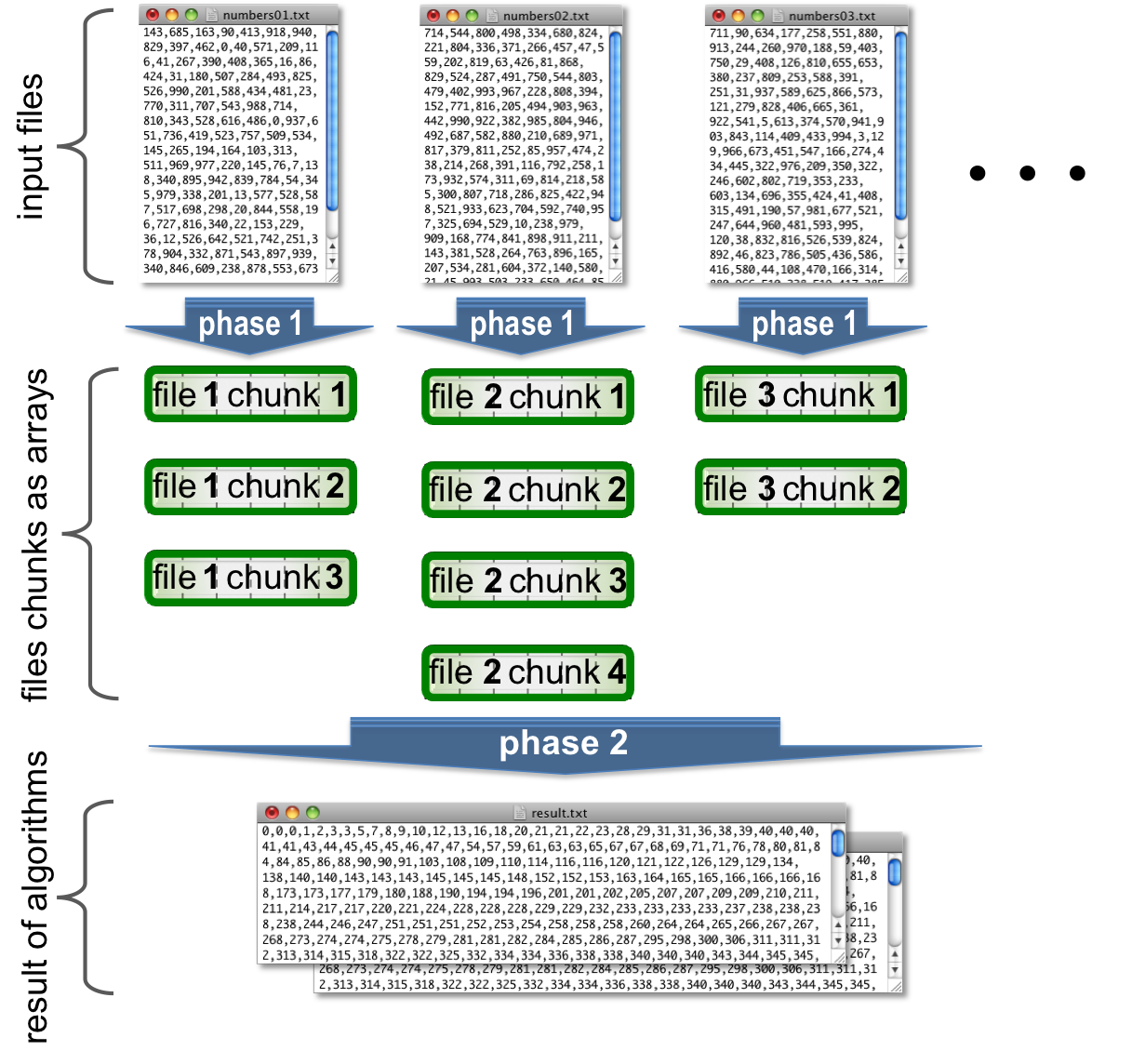
class heapArrayMerger
static void mergeSortedArrays(MEM_SIZE, ArrayList inputChunks, HeapTuple[] minHeap, String outfile, final boolean ENABLE_DEBUG) - Uses the minHeap technique to sort the various chunks with respect to each other and writes the output to a file called result_using_min_heap.txt Note: In class heapArrayMerger we are NOT explicitly calling theFHsort.heapSort() method. Use the array of HeapTuple objects called minHeap to hold the current minimums. NOTE: Assume the number of chunks can be greater than available MEM_SIZE. In this case the challenge is keep track of which array you grabbed the current minimum in this pass. Remember, it doesn't matter how many chunks we have, our only goal is to run through all the chunks until MEM_SIZE many minimums are grabbed. Write these out to a file. Then, we reset our array holding the mins and restart for the next pass. In your RUN.txt file show a sample number of iterations.
The format of the inputs files "numbers01.txt", "numbers02.txt", etc in CSV shown in the example below:
143,685,163,90,413,918,940,829,397
Output of example:
90,143,163,397,413,685,829,918,940,
In total you will have two output files:
Files produced by main called "result_using_bin_heap.txt". The output should be a comma delimited list of all sorted numbers with respect to each other.
For example: If you had four input files with the following:
numbers01.txt file:
5,3,4
numbers02.txt file:
4,2,3,2
numbers03.txt file:
1,9,5
numbers04.txt file:
4,5,1,7
Then, for example result_using_min_heap.txt should look as follows:
1,1,2,2,3,3,4,4,4,5,5,5,7,9
NOTE: Do NOT edit the output file result_using_bin_heap.txt.
File RUN.txt where you will copy and paste the output of your program.
Provided classes:
public class SortFileData { /** * Restricting the size of available memory to simulate large * input file(s) that do not fit in memory. * The size of a chunk is determined by the size of the memory. */ private static final int MEM_SIZE = 31; private static final boolean ENABLE_DEBUG_PHASE01 = false; private static final boolean ENABLE_DEBUG_PHASE02 = false; private static final int OUTPUT_WIDTH = 70; private static final String OUTPUT_SEPARATOR = "----------------------------------------------------------------------"; /** * Display the contents of a chunk. * @param chunk a subset of the data as a chunk */ public static void displayChunkContent(Integer [] chunk) { System.out.println(OUTPUT_SEPARATOR); String outStr = ""; for (int elem : chunk) { outStr += elem + ","; if (outStr.length() > OUTPUT_WIDTH) { System.out.println(outStr); outStr = ""; } } if (outStr != "") System.out.println(outStr); // print out left left one System.out.println(OUTPUT_SEPARATOR); } /** * Display the chunk number and contents. * @param chunk a subset of the data as a chunk * @param index the position of the data with respect to original */ public static void displayFileChunk(Integer [] chunk, int index) { System.out.println("file chunk[" + index + "] with size " + chunk.length + " :"); displayChunkContent(chunk); } /** * For debugging and displaying results. * Outputs the array of Integer objects. * @param array a subset of the data sorted * @param index the position of the data with respect to original */ public static void displaySortedChunks( Integer [] array, int index1) { System.out.println("sort file chunk[" + index1 + "] with size " + array.length + ":"); displayChunkContent(array); System.out.println(""); } /** * For debugging and displaying results. * Used to output a sample number of chunks. */ private static void displaySampleChunks(ArrayList fileChunksAsArrays, int numOfChunks) { int numOfFileChunks = fileChunksAsArrays.size(); // displays the chunks // NOTE: If there are too many chunks, alternatively vary by how much i is incremented. for (int i = 0; i fileChunksAsArrays = new ArrayList(); for (String fname : fileNames) { // TODO: Reads text files and stores the data into arrays of integers chunk(s). // Each chunk is represented by an array of Integers of length MEM_SIZE // Adds the chunk(s) to the list of chunks called fileChunksAsArrays // Suggestion: Use Arrays.copyOfRange(int[] original, int from, int to) // to copy a chunk found into fileChunksAsArrays // for more details see: // http://docs.oracle.com/javase/7/docs/api/java/util/Arrays.html#copyOfRange(int[],%20int,%20int) SimulateChunks.splitFileIntoArrayChunks(MEM_SIZE, filePath + fname, fileChunksAsArrays); } // Phase 1. Sort each individual chunk --------------------------------------- // // Note: the total size of all chunks should be the same as the total number // of values in each file divided by the memory size. int numOfChunks = fileChunksAsArrays.size(); System.out.println("Number of arrays holding file input = " + numOfChunks); int chunkIndex = 0; for (Integer[] chunk : fileChunksAsArrays) { if (ENABLE_DEBUG_PHASE01) { displayFileChunk(chunk, chunkIndex); chunkIndex++; } // TODO: Pick a sorting algorithm from the modules which sorts an individual chunk in place. // The sorting algorithm you should should depend on the specific size of the chunk. // The sorted result is stored in the argument "chunk". BasicSorter.sortChunk(chunk); } // Display the result of various chunks after sorting. displaySampleChunks(fileChunksAsArrays, numOfChunks); // Phase 2. Use the min heap sorting techniques to sort all chunks ---------- // long startTime, estimatedTime; // capture start time startTime = System.nanoTime(); DateFormat format = new SimpleDateFormat("yyyyMMdd_hhmmss"); String timeStamp = format.format(new Date()); String outputFileName = "result_using_min_heap_" + timeStamp + ".txt"; // TODO: Use the array of HeapTuple objects called "heap" to hold the current // minimums (or alternatively maximums) . // In your RUN.txt file show a sample number of iterations. // NOTE: Assume the number of chunks can be greater than available MEM_SIZE. int heapSize = MEM_SIZE; HeapTuple[] heap = new HeapTuple[heapSize]; // TODO: Use the minHeap (or alternatively maxHeap) technique we learned in // modules to sort the various chunks with respect to each other and // write the output to a file called "result_using_heap.txt" // Note: In class heapArrayMerger, we are *not* explicitly calling FHsort.heapSort. // // NOTE: When ENABLE_DEBUG_PHASE02 display the elements of heap to console at each iteration. // That is when your implementation is ready to dump the heap to the output file, print // the elements in heap to console. Write the elements to the output file. Finally, clear // the contents of heap in preparation for the next iteration. heapArrayMerger.mergeSortedArrays(MEM_SIZE, fileChunksAsArrays, heap, filePath + outputFileName, ENABLE_DEBUG_PHASE02); // TODO: Clone a copy of the heap. Add the clone to an array list. // Provide an accessor method. // NOTE: This data structure is for testing purposes. // Suggestion: Test whether your heap is a valid min or max heap ArrayList heapsUsed = heapArrayMerger.getHeapsUsed(); // stop and calculate elapsed time estimatedTime = System.nanoTime() - startTime; // report algorithm time System.out.println(" Algorithm Elapsed Time: " + TimeConverter.convertTimeToString(estimatedTime) + " "); } } public class HeapTuple implements Comparable{ /** * The number we read from a file */ private int data; /** * The index of the array that this data belongs to. */ private int arrayIndex; /** * The index of this data in its specific array. */ private int indexInArray; /** * Constructs a tuple to stores the value and the * array number it belongs to. * @param data the number * @param arrayIndex the index of the array * @param indexInArray the index of the data */ public HeapTuple(int number, int arrayIndex, int indexInArray) { data = number; this.arrayIndex = arrayIndex; this.indexInArray = indexInArray; } /** * Accessor method returns the data. * @return the data */ public int getData() { return data; } /** * Accessor method returns which array the data is from. * @return the array index */ public int getArrayIndex() { return arrayIndex; } /** * Accessor method returns the index of this data in its specific array. * @return the array index */ public int getIndexInArray() { return indexInArray; } /** * Setter method sets the data. */ public void setData(int number) { data = number; } /** * Setter method sets the index of this data in its array to i */ public void setIndexInArray(int i) { indexInArray = i; } @Override /** * Compares to the data of another HeapTuple. * @param other heap tuple instance */ public int compareTo(HeapTuple other) { if (data other.getData()) { return 1; } return 0; } /** * String representation of the tuple. * NOTE: For debugging purposes. * You may change the formatting of the String representation * as you see fit. */ public String toString() { return "at array #" + arrayIndex + " index="+ indexInArray + " is " + data ; } }
Physical Memory memory as array
Step by Step Solution
There are 3 Steps involved in it

Get step-by-step solutions from verified subject matter experts
 Study Help