







Question: can anyone help me to write VHDL code Thank you Design a bit-counting circuit in VHDL to count the number of bits in a register,
can anyone help me to write VHDL code
Thank you
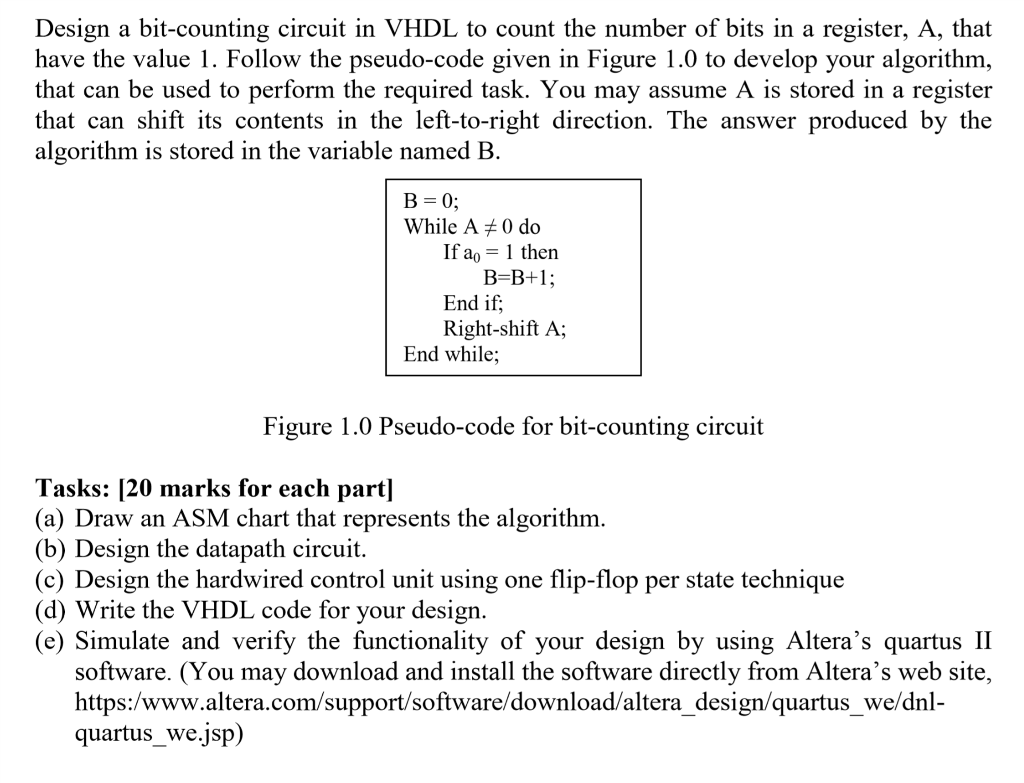
Design a bit-counting circuit in VHDL to count the number of bits in a register, A, that have the value 1. Follow the pseudo-code given in Figure 1.0 to develop your algorithm, that can be used to perform the required task. You may assume A is stored in a register that can shift its contents in the left-to-right direction. The answer produced by the algorithm is stored in the variable named B While A 0 do If ao 1 then End if; Right-shift A; End while; Figure 1.0 Pseudo-code for bit-counting circuit Tasks: [20 marks for each part] (a) Draw an ASM chart that represents the algorithm (b) Design the datapath circuit. (c) Design the hardwired control unit using one flip-flop per state technique (d) Write the VHDL code for your design. (e) Simulate and verify the functionality of your design by using Altera's quartus II software. (You may download and install the software directly from Altera's web site, https:/www.altera.com/support/software/download/altera design/quartus _we/dnl- quartus we.isp) Design a bit-counting circuit in VHDL to count the number of bits in a register, A, that have the value 1. Follow the pseudo-code given in Figure 1.0 to develop your algorithm, that can be used to perform the required task. You may assume A is stored in a register that can shift its contents in the left-to-right direction. The answer produced by the algorithm is stored in the variable named B While A 0 do If ao 1 then End if; Right-shift A; End while; Figure 1.0 Pseudo-code for bit-counting circuit Tasks: [20 marks for each part] (a) Draw an ASM chart that represents the algorithm (b) Design the datapath circuit. (c) Design the hardwired control unit using one flip-flop per state technique (d) Write the VHDL code for your design. (e) Simulate and verify the functionality of your design by using Altera's quartus II software. (You may download and install the software directly from Altera's web site, https:/www.altera.com/support/software/download/altera design/quartus _we/dnl- quartus we.isp)
Step by Step Solution
There are 3 Steps involved in it

Get step-by-step solutions from verified subject matter experts
 Study Help