







Question: Can you add the buttons Load (read the object from the file) and Save (saving the drawing to file) to my code. That you can
Can you add the buttons Load (read the object from the file) and Save (saving the drawing to file) to my code. That you can Load privious drawing file to this program.
Use an ObjectOutputStream to write to the file and an ObjectInputStream to read from the file. Write the array of MyShape objects using method writeObject (class ObjectOutputStream), and read the array using method readObject (ObjectInputStream).
I can not get them to work. Please help with it. Thank you.
Here is my code below, What I got so far. Please modify this code. Thank you.
=====================
DrawFrameTest.java
====================== import javax.swing.JFrame;
public class DrawFrameTest {
/** * @param args */ public static void main(String[] args) {
DrawFrame comp = new DrawFrame(); comp.setDefaultCloseOperation(JFrame.EXIT_ON_CLOSE); comp.setSize(600, 600); comp.setVisible(true);
}
}
========================
DrawFrame.java
======================== import java.awt.BorderLayout; import java.awt.Color; import java.awt.FlowLayout; import java.awt.event.ActionEvent; import java.awt.event.ActionListener; import java.awt.event.ItemEvent; import java.awt.event.ItemListener;
import javax.swing.JButton; import javax.swing.JCheckBox; import javax.swing.JComboBox; import javax.swing.JFrame; import javax.swing.JLabel; import javax.swing.JPanel;
public class DrawFrame extends JFrame {
/* * Next, create a JFrame subclass called DrawFrame that provides a GUI that * enables the user to control various aspects of drawing. * * For the layout of the DrawFrame, we recommend a BorderLayout, with the * components in the NORTH region, the main drawing panel in the CENTER * region, and a status bar in the SOUTH region, as in Fig. 14.49. * * In the top panel, create the components listed below. Each components * event handler should call the appropriate method in class DrawPanel. * * a) A button to undo the last shape drawn. * * b) A button to clear all shapes from the drawing. * * c) A combo box for selecting the color from the 13 predefined colors. * * d) A combo box for selecting the shape to draw. * * e) A check box that specifies whether a shape should be filled or * unfilled. * * Declare and create the interface components in DrawFrames constructor. * Youll need to create the status bar JLabel before you create the * DrawPanel, so you can pass the JLabel as an argument to DrawPanels * constructor. * * Finally, create a test class that initializes and displays the DrawFrame * to execute the application */
/** * */ private static final long serialVersionUID = 1L;
private JButton undo; private JButton clearall; private JComboBoxselectColor; private JComboBoxselectShape; private JCheckBox filled; private JLabel label; private JPanel panel; private DrawPanel mainpanel;
private String[] colorName = { "Black", "Blue", "Cyan", "Dark Gray", "Gray", "Green", "Light Gray", "Magenta", "Orange", "Pink", "Red", "White", "Yellow" };
private Color[] colors = { Color.BLACK, Color.BLUE, Color.CYAN, Color.DARK_GRAY, Color.GRAY, Color.GREEN, Color.LIGHT_GRAY, Color.MAGENTA, Color.ORANGE, Color.PINK, Color.RED, Color.WHITE, Color.YELLOW }; private String[] shapename = { "Line", "Rectangle", "Oval" }; // private MyShape[] shapes = {Myline,MyRect,MyOval};
public DrawFrame() { super("Java Drawings");
panel = new JPanel(new FlowLayout()); undo = new JButton("Undo"); clearall = new JButton("Clear"); selectColor = new JComboBox(colorName); selectColor.setMaximumRowCount(4); selectShape = new JComboBox(shapename); filled = new JCheckBox("Filled"); label = new JLabel("Label"); mainpanel = new DrawPanel(label); changeState changed = new changeState(); filled.addItemListener(changed); selectColor.addItemListener(changed); selectShape.addItemListener(changed);
undo.addActionListener(new ActionListener() {
@Override public void actionPerformed(ActionEvent e) { mainpanel.clearLastShape(); }
});// end action listener for undo button
clearall.addActionListener(new ActionListener() {
@Override public void actionPerformed(ActionEvent e) { mainpanel.clearDrawing(); }
});// end action listener for clear button
filled.addItemListener(new ItemListener() {
@Override public void itemStateChanged(ItemEvent e) { if (filled.isSelected()) mainpanel.setFilledShape(true); else mainpanel.setFilledShape(false); }
});// end itemListener
panel.add(undo); panel.add(clearall); panel.add(selectColor); panel.add(selectShape); panel.add(filled); // panel.setBackground(Color.CYAN); add(panel, BorderLayout.NORTH);
add(mainpanel, BorderLayout.CENTER); add(label, BorderLayout.SOUTH);
}// end constructor DrawFrame
private class changeState implements ItemListener {
@Override public void itemStateChanged(ItemEvent e) { if (filled.isSelected()) mainpanel.setFilledShape(true); else mainpanel.setFilledShape(false);
if (e.getStateChange() == ItemEvent.SELECTED) { if (e.getSource() == selectColor) { mainpanel.setCurrentColor(colors[selectColor.getSelectedIndex()]); } if (e.getSource() == selectShape) { mainpanel.setShapeType(selectShape.getSelectedIndex()); }
} // end if to go btw the two JComboboxes }// end itemStateChanged
} }// end class DrawFrame
==================
DrawPanel.java
====================
import java.awt.Color; import java.awt.Graphics; import java.awt.event.MouseAdapter; import java.awt.event.MouseEvent; import java.awt.event.MouseMotionListener;
import javax.swing.JLabel; import javax.swing.JPanel;
import chapter10.Exercises.MyLine; import chapter10.Exercises.MyOval; import chapter10.Exercises.MyRect; import chapter10.Exercises.MyShape;
public class DrawPanel extends JPanel { /* * a) An array shapes of type MyShape that will store all the shapes the * user draws. b) An integer shapeCount that counts the number of shapes in * the array. c) An integer shapeType that determines the type of shape to * draw. d) A MyShape currentShape that represents the current shape the * user is drawing. 5 9 -- 628 Chapter 14 GUI Components: Part 1 e) A Color * currentColor that represents the current drawing color. f) A boolean * filledShape that determines whether to draw a filled shape. g) A JLabel * statusLabel that represents the status bar. The status bar will display * the coordinates of the current mouse position. * * Class DrawPanel should also declare the following methods: * * a) Overridden method paintComponent that draws the shapes in the array. * Use instance variable shapeCount to determine how many shapes to draw. * Method paintComponent should also call currentShapes draw method, * provided that currentShape is not null. * * b) Set methods for the shapeType, currentColor and filledShape. * * c) Method clearLastShape should clear the last shape drawn by * decrementing instance variable shapeCount. Ensure that shapeCount is * never less than zero. * * d) Method clearDrawing should remove all the shapes in the current * drawing by setting shapeCount to zero. Methods clearLastShape and * clearDrawing should call repaint (inherited from JPanel) to refresh the * drawing on the DrawPanel by indicating that the system should call method * paintComponent. * * * Class DrawPanel should also provide event handling to enable the user to * draw with the mouse. Create a single inner class that both extends * MouseAdapter and implements MouseMotionListener to handle all mouse * events in one class. * * In the inner class, override method mousePressed so that it assigns * currentShape a new shape of the type specified by shapeType and * initializes both points to the mouse position. * * * Next, override method mouseReleased to finish drawing the current shape * and place it in the array. Set the second point of currentShape to the * current mouse position and add currentShape to the array. Instance * variable shapeCount determines the insertion index. Set currentShape to * null and call method repaint to update the drawing with the new shape. * * * Override method mouseMoved to set the text of the statusLabel so that it * displays the mouse coordinatesthis will update the label with the * coordinates every time the user moves (but does not drag) the mouse * within the DrawPanel. * * Next, override method mouseDragged so that it sets the second point of * the currentShape to the current mouse position and calls method repaint. * This will allow the user to see the shape while dragging the mouse. Also, * update the JLabel in mouse- Dragged with the current position of the * mouse. * * * Create a constructor for DrawPanel that has a single JLabel parameter. * * In the constructor, initialize statusLabel with the value passed to the * parameter. * * Also initialize array shapes with 100 entries, shapeCount to 0, shapeType * to the value that represents a line, currentShape to null and * currentColor to Color.BLACK. * * The constructor should then set the background color of the Draw- Panel * to Color.WHITE and register the MouseListener and MouseMotionListener so * the JPanel properly handles mouse events. * * Next, create a JFrame subclass called */
private static final long serialVersionUID = 1L;
private MyShape[] shapes; private MyShape currentShape; private int shapeCount; private int shapeType; private Color currentColor; private boolean filledShape; private JLabel statusLabel;
// variables for the mouse events private int startX; private int startY; private int endX; private int endY;
public void paintComponent(Graphics g) { super.paintComponent(g);// this is very important without it problems // man problems
// shapes = new MyShape[shapeCount]; for (int i = 0; i
if (currentShape != null) currentShape.draw(g);// this ensures that the graphics is drawn } // end for
}
public void setShapeType(int shapeType) { this.shapeType = shapeType; }
public void setCurrentColor(Color currentColor) { this.currentColor = currentColor; }
public void setFilledShape(boolean filledShape) { this.filledShape = filledShape; }
public void clearLastShape() { if (shapeCount != 0) shapeCount--; repaint(); if (shapeCount == 0) { shapes[shapeCount] = currentShape = new MyLine(0, 1, 1, 0, Color.WHITE); currentShape = null; shapeCount++; repaint(); } }// end clearLastShape
public void clearDrawing() { shapeCount = 0; repaint(); shapes[shapeCount] = currentShape = new MyLine(0, 1, 1, 0, Color.WHITE); currentShape = null; shapeCount++; repaint();
}// end clearDrawing
private class MouseMovements extends MouseAdapter implements MouseMotionListener {
public void mousePressed(MouseEvent e) { startX = e.getX(); startY = e.getY();
switch (shapeType) { case 0: currentShape = new MyLine(startX, startY, startX, startY, currentColor); break; case 1: currentShape = new MyRect(startX, startY, 0, 0, currentColor, filledShape); break; case 2: currentShape = new MyOval(startX, startY, startX, startY, currentColor, filledShape); break; }// end switch // currentShape; }// end mousePressed
public void mouseReleased(MouseEvent e) { endX = e.getX(); endY = e.getY();
switch (shapeType) { case 0: shapes[shapeCount] = currentShape = new MyLine(startX, startY, endX, endY, currentColor); currentShape = null; shapeCount++; repaint(); break; case 1: shapes[shapeCount] = currentShape = new MyRect(startX, startY, Math.abs(startX - endX), Math.abs(startY - endY), currentColor, filledShape); currentShape = null; shapeCount++; repaint(); break; case 2: shapes[shapeCount] = currentShape = new MyOval(startX, startY, Math.abs(startX - endX), Math.abs(startY - endY), currentColor, filledShape); currentShape = null; shapeCount++; repaint(); break; } }// end mouseReleased
public void mouseMoved(MouseEvent e) { statusLabel.setText(String.format("(%d, %d)", e.getX(), e.getY()));
}// end mouseMoved
public void mouseDragged(MouseEvent ev) {
switch (shapeType) { case 0: currentShape = new MyLine(startX, startY, ev.getX(), ev.getY(), currentColor); repaint(); break; case 1: currentShape = new MyRect(startX, startY, Math.abs(startX - ev.getX()), Math.abs(startY - ev.getY()), currentColor, filledShape); repaint(); break; case 2: currentShape = new MyOval(startX, startY, Math.abs(startX - ev.getX()), Math.abs(startY - ev.getY()), currentColor, filledShape); repaint(); break; }// end switch
statusLabel.setText(String.format("mouse dragged at(%d, %d)", ev.getX(), ev.getY())); }// end mouseDragged
}// end MouseMovements
public DrawPanel(JLabel label) { statusLabel = label;
shapes = new MyShape[100]; shapeCount = 0; shapeType = 0; currentShape = null; currentColor = Color.BLACK;
this.setBackground(Color.WHITE);
MouseMovements move = new MouseMovements(); this.addMouseListener(move); this.addMouseMotionListener(move);
// this enables you paint directly by painting an invisible line // just comment it and run to notice its effect // without it you won't see the first drawing shapes[shapeCount] = currentShape = new MyLine(0, 1, 1, 0, Color.WHITE); currentShape = null; shapeCount++; repaint(); }// end constructor
}// end class
==============
MyShape.java
=============== import java.awt.Color; import java.awt.Graphics;
public abstract class MyShape {
private int x1; // x-coordinate of first endpoint private int y1; // y-coordinate of first endpoint private int x2; // x-coordinate of second endpoint private int y2; // y-coordinate of second endpoint private Color myColor; // color of this shape public MyShape(){ x1 = 0; x2 = 0; y1 = 0; y2 = 0; myColor = Color.BLACK; }//end No Argument consturctor public MyShape(int startx, int starty, int endx, int endy, Color color){ x1 = startx; x2 = endx; y1 = starty; y2 = endy; myColor = color; }//end five parameter constructor public abstract void draw( Graphics g );
public int getX1() { return x1; }
public int getY1() { return y1; }
public int getX2() { return x2; }
public int getY2() { return y2; }
public Color getMyColor() { return myColor; }
public void setX1(int x1) { this.x1 = x1; }
public void setY1(int y1) { this.y1 = y1; }
public void setX2(int x2) { this.x2 = x2; }
public void setY2(int y2) { this.y2 = y2; }
public void setMyColor(Color myColor) { this.myColor = myColor; } }//end Class my Shape
==============
MyLine.java
============== import java.awt.Color; import java.awt.Graphics;
public class MyLine extends MyShape {
public MyLine(){ super.setX1(3); super.setY1(3); super.setX2(22); super.setY2(22); super.setMyColor(Color.GREEN); }//default values public MyLine(int startx, int starty, int endx, int endy, Color color){ super(startx,starty,endx,endy,color); }//end five argument constructor @Override public void draw(Graphics g) { g.setColor(getMyColor()); g.drawLine(getX1(), getY1(), getX2(), getY2()); }//end draw method
}
=================
MyRect.java
================= import java.awt.Color; import java.awt.Graphics;
public class MyRect extends MyBoundedShape {
public MyRect(){ super.setX1(3); super.setY1(3); super.setX2(22); super.setY2(22); super.setMyColor(Color.GREEN); super.setToFill(false); }//default values
public MyRect(int startx, int starty, int endx, int endy, Color color,boolean filled){ super(startx,starty,endx,endy,color,filled);
}//end five argument constructor @Override public void draw(Graphics g) { g.setColor(getMyColor()); if (super.isToFill()) g.fillRect(getX1(), getY1(), getX2(), getY2()); else g.drawRect(getX1(), getY1(), getX2(), getY2()); }//end draw method
}
==================== MyBoundedShape.java
==================== import java.awt.Color;
public abstract class MyBoundedShape extends MyShape {
private boolean toFill;
public MyBoundedShape(){ setToFill(false); }
public MyBoundedShape(int startx, int starty, int endx, int endy, Color color,boolean filled){ super(startx,starty,endx,endy,color); setToFill(filled); }
/** * @return the toFill */ public boolean isToFill() { return toFill; }
/** * @param toFill the toFill to set */ public void setToFill(boolean toFill) { this.toFill = toFill; } }
===================
MyOval.java
=================== import java.awt.Color; import java.awt.Graphics;
public class MyOval extends MyBoundedShape {
public MyOval(){ super.setX1(3); super.setY1(3); super.setX2(22); super.setY2(22); super.setMyColor(Color.GREEN); super.setToFill(false); }//default values public MyOval(int startx, int starty, int endx, int endy, Color color,boolean filled){ super(startx,starty,endx,endy,color,filled); }//end five argument constructor @Override public void draw(Graphics g) { g.setColor(getMyColor()); if (super.isToFill()) g.fillOval(getX1(), getY1(), getX2(), getY2()); else g.drawOval(getX1(), getY1(), getX2(), getY2()); }//end draw method
}
======
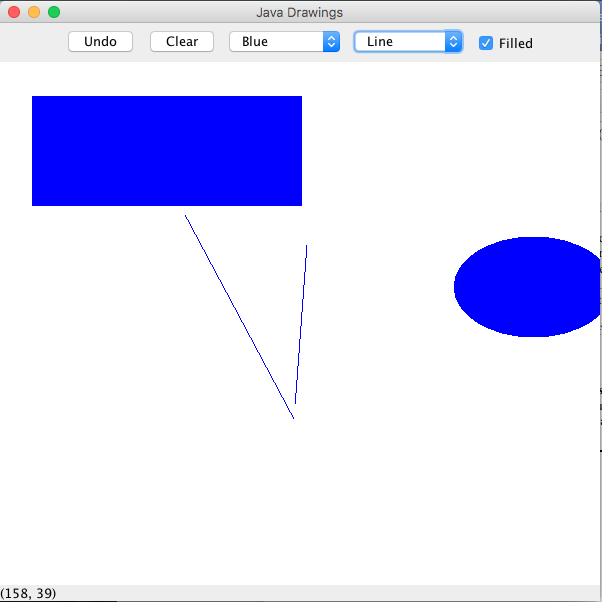
My output right now with this code:
Java Drawings Undo Clear Blue Line Filled (158, 39) Java Drawings Undo Clear Blue Line Filled (158, 39)
Step by Step Solution
There are 3 Steps involved in it

Get step-by-step solutions from verified subject matter experts
 Study Help