







Question: Create a class diagram based off of the information. Step 1 Insert a copy of your entity-relationship diagram (ERD) from Assignment 6 below: Vet Appointment
Create a class diagram based off of the information.
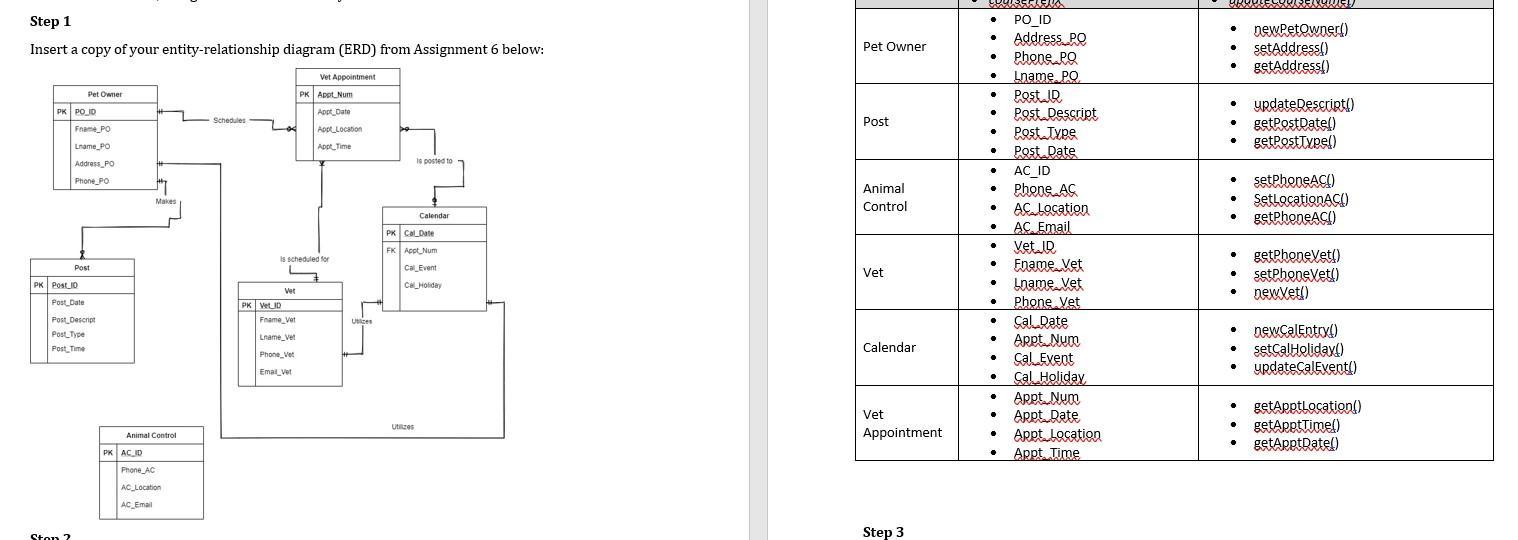
Step 1 Insert a copy of your entity-relationship diagram (ERD) from Assignment 6 below: Vet Appointment PK PO ID Pet Owner Frame PO Lname PO Address PO Phone PO PK Post 10 Post Post Date Ston ? Post Descript Post Type Post Time Animal Control PK AC ID Makes Phone AC AC Location AC Email Schedules PK Vet ID is scheduled for L Ver Frame Vet Lname Vet Phone Vet PK Appl Num Appt Date Email Vet App Location Appt Time Ubices is posted to Utilizes Calendar PK Cal Date FK Appt Num Cal Event Cel Holiday Pet Owner Post Animal Control Vet Calendar Vet Appointment Step 3 . . . . . Post Type . Post Date . AC_ID . Phone AC . AC Location AC Email Vet ID Ename Vet Lname. Vet Phone Vet Cal Date Appt Num . . . BEELENO PO ID Address PO Phone PO Lname PO . Post IR Post Descript . . Cal Event . Cal Holiday Appt Num . Appt Date Appt Location . Appt Time newPetOwner() setAddress() getAddress() . . . . . getPhoneAC() . update Descript() getPostDate() getPostType() getPhoneVet() setPhoneVet() newXet!) . setPhoneAC!) SetLocationACI) . new.CalEntry() setCalHoliday() updateCalEvent!) getApptLocation() getApptTime() . getApptDate()
Step by Step Solution
There are 3 Steps involved in it

Get step-by-step solutions from verified subject matter experts
 Study Help